The best Flourish alternative depends on what you're building. If you need fast, privacy-first static charts from CSV or Excel data with no account required, CleanChart is the strongest option. If you need animated, story-driven visualizations for editorial content, Flourish remains the better fit.
Flourish has carved out a strong niche in data storytelling. Its animated transitions, scrollytelling templates, and polished design presets make it a favorite among journalists, marketers, and communications teams. But many users — students writing a thesis, analysts preparing a board deck, researchers charting survey results — don't need animated stories. They need a clean chart, exported as a high-resolution image, in under two minutes.
This guide compares Flourish with the best alternatives and helps you pick the right tool for your workflow.
Updated October 1, 2026: refreshed the usage data; September 19, 2026: added a data section with real CleanChart usage stats and app screenshots for the upload-to-chart walkthrough, and fixed a data privacy claim in the "Flourish vs. CleanChart" section that misstated how CleanChart's server-side rendering works.
Why Look for a Flourish Alternative?
Flourish is a capable tool, but several friction points push users to explore alternatives:
- Account required for everything. You must create a Flourish account before you can do anything. For a quick one-off chart, this adds unnecessary steps.
- Watermark on the free tier. Every chart created on a free Flourish account includes a "Made with Flourish" watermark. Removing it requires a paid plan starting at $63/month (billed annually).
- Steeper learning curve. Flourish's template system is powerful but complex. Choosing from dozens of templates, each with different data structure requirements, can overwhelm users who just need a bar chart.
- Data leaves your browser. Flourish processes and stores your data on its servers. For confidential business data, research data under GDPR restrictions, or proprietary financial figures, this is a concern.
- Overkill for static charts. If your chart ends up in a PDF report, PowerPoint slide, or printed paper, Flourish's animation and interactivity add complexity without value.
- Limited analytical chart types. Flourish focuses on editorial chart types but lacks specialized analytical charts like Gantt charts, bullet charts, Pareto charts, and gauge charts.
These aren't flaws — they're trade-offs. Flourish optimized for animated storytelling. If that's not what you need, a different tool will save you time and money.
How Does CleanChart Compare to Flourish?
CleanChart focuses on a different problem: turning data files into publication-ready static charts as fast as possible. Here's a direct comparison:
| Feature | Flourish | CleanChart |
|---|---|---|
| Account required | Yes | No |
| Chart types | ~30 templates (editorial focus) | 25 types (analytical + editorial) |
| Animation & transitions | Yes (core strength) | No (static output) |
| Data privacy | Data stored on Flourish servers | Processed in memory, not stored |
| Built-in data cleaning | No | Yes (duplicates, missing values, formatting) |
| Watermark on free tier | Yes ("Made with Flourish") | Yes; removed on any paid export from $0.99 |
| PNG export quality | Good (paid plans only for high-res) | 300 DPI, publication-ready |
| SVG export | Paid plans only | Available |
| Scrollytelling / stories | Yes (excellent) | No |
| Input formats | CSV, paste, Google Sheets | CSV, Excel, JSON, TSV, XML, YAML, Markdown, Numbers |
| Pricing | Free (watermark) / $63+/month | Free (watermark) / from $0.99 per chart |
| Learning curve | Moderate (template system) | Very low (upload → chart → export) |
The core difference: Flourish creates interactive, animated visualizations designed for the web. CleanChart creates static, high-quality charts designed for documents. If your chart ends up embedded on a webpage with scrollytelling, Flourish wins. If it ends up in a slide deck, research paper, or PDF report, CleanChart is faster and cheaper.
What Chart Types Does CleanChart Offer That Flourish Doesn't?
While Flourish has a wide template library, it's geared toward editorial and narrative chart types. CleanChart includes several analytical chart types that Flourish lacks:
- Gantt charts — project timelines and task scheduling
- Bullet charts — compact performance vs. target visualization
- Gauge charts — single KPI against a range
- Pareto charts — 80/20 analysis with cumulative line
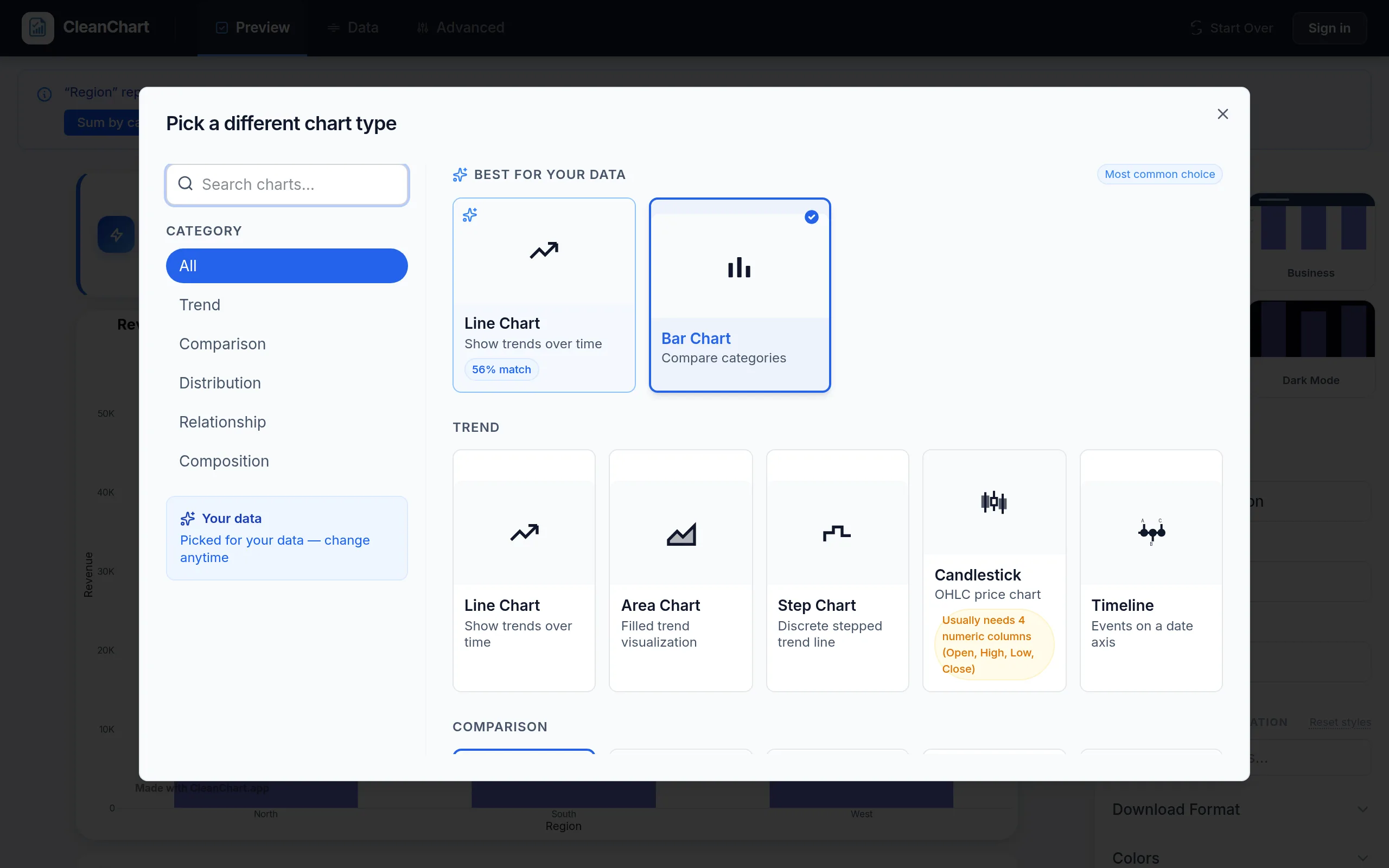
- Candlestick charts — financial OHLC data
- Step charts — data that changes at discrete intervals
- Combo charts — dual-axis bar and line combinations
Conversely, Flourish offers templates for things CleanChart doesn't: animated bar chart races, parliament charts, sports brackets, and network graphs. For a full overview of chart types and when to use each one, see our chart types explained guide.
What CleanChart's Own Usage Data Shows
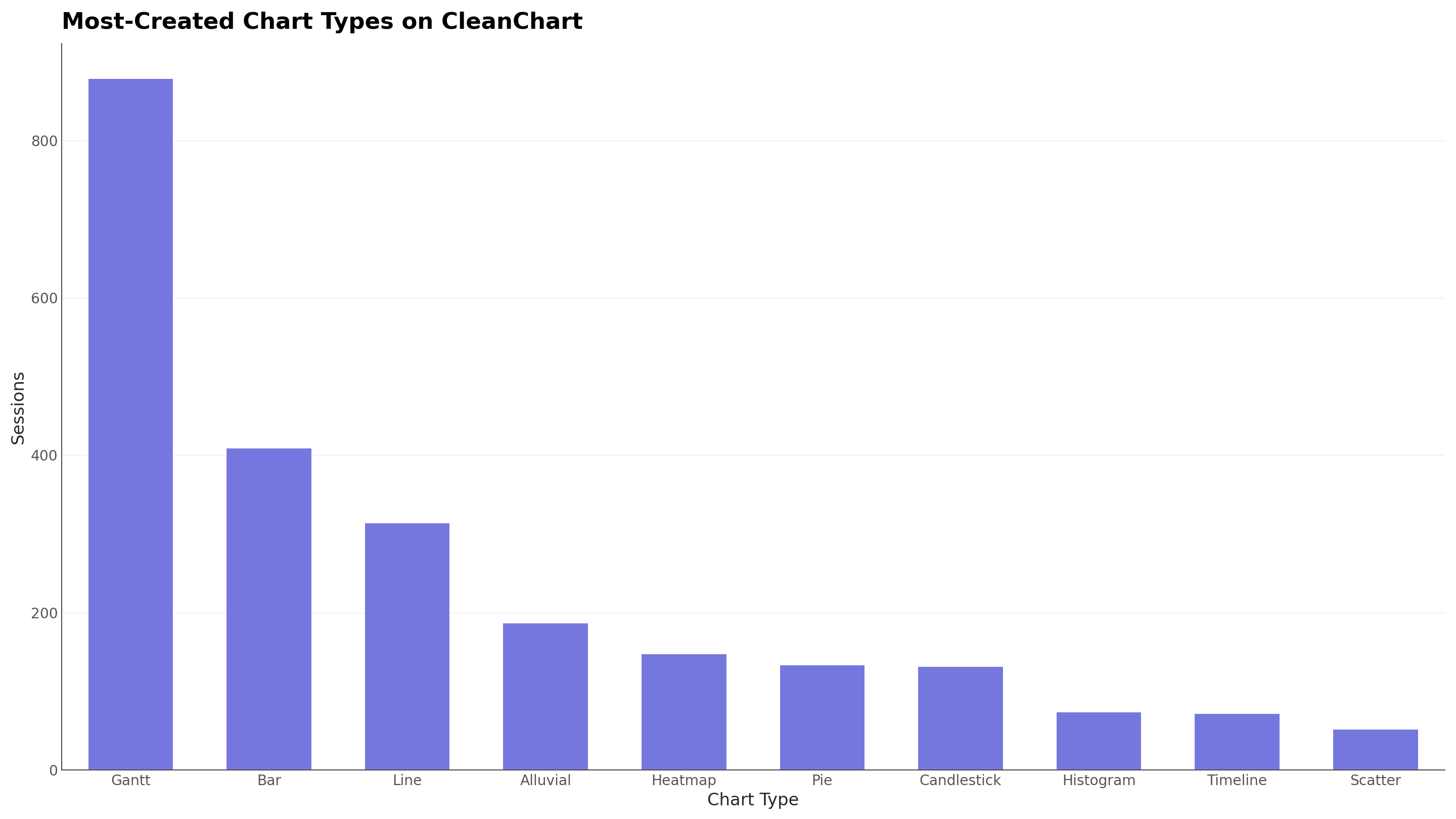
Rather than assume which chart types people actually reach for, here is what CleanChart's own session data shows, pulled from every chart rendered on the platform between May and September 2026.
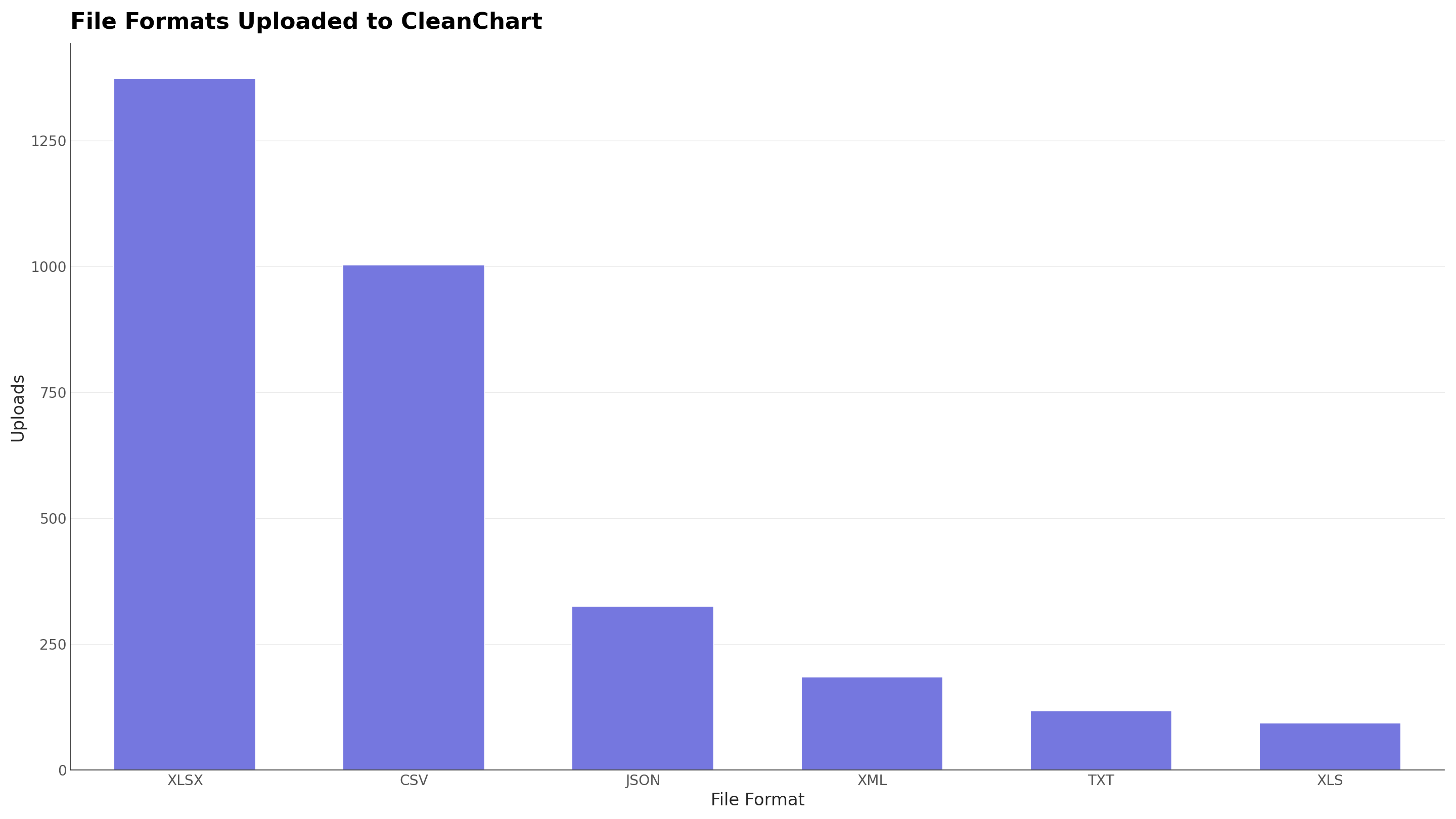
The comparison table above notes that CleanChart accepts CSV, Excel, JSON, TSV, XML, YAML, and Markdown, while Flourish is mostly limited to CSV, paste, and Google Sheets. Here is what people actually upload:
Which Flourish Alternative Is Best for Your Use Case?
Different users need different tools. Here's a decision guide:
For students and academic researchers
Choose CleanChart. No account needed, no watermark, and your rows are never stored, apart from a few truncated sample values kept for up to 180 days when a column fails to parse, which matters for IRB-regulated research. Export at 300 DPI for journal submissions and theses. The built-in data cleaning catches messy CSV issues before they affect your chart. For more on academic chart-making, see our publication-ready charts guide.
For journalists and editorial teams
Stick with Flourish if you need animated stories, scrollytelling, or interactive embeds for articles. Flourish's narrative visualization tools are genuinely excellent and purpose-built for editorial workflows. If you only need a static chart image for social media or a newsletter, CleanChart is faster.
For business analysts and consultants
Choose CleanChart when your charts go into slide decks, reports, or client deliverables. The upload-to-export workflow takes under two minutes, and pay-per-chart pricing ($0.99 per clean export, or $4.99 for a 24-hour pass) is far cheaper than Flourish's $63/month for teams that make charts occasionally. For dashboard design tips, see our data dashboard design guide.
For marketers and communications
Either works, depending on output. Use Flourish for animated social media content and interactive web features. Use CleanChart for charts in presentations, whitepapers, and reports. If you're visualizing campaign data, our marketing data visualization guide covers best practices.
Other Flourish Alternatives Worth Considering
| Tool | Best For | Limitations |
|---|---|---|
| Datawrapper | Interactive embeds for newsrooms | Account required, limited chart types, data on servers |
| RAWGraphs | Unusual chart types (alluvial, bump) | No hosting, limited styling, technical audience |
| Google Sheets | Quick charts from existing spreadsheets | Limited types, poor export quality, data on Google servers |
| Canva | Design-first infographics | Not data-driven — can't upload CSV and generate a real chart |
| Infogram | Infographics with embedded charts | Watermark on free tier, limited data import options |
For a full rundown of all these tools, see our best free chart makers in 2026 comparison.
How to Switch from Flourish to CleanChart
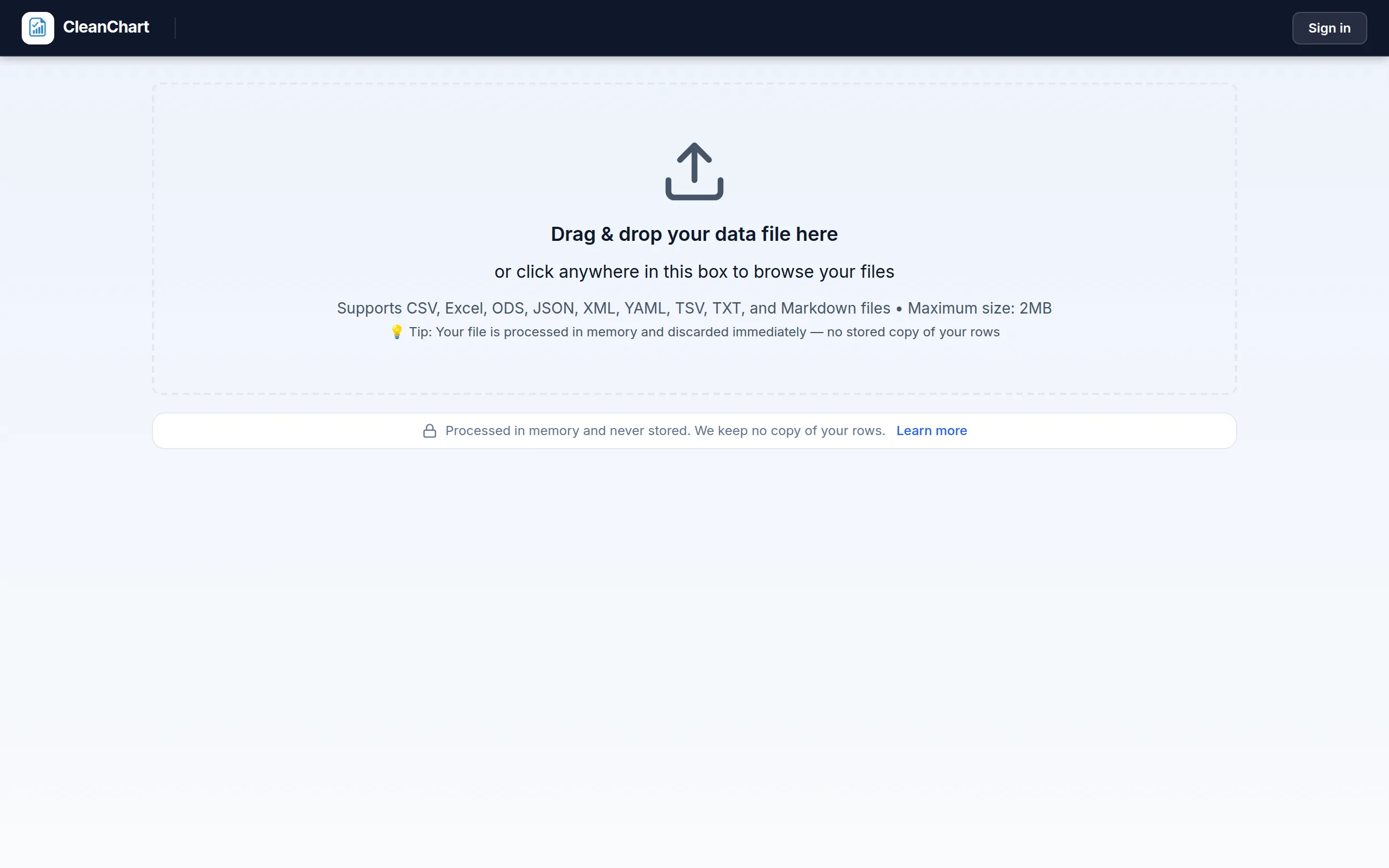
Switching is instant because CleanChart doesn't require an account or migration:
- Export your data from Flourish as CSV (or use your original data file)
- Go to CleanChart — no signup, no account
- Upload your file (CSV, Excel, JSON, TSV, XML, YAML, or Markdown)
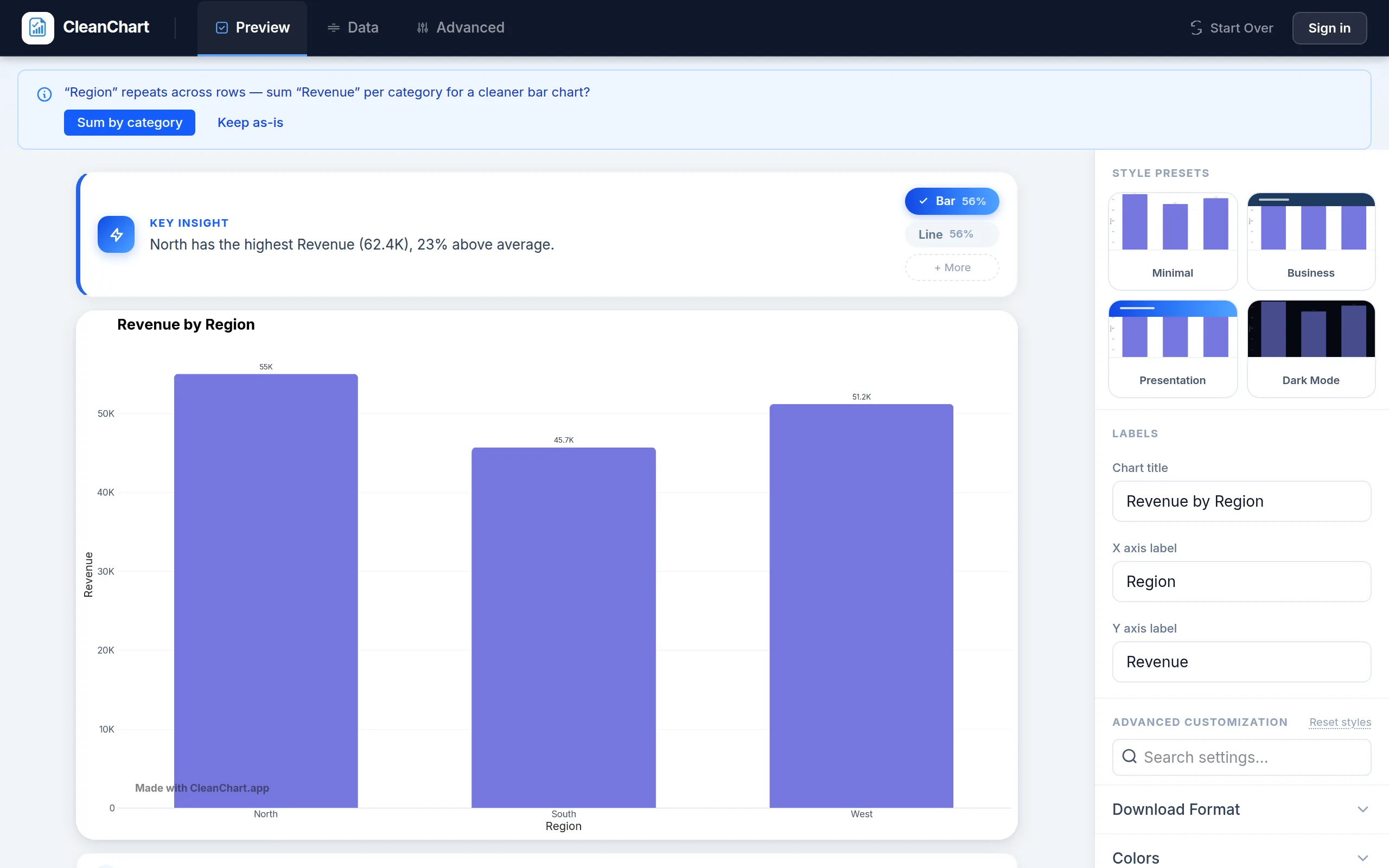
- Select your chart type from 25 options
- Customize colors, fonts, labels, and axes
- Export as high-resolution PNG or vector SVG — no watermark
The entire process takes under two minutes. For a detailed walkthrough, see our CSV to chart tutorial.
Data Privacy: Flourish vs. CleanChart
Data privacy is one of the sharpest differences between the two tools.
Flourish stores your data on its servers. This is necessary for hosting interactive visualizations, but it means your spreadsheet data exists on a third-party infrastructure. Flourish is used by large organizations and maintains reasonable security practices, but "hosted publicly by default" and "never stored once your chart renders" are fundamentally different privacy models.
CleanChart sends your file over HTTPS to clean and render it, then discards it. There's no stored copy of your rows and no hosted copy of your chart once the export downloads to your device. This makes CleanChart a better choice for:
- HR teams charting salary or performance data
- Healthcare researchers working with patient-adjacent data
- Financial analysts visualizing proprietary data
- Students handling data under university IRB protocols
For more on privacy-conscious visualization, see our guides on financial data visualization and HR data visualization.
Pricing Compared
Flourish's pricing targets teams and organizations. CleanChart's pricing targets individuals and occasional users.
| Plan | Flourish | CleanChart |
|---|---|---|
| Free | Unlimited charts with "Made with Flourish" watermark | Unlimited charts with CleanChart watermark |
| Single chart | $63/month ($756/year) — no watermark | $0.99 one-off, no account needed |
| Unlimited | $125/month per seat ($1,500/year) | $4.99 for 24 hours, or $9.99/month |
| Cost for 10 charts | $0 with watermark / $756/yr without | $4.99 in one sitting (24-hour pass) |
| Cost for 50 charts/year | $0 with watermark / $756/yr without | $9.99/month unlimited, or $4.99 per batch day |
Bottom line: If you create charts occasionally and want watermark-free exports, CleanChart costs a fraction of Flourish. If you publish dozens of animated visualizations per month, Flourish's subscription may justify its cost through time savings on animation and storytelling features.
Related CleanChart Resources
- 7 Best Datawrapper Alternatives in 2026 — another popular chart tool compared
- CleanChart vs Datawrapper — detailed head-to-head comparison
- Best Free Chart Makers in 2026 — comprehensive tool roundup
- Create Charts Without Python — no-code chart alternatives
- Data Storytelling with Charts — narrative visualization techniques
- Bar Chart Maker — create bar charts from any data format
- Sankey Diagram Maker — flow diagrams Flourish doesn't support well
- Gantt Chart Maker — project timelines without complex software
- CSV to Bar Chart Converter
- Excel to Sankey Diagram Converter
External Resources
- Flourish — official site for the data storytelling tool compared in this post
- Data Visualization (Wikipedia) — overview of visualization history and principles
- GDPR (Wikipedia) — why data privacy matters when choosing online tools
- NerdSip — micro-learning platform for data visualization and analytics skills
Frequently Asked Questions
Is Flourish free to use?
Flourish has a free tier that lets you create unlimited public visualizations, but all charts include a "Made with Flourish" watermark. Removing the watermark and accessing private projects requires a paid plan starting at $63 per month (billed annually). CleanChart does not add watermarks to exported charts.
Can CleanChart create animated charts like Flourish?
No. CleanChart produces high-resolution static charts (PNG and SVG) designed for reports, presentations, and papers. If you need animated transitions, scrollytelling, or interactive hover effects, Flourish is the better choice. The two tools target different output formats.
Does CleanChart upload my data to a server?
Yes, briefly. Your file is sent over HTTPS so we can clean it and render your chart, then it's discarded. We don't write it to disk and we don't keep your rows, so there's no stored copy to leak later. We keep only anonymous structure metadata, column names and data types, never cell values.
Which tool supports more chart types?
Flourish has more templates overall (~30+), but many are editorial variants of the same base chart. CleanChart offers 25 distinct chart types including analytical types like Gantt charts, bullet charts, Pareto charts, and gauge charts that Flourish doesn't support. For most data analysis and reporting needs, CleanChart covers more ground.
What file formats does CleanChart accept that Flourish doesn't?
CleanChart accepts CSV, Excel (.xlsx/.xls), JSON, TSV, XML, YAML, Markdown tables, Apple Numbers, and Google Sheets data. Flourish primarily supports CSV and direct paste. If your data is in JSON (API responses), YAML (config files), or XML (enterprise exports), CleanChart handles it natively without conversion.
Last updated: October 1, 2026