CleanChart is better for one-off static charts with strong privacy guarantees. Datawrapper is better for interactive, embeddable charts on the web. This guide breaks down every difference so you can pick the right tool for your situation.
Both CleanChart and Datawrapper let you upload data and create charts without coding. But they target different workflows and output formats. Choosing the wrong one means either overpaying for features you do not need or missing features you do.
This is an honest comparison. We build CleanChart, so we are transparent about where Datawrapper wins. If you want a broader overview of free tools, see our best free chart makers roundup.
Updated October 1, 2026: added a data section with real CleanChart usage stats, app screenshots for the upload-to-chart walkthrough, and a title and summary that answer the pricing question directly.
What CleanChart's Own Usage Data Shows
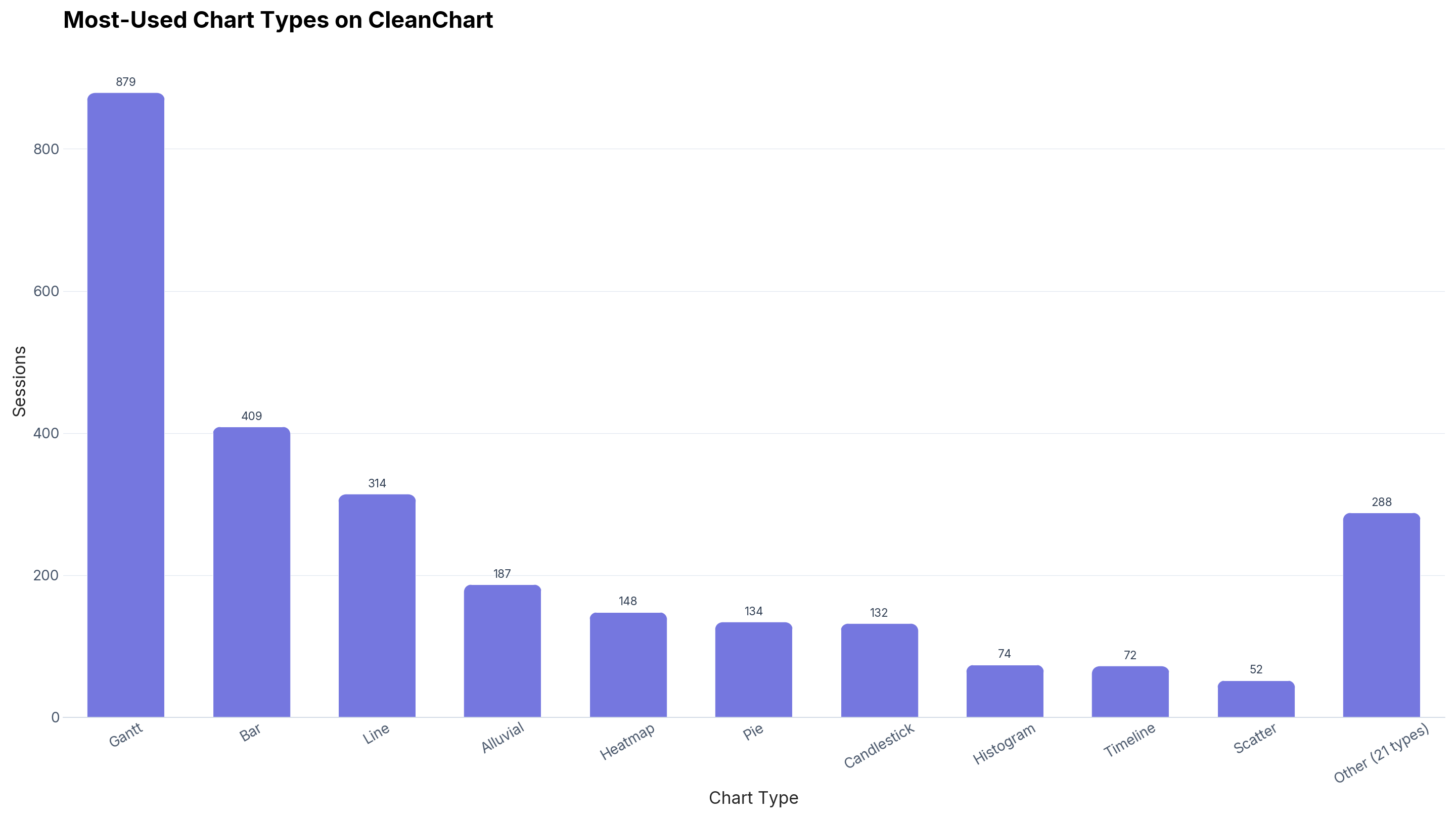
The "Chart Types Compared" table above lists eight chart types CleanChart has that Datawrapper does not: Sankey, Gantt, gauge, bullet, candlestick, radar, box plot, and Pareto. Here is how often people actually use them, pulled from CleanChart's own session data rather than assumed.
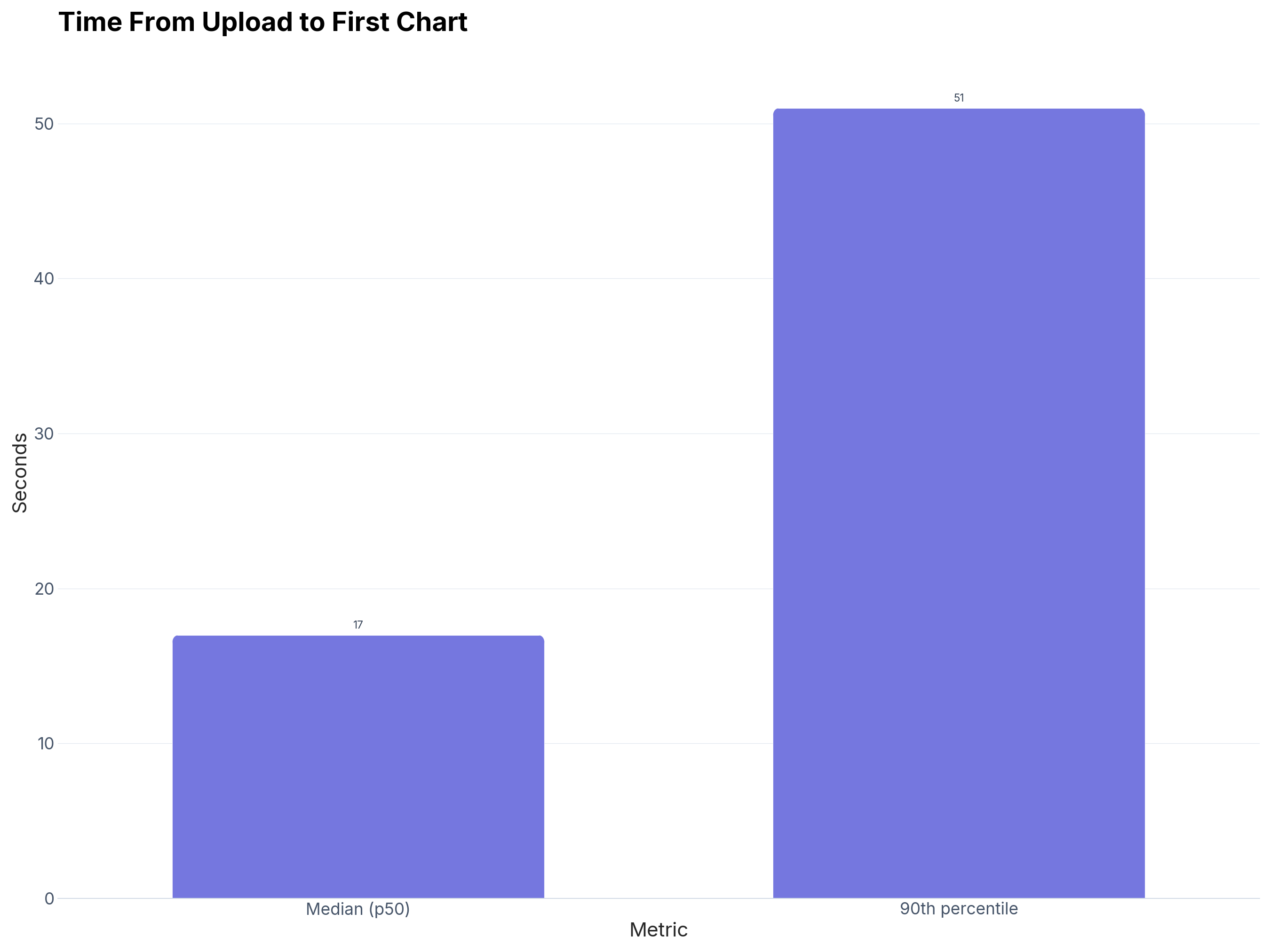
The "Ease of Use" section below claims CleanChart gets you a result in under two minutes. Here is the measured number behind that claim:
Quick Summary: When to Use Each Tool
If you need a chart for a report, presentation, or research paper — use CleanChart. If you need an interactive chart embedded on a website — use Datawrapper.
| Factor | CleanChart | Datawrapper |
|---|---|---|
| Best for | Static charts for reports, papers, slides | Interactive web embeds for articles |
| Chart types | 25 types (incl. sankey, gantt, bullet, gauge) | ~20 types (strong maps, limited advanced charts) |
| Data privacy | No stored copy, no hosted chart | Data uploaded to Datawrapper servers |
| Account required | No | Yes (free tier available) |
| Pricing | Free with watermark; from $0.99 for clean exports | Free tier + $599/year custom plan |
| Export formats | PNG, SVG (high-res, print-ready) | PNG, SVG, interactive embed code |
| Data cleaning | Built-in automatic cleaning | Manual column editing only |
| Learning curve | Upload and chart — no wizard steps | 4-step wizard with preview |
| Maps | Not supported | Excellent (choropleth, symbol, locator) |
| Input formats | CSV, Excel, JSON, TSV, XML, YAML, Markdown, Numbers | CSV, Excel, paste, Google Sheets link |
What Is CleanChart?
CleanChart is a browser-based chart maker that turns CSV, Excel, and JSON data into publication-ready charts. It supports 25 chart types — including specialized types like Sankey diagrams, Gantt charts, and gauge charts that most free tools lack. We keep no stored copy of your rows, which matters for confidential business or research data.
CleanChart is designed for the "I need one chart right now" use case. No account, no wizard, no templates. Upload a file, pick a chart type, customize, export. For a detailed walkthrough, see our CSV to chart tutorial.
What Is Datawrapper?
Datawrapper is a chart and map tool built for journalists, newsrooms, and content teams. It is used by The New York Times, The Washington Post, and hundreds of other publications. Datawrapper excels at creating interactive, responsive charts that embed directly into web pages with tooltips, hover states, and mobile-friendly layouts.
Datawrapper's free tier allows unlimited chart creation with a Datawrapper watermark. Paid plans (starting at $599/year) remove the watermark and add team features. See Datawrapper's official site for current pricing.
Chart Types Compared
Both tools cover the basics — bar, line, pie, area, scatter. The differences appear in specialized chart types.
CleanChart has, Datawrapper does not:
- Sankey diagrams — flow and relationship visualization
- Gantt charts — project timeline and scheduling
- Gauge charts — KPI and progress indicators
- Bullet charts — performance against targets
- Candlestick charts — financial OHLC data
- Radar/spider charts — multi-variable comparison
- Box plots — statistical distribution
- Pareto charts — 80/20 analysis
Datawrapper has, CleanChart does not:
- Choropleth maps — geographic data on colored maps
- Symbol maps — point data on maps
- Locator maps — place identification
- Range plots — showing data ranges
- Election results charts — specialized political visualization
If your work involves geographic data, Datawrapper is the clear winner. If you need advanced analytical charts, CleanChart covers more ground. For general chart types, see our complete chart types guide.
Data Privacy and Security
This is the sharpest difference between the two tools.
CleanChart processes your upload in memory over HTTPS to render the chart, then discards it, keeping no stored copy of your rows and no hosted copy of your chart. This makes CleanChart safe for:
- Confidential business data
- Research data under IRB or GDPR restrictions
- Financial data with compliance requirements
- Student data protected by FERPA
Datawrapper uploads your data to its servers for chart rendering and hosting. This is necessary for interactive embeds (the chart must be served from somewhere), but it means your data exists on a third-party server. Datawrapper's privacy policy explains their data handling, and they are GDPR-compliant. But "GDPR-compliant" and "never stored at all" are different levels of privacy.
Pricing Breakdown
Datawrapper's free tier is generous for web use. CleanChart's pay-per-chart model is cheaper for occasional use.
| Plan | CleanChart | Datawrapper |
|---|---|---|
| Free | Unlimited charts with CleanChart watermark | Unlimited charts with Datawrapper watermark |
| Single chart | $0.99 for one clean, high-resolution export | N/A |
| Unlimited | $4.99 for a 24-hour pass, or $9.99/month | $599/year (custom plan, no watermark) |
| Cost for 10 charts | $4.99 in one sitting (24-hour pass) | $0 with watermark, $599/yr without |
| Cost for 50 charts/year | $9.99/month unlimited, or $4.99 per batch day | $0 with watermark, $599/yr without |
Bottom line: If you make charts occasionally and need clean exports without watermarks, CleanChart is dramatically cheaper. If you publish dozens of interactive charts per month on a website, Datawrapper's free tier (with watermark) or annual plan makes more sense.
Export and Output Quality
CleanChart produces high-resolution static images (PNG at 2x resolution, SVG for infinite scaling). These are designed for print, PDF reports, PowerPoint slides, and academic papers. The output uses matplotlib rendering, which produces clean, publication-grade typography. For tips on export workflows, see our PowerPoint export guide.
Datawrapper produces interactive HTML embeds optimized for the web. Charts include tooltips on hover, responsive layout for mobile, and accessible markup. Datawrapper also offers PNG and SVG export, but its primary strength is the embed experience.
If your charts end up in a browser, Datawrapper's output is superior. If they end up on paper or in slides, CleanChart's output is purpose-built for that.
Ease of Use
Both tools are designed for non-technical users, but the workflow differs.
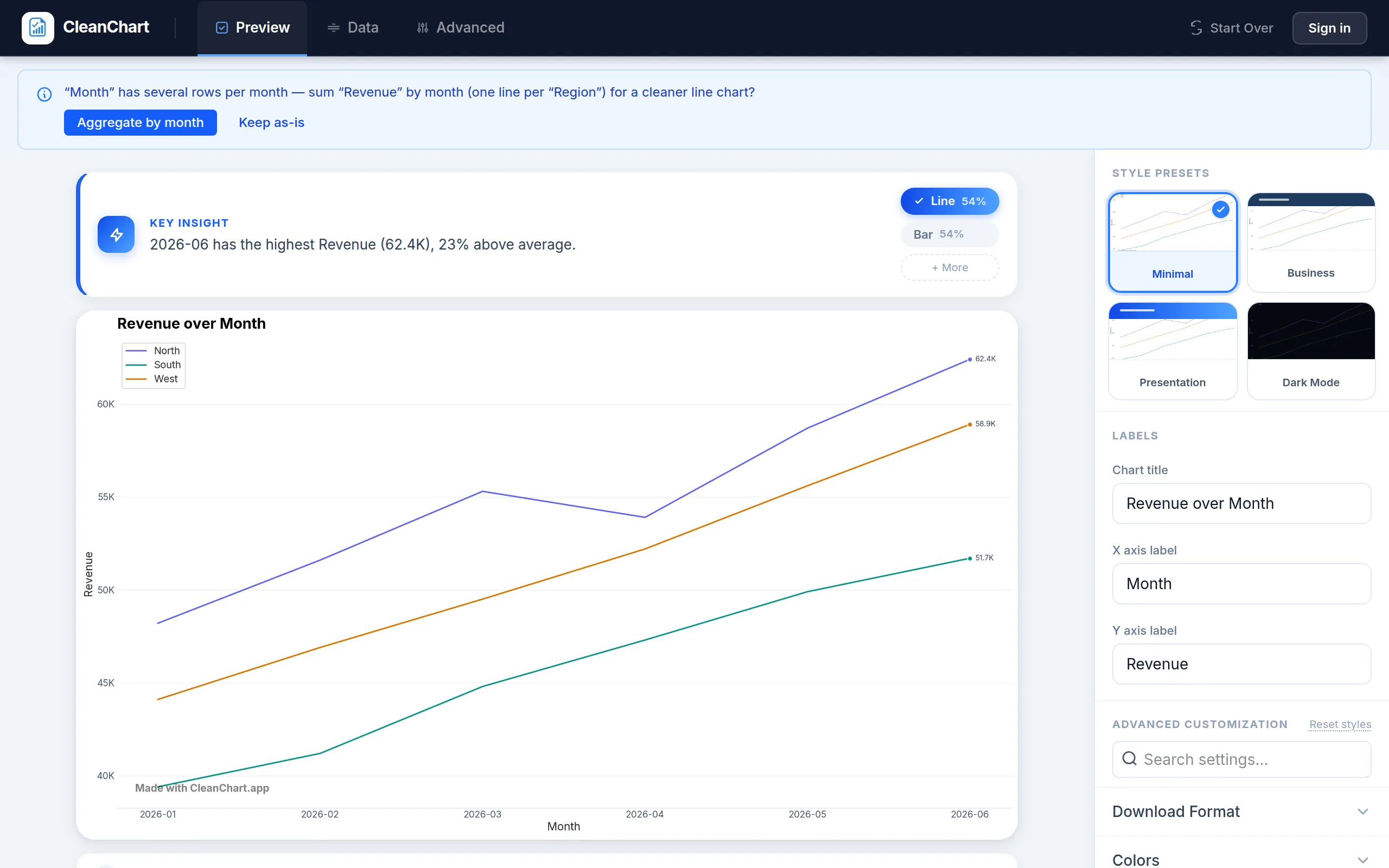
CleanChart workflow:
- Go to cleanchart.app (no signup)
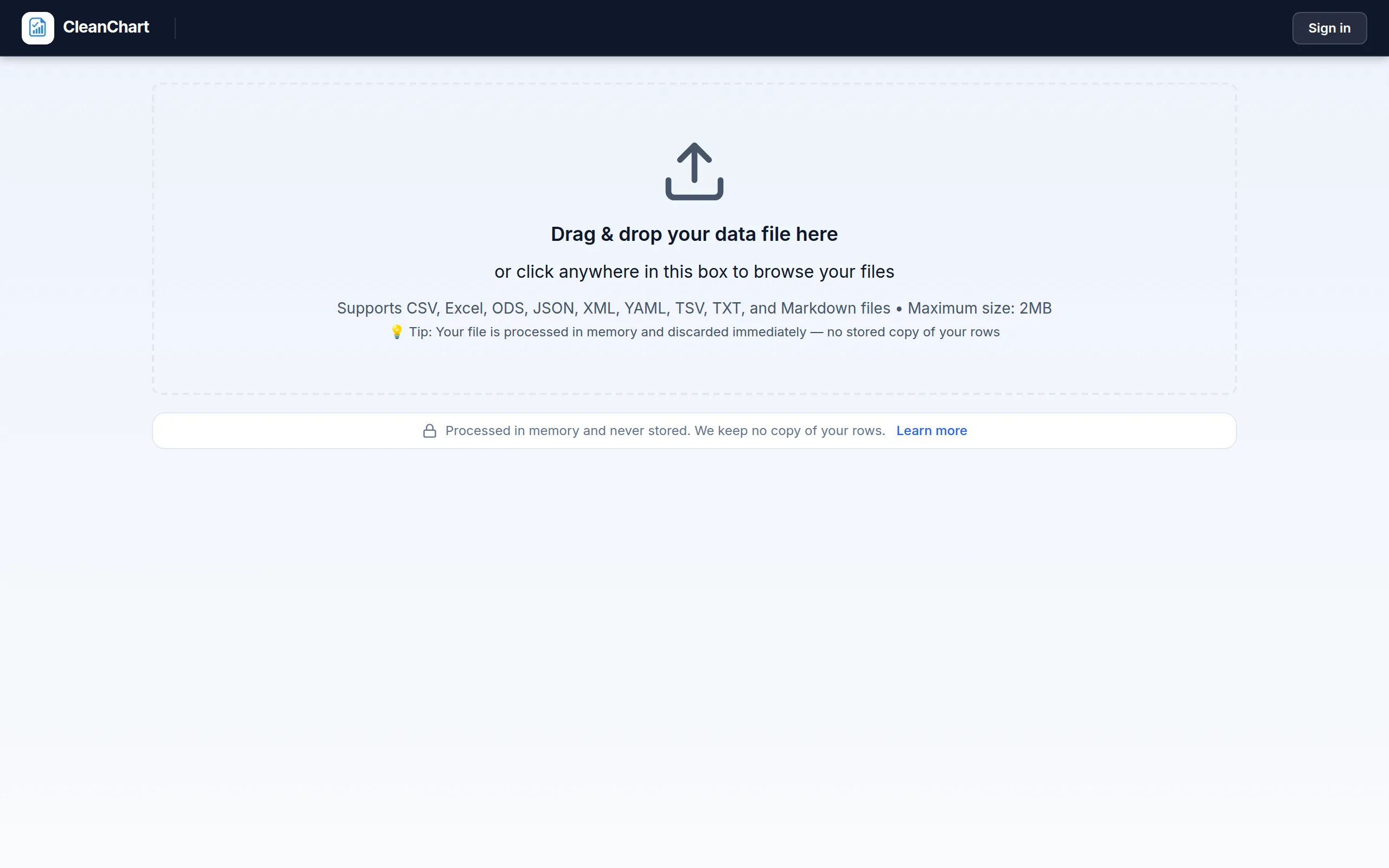
- Upload your file (drag and drop)
- Select chart type and columns
- Customize colors, labels, title
- Export
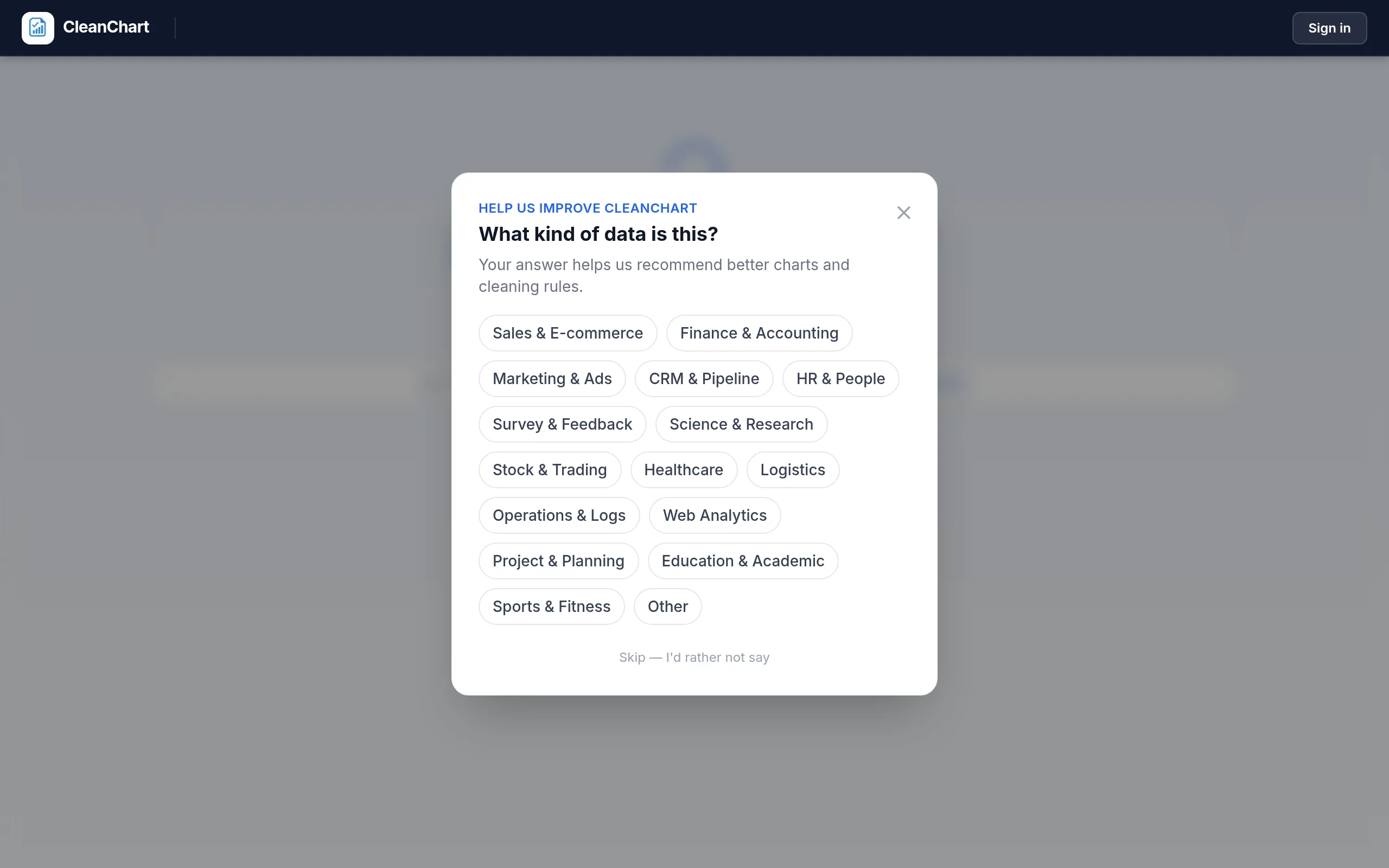
Here is that workflow with a real CSV upload:
Datawrapper workflow:
- Create a free account
- Start a new chart and paste/upload data
- Review and clean data in the data editor
- Select chart type
- Customize design in the Refine tab
- Add annotations in the Annotate tab
- Publish and get embed code
CleanChart is faster for a single chart because it skips the account creation and multi-step wizard. Datawrapper's wizard is more structured, which helps new users who are unsure what settings to adjust. If you value speed, see our guide to creating charts without coding.
Input Format Support
CleanChart accepts nine file formats: CSV, Excel (.xlsx/.xls), JSON, TSV, XML, YAML, Markdown tables, Apple Numbers, and Google Sheets data. This means you can upload data from virtually any source without manual conversion. You can go directly from JSON to a bar chart or from Excel to a Sankey diagram.
Datawrapper accepts CSV, Excel, direct paste, and Google Sheets URLs. This covers most common scenarios but lacks support for developer-oriented formats like JSON, XML, and YAML.
Who Should Choose CleanChart?
- Students and researchers who need print-ready charts for papers and theses
- Business analysts who create occasional charts for reports or presentations
- Anyone handling sensitive data that cannot be uploaded to third-party servers
- Users who need advanced chart types like Sankey, Gantt, gauge, or bullet charts
- Budget-conscious users who want per-chart pricing instead of annual subscriptions
Who Should Choose Datawrapper?
- Journalists and content teams who publish interactive charts on websites
- Anyone who needs maps — Datawrapper's map support is excellent
- Organizations with ongoing publishing needs who create many charts per week
- Teams that need chart hosting — Datawrapper hosts your charts and serves them
- Users who prioritize interactive tooltips and responsive design
Related CleanChart Resources
- 7 Best Datawrapper Alternatives in 2026 — in-depth review of alternatives
- Data Visualization Color Palettes — choose the right colors for your charts
- Data Visualization for Students — academic chart-making guide
- Bar Chart Maker — create bar charts online
- Sankey Diagram Maker — create flow diagrams
- CSV to Bar Chart Converter
External Resources
- Datawrapper Official Site — create interactive charts and maps
- Data Visualization (Wikipedia) — history and principles of data visualization
- Datawrapper Blog — data visualization tutorials and best practices
- NerdSip — micro-learning platform for data skills and visualization
Frequently Asked Questions
Is CleanChart better than Datawrapper?
It depends on your use case. CleanChart is better for static charts in reports and presentations — it supports more chart types, costs less for occasional use, and keeps no stored copy of your rows. Datawrapper is better for interactive charts embedded on websites, especially if you need maps or responsive tooltips.
Is Datawrapper really free?
Datawrapper's free tier lets you create unlimited charts, but all charts include a Datawrapper watermark and your data is stored on their servers. Removing the watermark requires a paid plan starting at $599 per year. CleanChart is also free with a watermark, and clean exports start at $0.99 for a single chart.
Which tool has better data privacy?
Both tools send your file to a server to render the chart. The difference is what happens next: CleanChart cleans and renders in memory, then discards the file, so there's no stored copy of your rows and no hosted copy of your chart. Datawrapper stores your data and hosts the chart for embedding. If you work with confidential, regulated, or sensitive data, CleanChart provides stronger privacy guarantees.
Can I use both tools together?
Yes. Many teams use Datawrapper for web-published interactive charts and CleanChart for internal reports, presentations, and academic papers. The tools serve different output needs and complement each other well.
Which tool is easier for beginners?
Both are designed for non-technical users. CleanChart is faster (no account required, fewer steps). Datawrapper's step-by-step wizard provides more guidance. If you have never made a chart before, try both — Datawrapper walks you through the process; CleanChart gets you a result in under two minutes.
Last updated: October 1, 2026