You need to create a chart. Fast.
You Google "free chart maker" and get 10 million results. Every tool claims to be "the best." Which one do you actually choose?
Some are truly free. Others bait-and-switch you with paywalls. Some are powerful but complicated. Others are simple but limited.
You just want an honest answer: Which free chart maker should I use?
In this guide, we've tested 7 popular free chart makers and ranked them based on ease of use, features, output quality, and actual limitations.
Updated October 1, 2026: corrected CleanChart's own pricing and watermark details below (we'd let them go stale), and added a data section built from CleanChart's real usage numbers plus live app screenshots instead of a described-from-memory workflow.
No affiliate links. No sponsored rankings. Just honest comparisons.
Whether you're creating charts from CSV files, building presentations, or publishing research, this guide will help you choose the right tool.
How We Tested
We tested each tool with the same task:
Test Task: Create a professional bar chart from a CSV file with 50 rows
What we measured:
- Time to first chart (from signup to download)
- Ease of use (how intuitive?)
- Design quality (how professional does it look?)
- Free tier limitations (what's actually free?)
- Export options (PNG, SVG, PDF?)
- Support for different chart types
Scoring: Each tool rated 1-5 stars in each category
Quick Comparison Table
| Tool | Best For | Ease of Use | Design Quality | Free Limits | Overall |
|---|---|---|---|---|---|
| CleanChart | Beginners | 5/5 | 5/5 | Generous | 5/5 |
| Google Sheets | All-around | 4/5 | 3/5 | None | 4.5/5 |
| Datawrapper | Professionals | 3/5 | 5/5 | Good | 4.5/5 |
| Canva | Infographics | 4/5 | 5/5 | Some limits | 4/5 |
| Plotly | Interactive charts | 3/5 | 4/5 | Watermark | 4/5 |
| RAWGraphs | Unique designs | 3/5 | 4/5 | Fully free | 3.5/5 |
| ChartBlocks | Simple needs | 4/5 | 3/5 | 50 charts | 3.5/5 |
#1: CleanChart — Best for Beginners
Website: cleanchart.app
Price: Free and unlimited with a watermark; clean exports start at $0.99 for a single chart, $4.99 for a 24-hour pass, or $9.99/month unlimited
Overall Rating: 5/5
What Makes It #1
Speed: We created a publication-quality chart in 90 seconds. Fastest of all tools tested.
Ease: Upload CSV → Choose chart → Export. Three clicks. No learning curve.
Quality: Charts look professional by default. No manual formatting needed.
Test Results
Time to first chart: 90 seconds (fastest)
Task breakdown:
- Upload CSV: 5 seconds
- Choose bar chart: 10 seconds
- Auto-formatted perfectly: 0 seconds (no work needed!)
- Export high-res PNG: 5 seconds
No account required: Just use it immediately
Pros
Automatic data cleaning
- Detects duplicates, missing values, formatting issues
- One-click fixes for common data cleaning mistakes
- Saves hours vs manual cleaning
Professional defaults
- Colorblind-friendly palettes built-in
- Clean, modern design with optimized color schemes
- Publication-ready without customization
Truly free
- Unlimited exports (watermarked PNG at standard resolution)
- All chart types included
- No credit card required
Beginner-friendly
- No learning curve
- Smart recommendations (suggests best chart for your data)
- Preview before committing
Cons
Limited to charting
- Not a full spreadsheet (just for creating charts from data)
- Can't do complex calculations (use Google Sheets first, then import)
100K row limit
- Fine for 99% of users
- If you have millions of rows, use Python/R
Free Tier Includes
- Unlimited charts
- All chart types (bar, line, scatter, pie, histogram, box, heatmap)
- Watermarked PNG export at standard resolution
- Automatic data cleaning
- Up to 100,000 rows
Premium adds ($0.99 per chart, $4.99 for a 24-hour pass, or $9.99/month unlimited): clean, high-resolution PNG and SVG exports, plus PDF export. A subscription or day pass also unlocks an API key for generating charts from MCP-capable AI assistants like Claude and ChatGPT.
Best For
- Students creating charts for papers and academic work
- Researchers needing publication-ready charts for journals
- Business analysts making quick charts for reports
- Anyone who wants a professional chart in under 2 minutes without coding
Our Verdict
Perfect first choice. If you just need clean, professional charts fast, CleanChart is unbeatable.
The free tier is genuinely generous—no hidden gotchas. We tried to hit limits and couldn't.
Use CleanChart when: You need a chart today, not next week after watching tutorials.
Real Usage Data: Does "Fast" Hold Up Beyond Our One Test?
Everything above is one test run with one file. Here is what actually happens across thousands of real CleanChart sessions, pulled from the same production data the app runs on.
Across 1,164 upload sessions that finished with a rendered chart (May through October 2026), the median time from upload to first chart is 17 seconds, faster than the 90-second figure from our single test above, with 90% of sessions finished within 51 seconds.
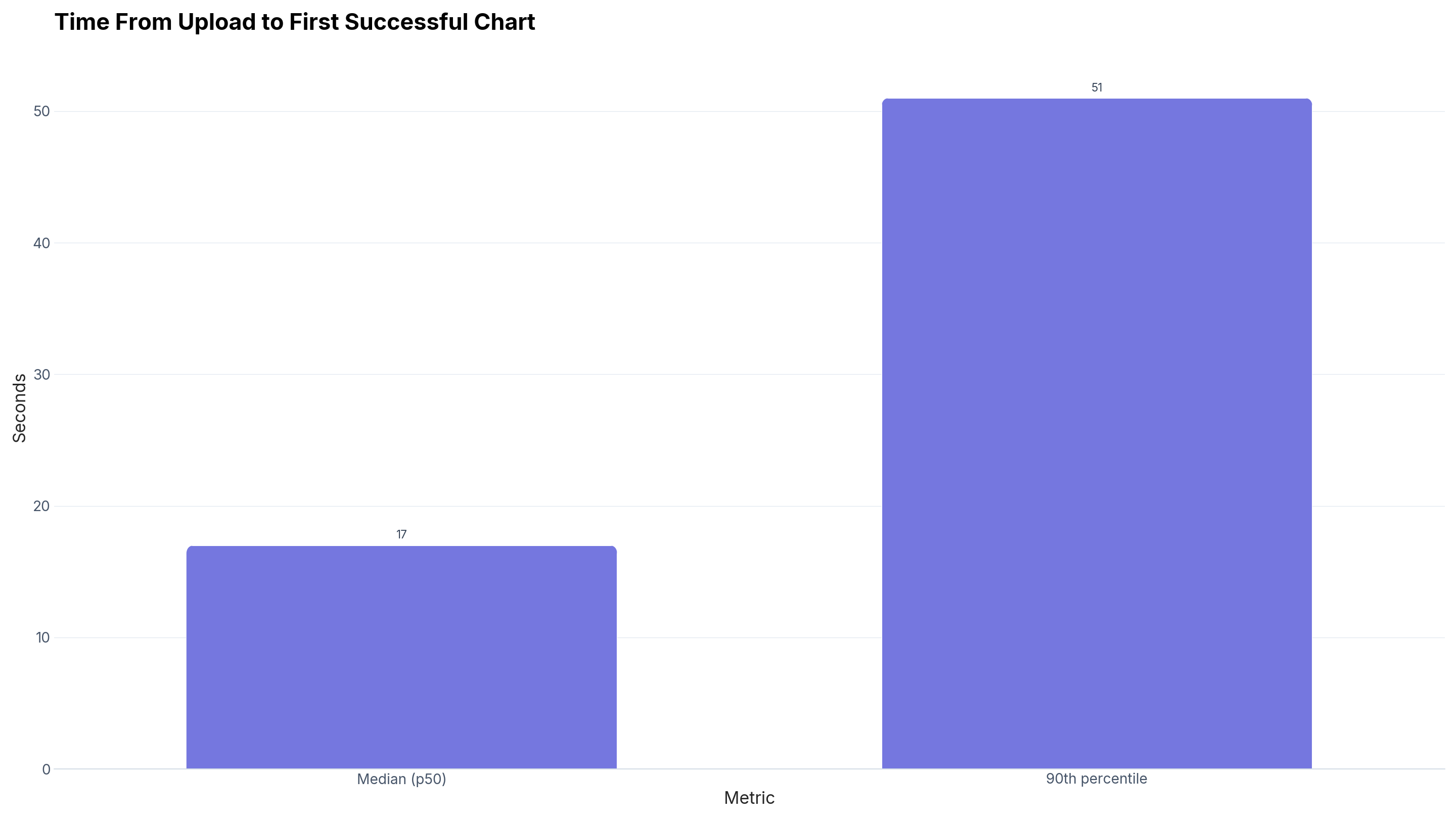
Source: CleanChart usage data, May–Oct 2026, n = 1,164. Download the underlying data (CSV).
Our test task used a CSV file, but that is not what most CleanChart users actually upload. Of 3,155 sessions with a recorded file format in the same window, Excel (.xlsx/.xls) accounts for 1,468, ahead of CSV/TSV at 1,022, JSON at 326, XML at 185, and TXT at 118. (Markdown and ODS uploads exist too, but each falls under our 50-session minimum sample size, so they are not broken out individually here.)
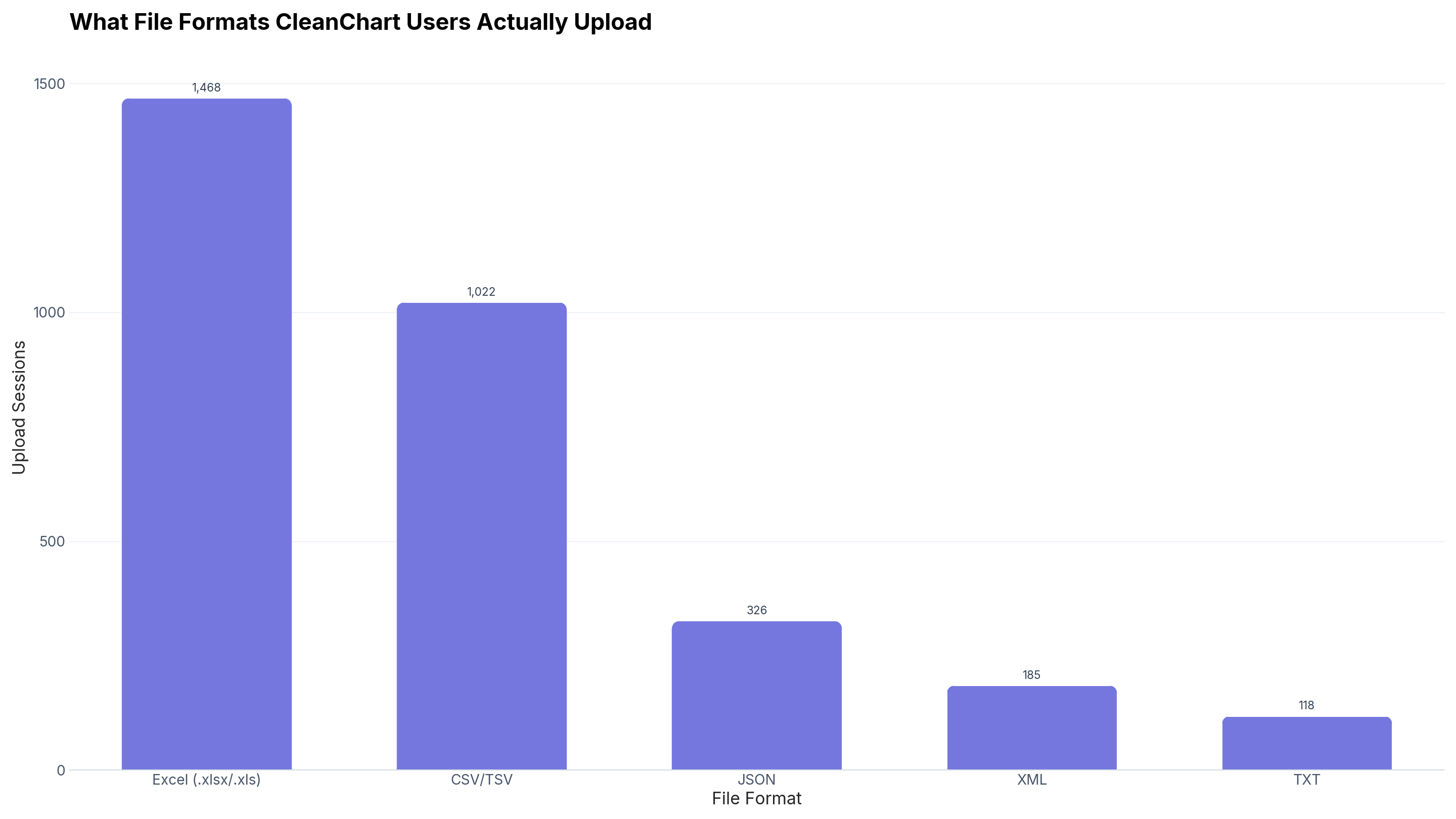
Source: CleanChart usage data, May–Oct 2026, n = 3,119 (formats with n ≥ 50 only). Download the underlying data (CSV).
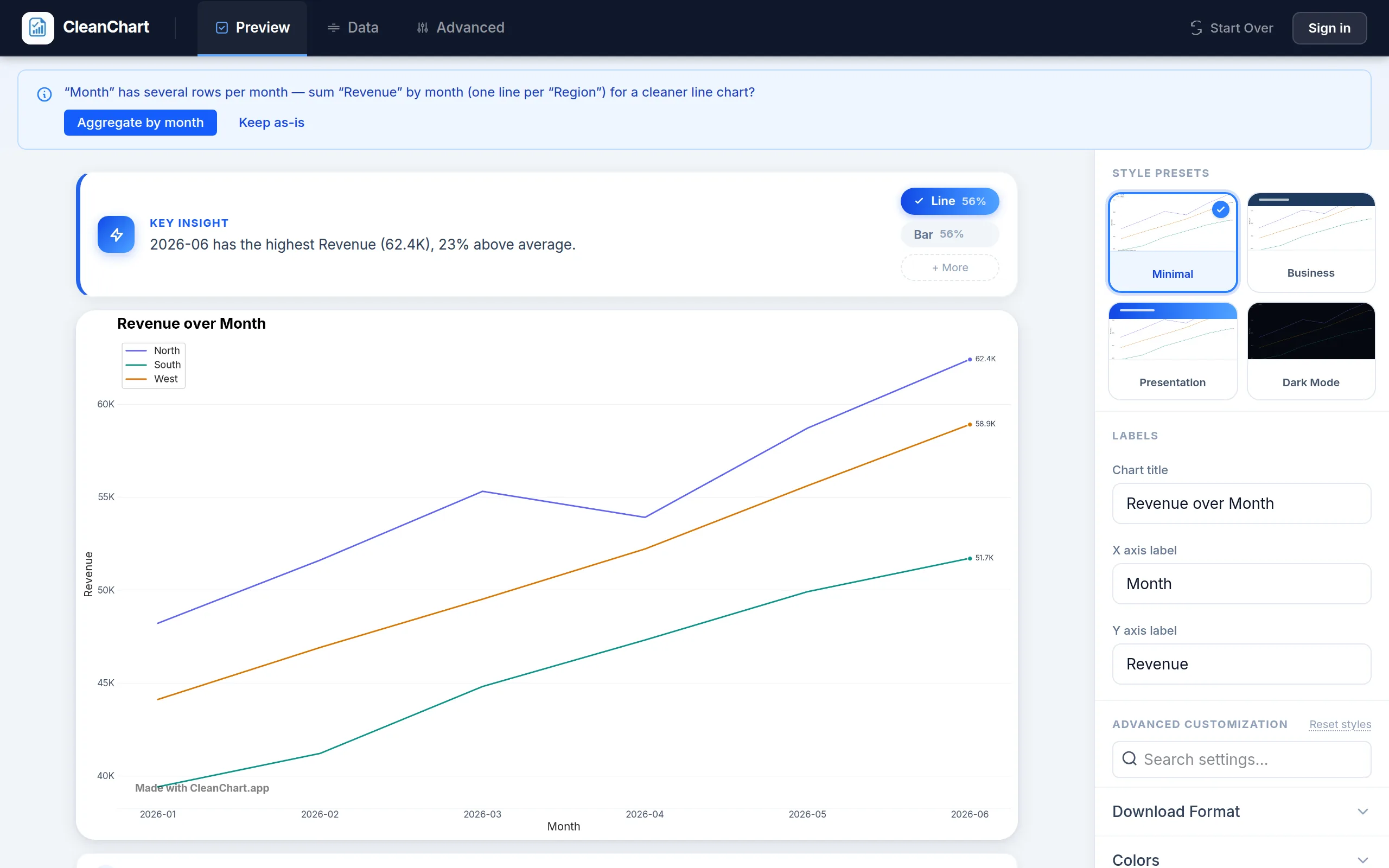
See the Actual Upload-to-Chart Flow
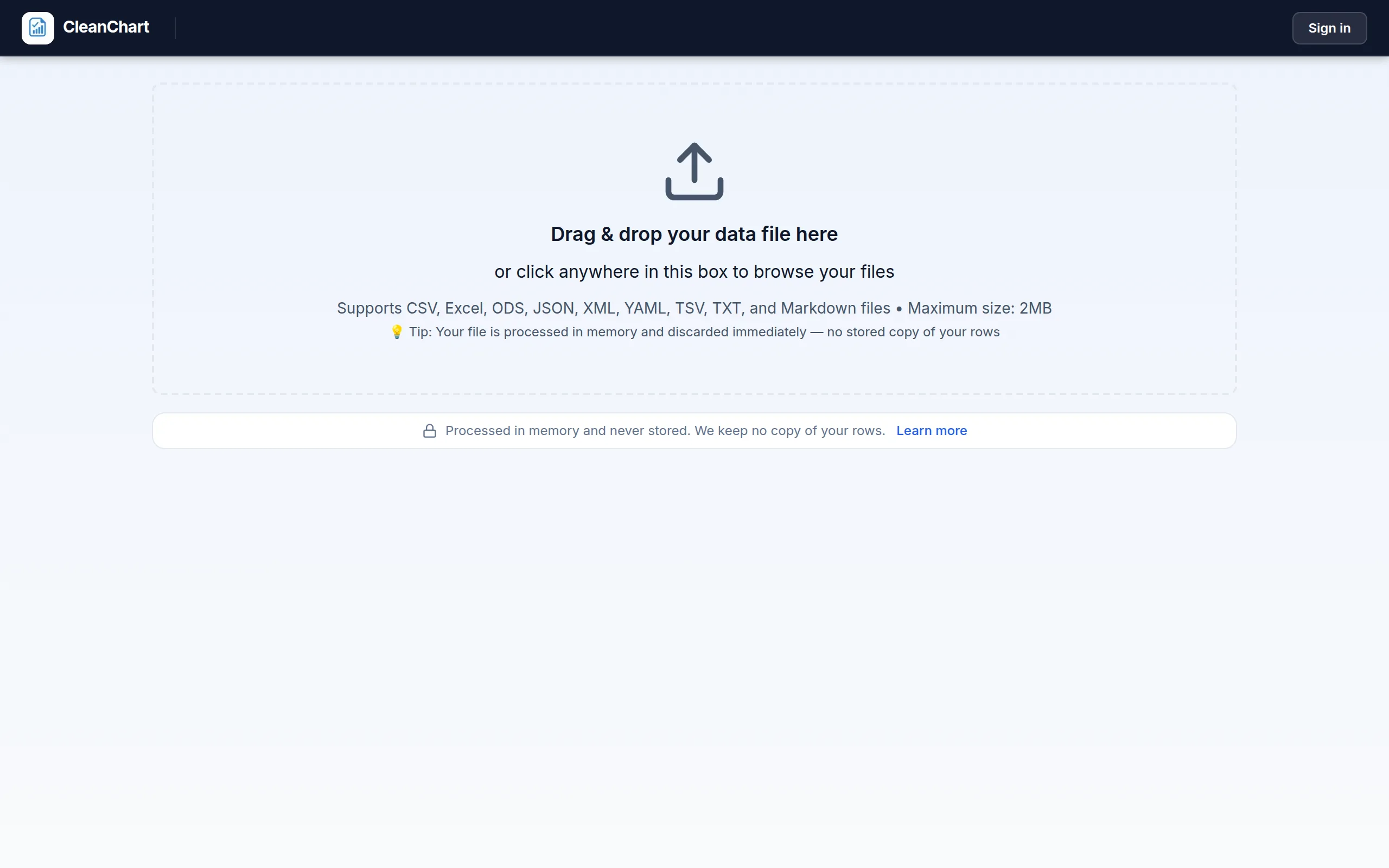
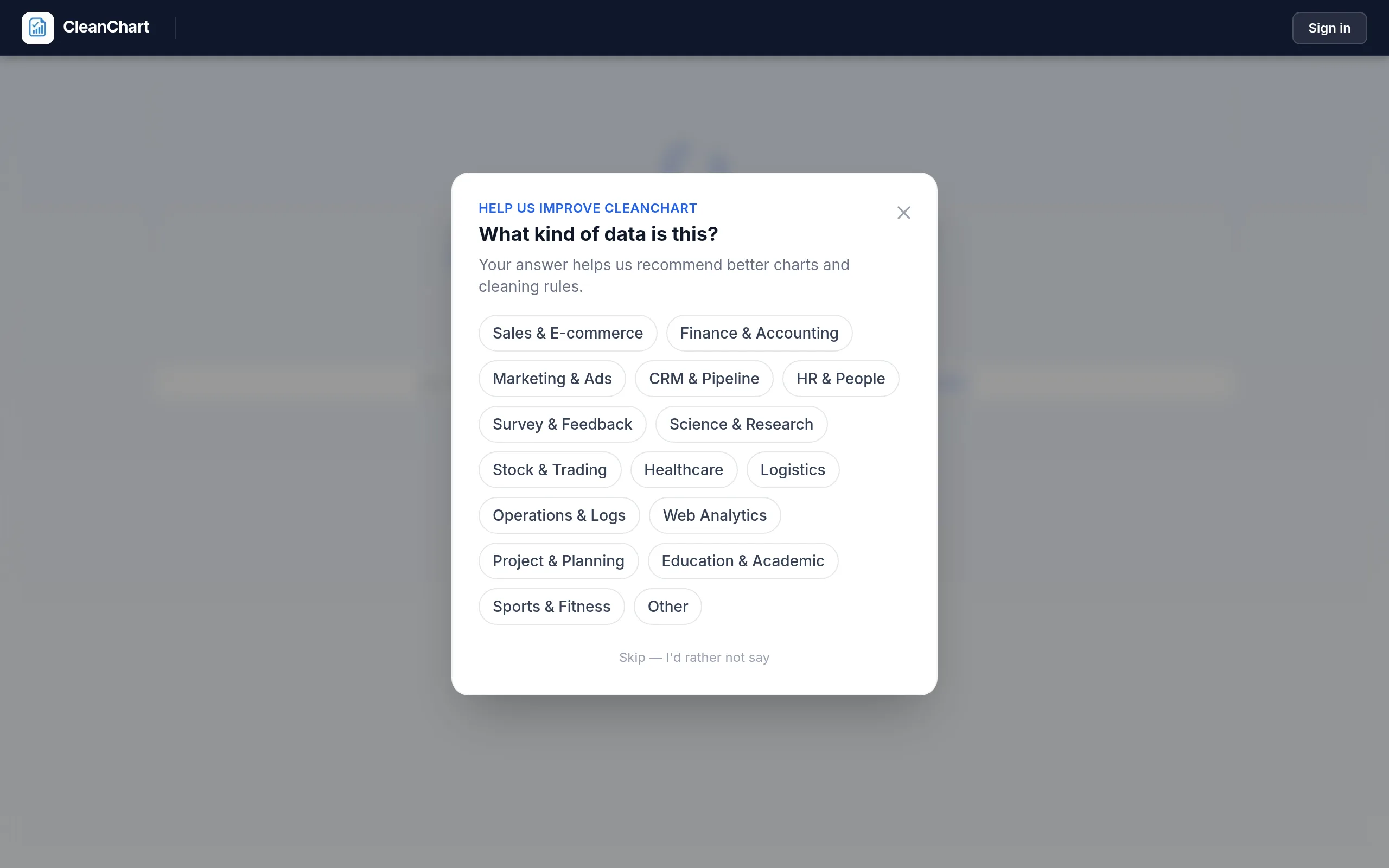
Rather than describe the three clicks from memory, here is the real flow from a fresh CleanChart session with a monthly sales CSV, the same kind of file our test used.
#2: Google Sheets — Best All-Around
Website: Google Sheets
Price: Free with Google account
Overall Rating: 4.5/5
What Makes It #2
Versatility: Spreadsheet + charting in one. Edit data and create charts in the same place.
Collaboration: Real-time collaboration with team members.
Familiar: If you know Excel, you know Google Sheets.
Test Results
Time to first chart: 8 minutes (slower due to formatting)
Task breakdown:
- Import CSV: 30 seconds
- Select data: 1 minute (had to get range right)
- Insert chart: 30 seconds
- Format chart (change colors, labels, title): 5 minutes
- Export as image: 1 minute
Account required: Need Google account (free)
Pros
- Free forever: No limits on charts, 15GB free storage, all features included
- Real-time collaboration: Multiple people edit at once, comments, version history
- Works anywhere: Any device with browser, mobile apps, auto-saves
- Integrations: Google Forms, Google Analytics, add-ons
- Full spreadsheet power: Formulas, pivot tables, data validation
Cons
- Manual formatting required: Default charts look dated, need 5-10 minutes styling
- Learning curve: Many features can be overwhelming
- Slower for large files: 100K+ rows can lag
- Limited chart types: No box plots, violin plots, advanced charts
Best For
- Teams needing collaboration
- People who need spreadsheet + charts
- Google ecosystem users
- Budget-conscious (100% free)
Our Verdict
Best free spreadsheet with charting. If you need to manipulate data AND create charts, Google Sheets is hard to beat.
But for JUST creating charts, it's slower and requires more work than CleanChart or Datawrapper.
Use Google Sheets when: You need spreadsheet functionality + charts in one tool.
#3: Datawrapper — Best for Professionals
Website: Datawrapper
Price: Free (Custom plan $599/year for teams)
Overall Rating: 4.5/5
What Makes It #3
Professional quality: Used by The New York Times, Washington Post, BBC, and Scientific American
Beautiful defaults: Charts look publication-ready immediately
Advanced features: Annotations, custom colors, responsive design
Pros
- Journalism-grade quality: Beautiful, professional designs used by top media
- Responsive charts: Automatically adapts to screen size
- Advanced customization: Annotations, labels, custom palettes
- Maps: Best tool for geographic data visualization
- Embeddable: Easy iframe embedding for websites
Cons
- Steeper learning curve: More options = more complexity
- Requires account: Email verification needed
- Free tier has branding: Small "Made with Datawrapper" link
- Slower: 4 minutes vs CleanChart's 90 seconds
Best For
- Journalists and media professionals
- Data storytellers needing interactive charts
- Researchers publishing online
- Anyone needing geography/map visualizations
Our Verdict
Best professional tool. If your work will be published (news, research, professional reports), Datawrapper's quality justifies the learning curve.
Use Datawrapper when: Quality and credibility matter most.
#4: Canva — Best for Infographics
Website: Canva
Price: Free (Pro $120/year)
Overall Rating: 4/5
What Makes It #4
Templates: Hundreds of beautiful infographic templates
Design tools: Combines charts with graphics, text, images
Social media: Perfect sizing for Instagram, LinkedIn, etc.
Pros
- Beautiful templates: 1000+ infographic designs
- All-in-one design: Charts + text + images + shapes
- Easy drag-and-drop: No design skills needed
- Canva for Education: Free Pro features for students/teachers
Cons
- Not optimized for data charts: Better for infographics
- Free tier limitations: Many templates require Pro
- Overwhelming: Many features can be distracting
Best For
- Social media creators
- Marketing teams
- Students creating poster presentations
- Anyone making infographics
Our Verdict
Best for design-heavy content. Canva excels when you need a chart PLUS surrounding design.
For pure data visualization, use CleanChart or Datawrapper to create your charts, then import them to Canva for final design.
Use Canva when: You need a chart as part of a larger visual.
#5: Plotly Chart Studio — Best for Interactive Charts
Website: Plotly Chart Studio
Price: Free (Pro $420/year)
Overall Rating: 4/5
Pros
- Interactive features: Zoom, pan, hover tooltips
- Wide chart variety: Statistical charts, 3D plots
- Python/R integration: For advanced users
- Embeddable: Interactive charts on websites
Cons
- Learning curve: Complex interface
- Free tier limits: Charts are public, has watermark
- Requires account: Email verification
Best For
- Data scientists and analysts
- Dashboards with interactive data
- 3D visualization needs
#6: RAWGraphs — Best for Unique Chart Types
Website: RAWGraphs
Price: 100% Free (open source)
Overall Rating: 3.5/5
Pros
- Unique visualizations: Alluvial diagrams, sunbursts, circular dendrograms
- 100% free: No limits, no watermarks, no account
- Privacy-focused: Processed in memory, not stored
Cons
- Steep learning curve: Complex interface
- Limited to unique charts: For common charts, use other tools
- Basic design: Not as polished
Best For
- Researchers needing specialized visualizations
- Privacy-conscious users
- Academic work requiring unique chart types
#7: ChartBlocks — Simple and Limited
Website: ChartBlocks
Price: Free (Pro $20/month)
Overall Rating: 3.5/5
Pros
- Simple wizard: Step-by-step guidance
- Multiple import methods: CSV, Excel, Google Sheets
- Cheap Pro plan: $20/month
Cons
- Free tier very limited: Only 50 charts total, watermark
- Dated interface: Looks old
- Limited features: Fewer chart types
Our Verdict
Outclassed by competitors. CleanChart is easier, free, and better quality.
Which Tool Should You Choose?
Based on Your Goal
"I need a chart for my paper/report by tomorrow"
→ CleanChart (fastest, easiest)
"I need to edit data AND make charts"
→ Google Sheets (all-in-one) - Compare Excel vs online chart makers
"I'm creating content for publication"
→ Datawrapper (professional quality)
"I need an infographic or social media post"
→ Canva (design-focused)
"I need interactive charts for my website"
→ Plotly (interactivity)
"I need a unique chart type"
→ RAWGraphs (specialized charts) - Browse all chart types explained
Based on Your Skill Level
Beginner: CleanChart → ChartBlocks → Google Sheets
Intermediate: Google Sheets → Datawrapper → Canva
Advanced: Plotly → RAWGraphs → Tableau Public
Based on Budget
$0/month:
- CleanChart (best free tier)
- Google Sheets (100% free)
- RAWGraphs (open source)
Frequently Asked Questions
Q: Is there a 100% free tool with no watermarks?
Yes:
- CleanChart (no watermark on free tier)
- Google Sheets (100% free)
- RAWGraphs (100% free, open source)
Q: Which tool is best for students?
CleanChart or Google Sheets
CleanChart is fastest for creating charts for academic papers. Google Sheets is best if you need to manage data + create charts.
Bonus: Canva for Education offers free Pro features for students/teachers.
Q: Can I use these tools for commercial projects?
Yes, all tools allow commercial use. Always check specific terms of service.
Q: Which exports the highest quality images?
Best quality:
- CleanChart (300 DPI built-in)
- Datawrapper (publication-quality)
- Canva (design-focused)
SVG for infinite scaling: CleanChart, Google Sheets, Datawrapper, RAWGraphs all support SVG export.
Q: Do I need to install software?
No! All tools listed are web-based. Work in any browser, no downloads needed.
Q: Which is best for collaboration?
Google Sheets wins for collaboration: real-time multi-user editing, comments, version history, permission controls.
Conclusion
Our top picks for 2026:
Best Overall: CleanChart
Fast, easy, professional quality. Perfect free tier.
Best Free Spreadsheet: Google Sheets
Can't beat free + familiar + collaborative.
Best for Professionals: Datawrapper
Publication-quality charts worth the learning curve.
Quick decision:
- Need it fast? → CleanChart
- Need to edit data too? → Google Sheets
- Publishing professionally? → Datawrapper
- Making infographics? → Canva
- Need interactivity? → Plotly
Ready to Create Your Chart?
Try CleanChart free—no credit card, no watermarks, professional results in 90 seconds.
Upload your CSV. Choose your chart. Download. Done.
Related Articles
- Excel vs Online Chart Makers: Which is Better?
- 7 Chart Types Explained with Examples
- Data Visualization for Beginners: Complete Guide
- Creating Charts Without Python or Coding
- Common Data Cleaning Mistakes to Avoid
- Best Color Palettes for Data Visualization
- How to Create a Gauge Chart: KPI Dashboard Guide
- How to Create a Funnel Chart: Conversion Guide
- How to Create a Sankey Diagram: Flow Visualization
- How to Create a Waterfall Chart: Step-by-Step
- How to Visualize Sales Data with Charts
- Business Reports with Charts: Complete Guide
Quick Tools
- Bar Chart Maker - Create bar charts instantly
- CSV to Bar Chart - Convert CSV files to bar charts
- Excel to Bar Chart - Import Excel data as bar charts
- Google Sheets to Bar Chart - Create charts from spreadsheets
External Resources
Learn more about data visualization best practices from these authoritative sources:
- Tableau's Data Visualization Guide - Comprehensive resource on visualization principles
- Storytelling with Data - Cole Nussbaumer Knaflic's popular data viz blog
- FlowingData - Nathan Yau's data visualization tutorials and examples
- Edward Tufte - The pioneer of data visualization theory
- Wikipedia: Data Visualization - Overview and history of the field
About this review: We tested each tool with the same CSV file and timed the process. No affiliate links or sponsored rankings. Rankings based on actual testing in January 2026, with CleanChart's pricing, export details, and usage data refreshed in September 2026.
Last updated: October 1, 2026