A Sankey diagram traces how quantities flow from one stage to another, with each band's width proportional to the amount it carries. Build one two ways: upload a file to CleanChart and get a finished diagram in about 20 seconds with no code, or write it yourself in JavaScript with the d3-sankey library. Both paths are covered step by step below.
Updated October 1, 2026 (usage data refreshed): added a JavaScript (D3.js) method, real CleanChart usage data on how common Sankey diagrams are, and app screenshots of the no-code flow.
Marketing teams use Sankey diagrams to see where website visitors go after landing on the homepage. Energy analysts use them to map how fuel sources convert into electricity, heat, and waste. Supply chain managers use them to track materials from raw input through manufacturing to final delivery. Wherever something moves from A to B through intermediate steps, a Sankey diagram makes the path visible.
In this guide, you'll learn what Sankey diagrams are, when to use them, how to create one step by step, and the design mistakes that turn a clear flow into a tangled mess.
What Is a Sankey Diagram?
A Sankey diagram is a flow visualization where arrows (or bands) connect nodes, and the width of each band is proportional to the quantity it represents. Nodes are the stages, categories, or entities in the system, and the bands show how much flows between them. The result is an intuitive picture of magnitude and direction across a multi-step process.
The diagram is named after Captain Matthew Sankey, an Irish engineer who used it in 1898 to show the energy efficiency of a steam engine. One of the most famous early examples is Charles Minard's 1869 map of Napoleon's Russian campaign, which is often cited as one of the greatest statistical graphics ever drawn. Today, Sankey diagrams are standard in energy policy, web analytics, logistics, and any domain where understanding flow and conversion matters.
If you're new to data visualization, our beginner's guide to data visualization covers the fundamentals before you dive into Sankey diagrams.
When Should You Use a Sankey Diagram?
Sankey diagrams are the right choice when your data represents flow between stages and you want to show both the path and the magnitude. They excel at:
- Conversion funnel analysis — Show how visitors move from landing page to signup to purchase, with band width revealing where the biggest drop-offs occur
- Energy flow mapping — Trace how energy sources (coal, gas, solar) convert into electricity, transport fuel, heat, and waste
- Customer journey visualization — Map the paths users take through a product or website, identifying the most common routes and dead ends
- Supply chain tracking — Follow materials from suppliers through manufacturing stages to distribution channels
- Budget allocation flow — Show how a total budget flows from top-level departments through teams to individual projects
- Migration and demographic flows — Visualize population movement between regions, job transitions between industries, or student pathways through education
Sankey diagrams are not the best choice when you need to compare categories side by side (use a bar chart), track trends over time (use a line chart), show static parts of a whole (use a pie chart or treemap), explain step-by-step cumulative changes (use a waterfall chart), or show drop-off in a single linear process (use a funnel chart—see our funnel chart guide). For help choosing the right chart, see our chart types explained guide.
Sankey Diagram vs. Other Charts: When to Use What?
Sankey diagrams share territory with several other chart types. Here's how to choose.
| Question You're Answering | Best Chart | Why Not a Sankey? |
|---|---|---|
| How does quantity flow from sources to destinations? | Sankey diagram | This is exactly what Sankey diagrams are built for |
| How does a value change through sequential additions and subtractions? | Waterfall chart | Waterfall shows cumulative change; Sankey shows branching flows |
| Where do we lose volume in a single linear process? | Funnel chart | Funnel shows one-path drop-off; Sankey shows multiple branching paths (funnel guide) |
| What share does each category hold? | Pie chart or treemap | Sankey shows transitions between stages, not static proportions |
| Which category is largest? | Bar chart | Bar charts compare magnitudes; Sankey shows connections |
| How does a metric trend over time? | Line chart or area chart | Sankey shows flow at a point in time, not temporal progression |
| What is the correlation between two variables? | Scatter plot | Scatter shows relationships; Sankey shows directional flow |
| What is the data distribution? | Histogram or box plot | Sankey is not designed for statistical distributions |
How to Create a Sankey Diagram: Step by Step
There are several ways to create Sankey diagrams, from no-code tools to full programming environments.
Method 1: Use CleanChart (No Code Required)
The fastest way to create a Sankey diagram without writing any code:
- Prepare your data with three columns: source node, target node, and a numerical value representing the flow between them
- Go to CleanChart's Sankey diagram maker and upload your file
- Map your columns to source, target, and value
- Customize node colors, band opacity, labels, and layout
- Export as PNG, SVG, or PDF for presentations and reports
You can upload data from multiple sources:
- CSV to Sankey diagram – Import comma-separated data files
- Excel to Sankey diagram – Upload .xlsx spreadsheets directly
- Google Sheets to Sankey diagram – Connect live spreadsheets
If your data needs cleaning before visualization, our complete CSV data cleaning guide walks through the process step by step.
Method 2: Google Sheets
Google Sheets does not have a native Sankey chart type. However, you can use Google Charts (a JavaScript library) with data exported from Google Sheets.
Method 3: Excel
Excel does not include a built-in Sankey chart type. Power BI (which integrates with Excel) does support Sankey diagrams through a custom visual. For standalone Excel users, the practical approach is to export your data as CSV and use an online tool. If you're evaluating options, our Excel vs. online chart makers comparison breaks down the trade-offs. For publication-quality output, see our publication-ready charts guide.
Method 4: Python (Plotly)
For programmers, Plotly offers the most accessible Python library for Sankey diagrams:
import plotly.graph_objects as go

# Define nodes (stages)
labels = ["Website", "Landing Page", "Signup Form",
          "Free Trial", "Paid Plan", "Churned",
          "Bounced"]

# Define flows: source index, target index, value
sources = [0, 0, 1, 1, 2, 2, 3, 3]
targets = [1, 6, 2, 6, 3, 5, 4, 5]
values =  [800, 200, 500, 300, 350, 150, 250, 100]

fig = go.Figure(go.Sankey(
    node=dict(
        label=labels,
        color=["#3498db", "#2ecc71", "#f39c12",
               "#9b59b6", "#27ae60", "#e74c3c",
               "#95a5a6"]
    ),
    link=dict(
        source=sources,
        target=targets,
        value=values
    )
))

fig.update_layout(title="Customer Conversion Funnel")
fig.write_image("sankey.png", scale=2)
fig.show()
The Plotly Sankey diagram documentation covers advanced features like custom colors per link, hover templates, and multi-level diagrams. If coding isn't your preference, our guide on creating charts without Python covers no-code alternatives.
Method 5: JavaScript (D3.js)
For web developers who need an interactive, embeddable Sankey diagram, the d3-sankey plugin for D3.js is the standard choice:
// npm install d3 d3-sankey
import * as d3 from "d3";
import { sankey, sankeyLinkHorizontal } from "d3-sankey";

const data = {
  nodes: [
    { name: "Website" }, { name: "Landing Page" }, { name: "Signup Form" },
    { name: "Free Trial" }, { name: "Paid Plan" }, { name: "Churned" }, { name: "Bounced" }
  ],
  links: [
    { source: 0, target: 1, value: 800 },
    { source: 0, target: 6, value: 200 },
    { source: 1, target: 2, value: 500 },
    { source: 1, target: 6, value: 300 },
    { source: 2, target: 3, value: 350 },
    { source: 2, target: 5, value: 150 },
    { source: 3, target: 4, value: 250 },
    { source: 3, target: 5, value: 100 }
  ]
};

const width = 800, height = 500;
const svg = d3.select("#chart").append("svg")
  .attr("width", width).attr("height", height);

const { nodes, links } = sankey()
  .nodeWidth(20)
  .nodePadding(12)
  .extent([[1, 1], [width - 1, height - 1]])(data);

svg.append("g")
  .selectAll("rect")
  .data(nodes)
  .join("rect")
    .attr("x", d => d.x0)
    .attr("y", d => d.y0)
    .attr("height", d => d.y1 - d.y0)
    .attr("width", d => d.x1 - d.x0)
    .attr("fill", "#3498db");

svg.append("g")
    .attr("fill", "none")
  .selectAll("path")
  .data(links)
  .join("path")
    .attr("d", sankeyLinkHorizontal())
    .attr("stroke", "#9b59b6")
    .attr("stroke-width", d => Math.max(1, d.width))
    .attr("stroke-opacity", 0.4);

svg.append("g")
  .selectAll("text")
  .data(nodes)
  .join("text")
    .attr("x", d => (d.x0 < width / 2 ? d.x1 + 6 : d.x0 - 6))
    .attr("y", d => (d.y1 + d.y0) / 2)
    .attr("text-anchor", d => (d.x0 < width / 2 ? "start" : "end"))
    .text(d => d.name);
This renders the same conversion funnel as the Plotly example above, but as an interactive SVG you control directly, which is useful for embedding in a dashboard or adding hover tooltips and click handlers. The trade-off is setup time: d3-sankey has no built-in export button, legend, or responsive layout, so budget extra work for anything beyond a one-off chart.
The d3-sankey documentation covers layout options like nodeAlign and iterations. If you'd rather skip the setup, CleanChart's Sankey diagram maker (Method 1 above) produces a comparable diagram from the same data with no code.
How to Structure Data for a Sankey Diagram
Sankey diagrams require flow data with sources, targets, and values. There are two common formats:
Edge List (Most Common)
Each row represents one flow between two nodes:
| Source | Target | Value |
|---|---|---|
| Organic Search | Homepage | 5000 |
| Paid Ads | Landing Page | 3000 |
| Social Media | Blog | 2000 |
| Homepage | Product Page | 3500 |
| Homepage | Exit | 1500 |
| Landing Page | Signup | 1800 |
| Landing Page | Exit | 1200 |
| Blog | Product Page | 800 |
| Blog | Exit | 1200 |
| Product Page | Purchase | 2100 |
| Product Page | Exit | 2200 |
| Signup | Purchase | 1200 |
| Signup | Exit | 600 |
This format works directly with CleanChart, Plotly, D3.js, and most Sankey tools. The tool automatically discovers nodes from the unique values in the Source and Target columns.
Node + Link Format (for Programming)
Some libraries (including Plotly and D3.js) expect nodes and links as separate lists, with links referencing nodes by index:
// Nodes: indexed 0, 1, 2, ...
nodes = ["Organic", "Paid", "Homepage", "Signup", "Purchase", "Exit"]

// Links: source index -> target index, with value
links = [
  {source: 0, target: 2, value: 5000},
  {source: 1, target: 3, value: 3000},
  {source: 2, target: 4, value: 3500},
  {source: 3, target: 4, value: 1800},
  {source: 2, target: 5, value: 1500},
  {source: 3, target: 5, value: 1200}
]
If your data has missing values or inconsistent category names, clean it first. "Organic Search" vs. "organic search" will create duplicate nodes. See our guide to handling missing values in CSV files for cleanup techniques, and our common data cleaning mistakes article for pitfalls to avoid.
Practical Sankey Diagram Examples
Example 1: Website Traffic Flow
A marketing team maps visitor paths through their website. The Sankey starts with traffic sources (Organic, Paid, Social, Direct) flowing into entry pages (Homepage, Blog, Landing Pages). From there, bands flow to product pages, pricing pages, signup forms, and exits. The diagram instantly reveals that organic traffic converts at 2x the rate of paid traffic—and that the blog is a more effective entry point than paid landing pages. This type of analysis pairs well with chart-enhanced business reports for presenting findings to stakeholders.
Example 2: Energy Balance
An energy analyst visualizes a country's energy flow. Source nodes on the left show primary energy inputs (oil, natural gas, coal, nuclear, renewables). These flow through transformation stages (power plants, refineries) into end-use sectors (residential, commercial, industrial, transportation). A large band flowing to "rejected energy" (waste heat) immediately highlights the system's inefficiency. The Lawrence Livermore National Laboratory's energy flow charts are iconic examples of this approach.
Example 3: E-Commerce Conversion Funnel
An e-commerce company traces the purchase journey. Starting with 100,000 site visits, the Sankey shows how users flow through category pages (40,000), product detail pages (25,000), add-to-cart (8,000), checkout (5,000), and purchase (3,300). At every stage, a band flows to "Exit," and its width shows the magnitude of drop-off. The product team sees that the biggest loss is between product detail and add-to-cart—indicating a UX or pricing issue on product pages. For complementary analysis, see our guide on visualizing sales data.
Example 4: Employee Career Transitions
An HR analytics team visualizes how employees move between departments over a 3-year period. Source nodes are departments in Year 1, and target nodes are departments in Year 3. Wide bands from Engineering to Engineering show retention, while thinner bands from Engineering to Product Management show a common career path. The diagram also reveals that Customer Support has the highest outflow to External (attrition), guiding retention efforts. For survey-based analysis of employee data, see our charts for survey data guide.
How Common Are Sankey Diagrams, Really?
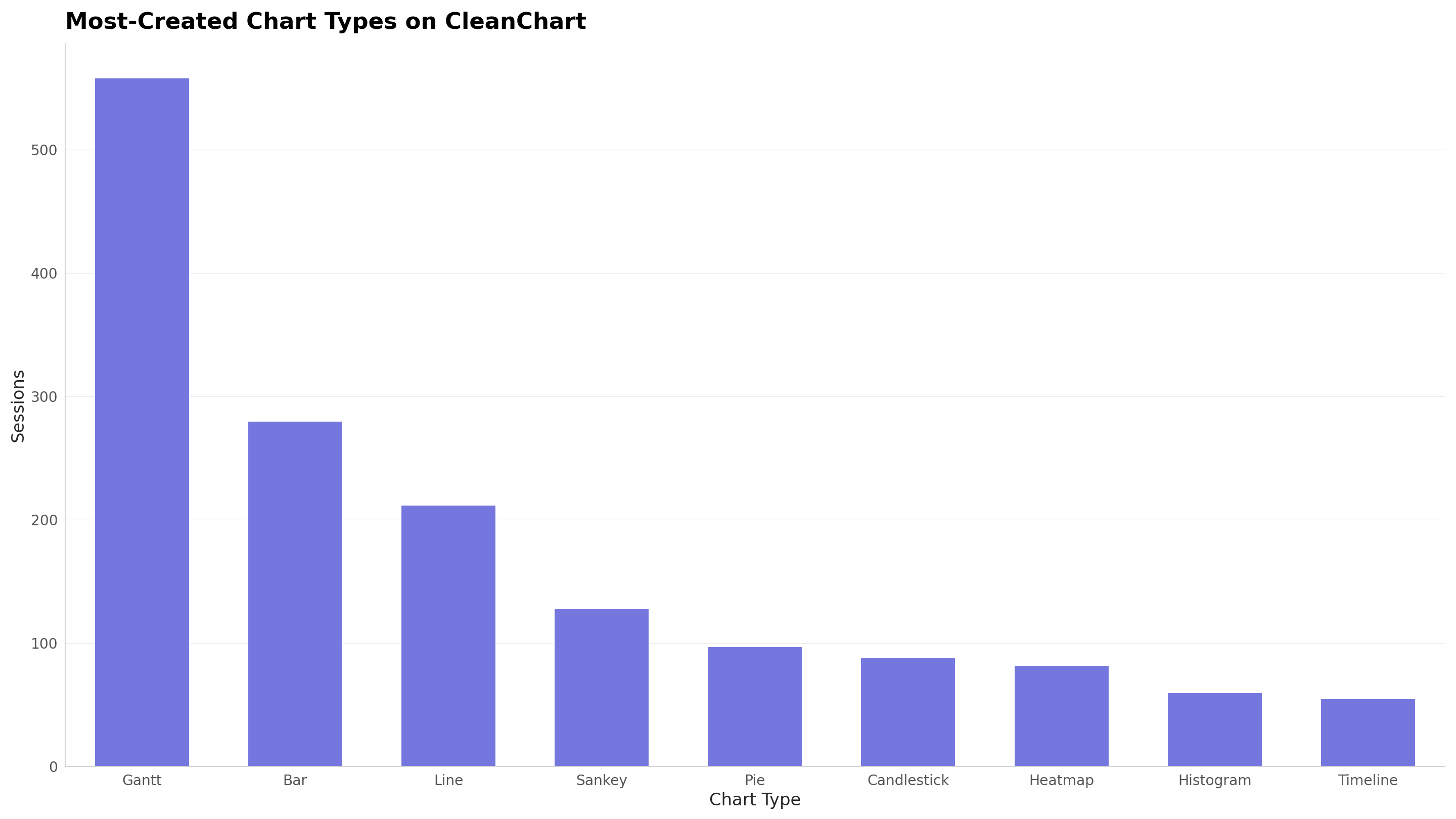
Sankey diagrams (CleanChart's internal chart type name is "alluvial") are a niche chart type, but they're used more than you might expect. Here's what CleanChart's own session data shows.
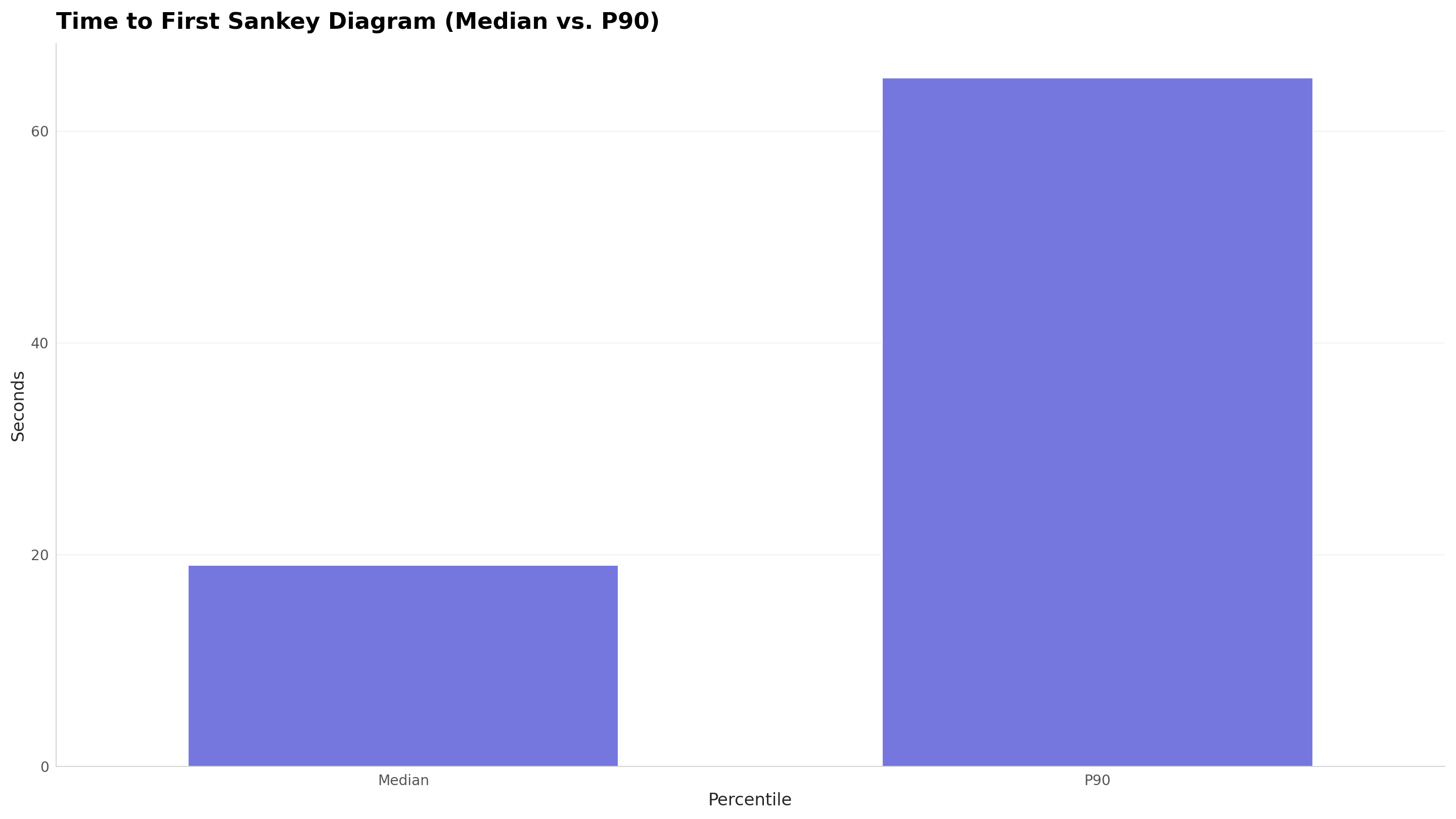
Once someone uploads flow data, how long until they have a finished diagram?
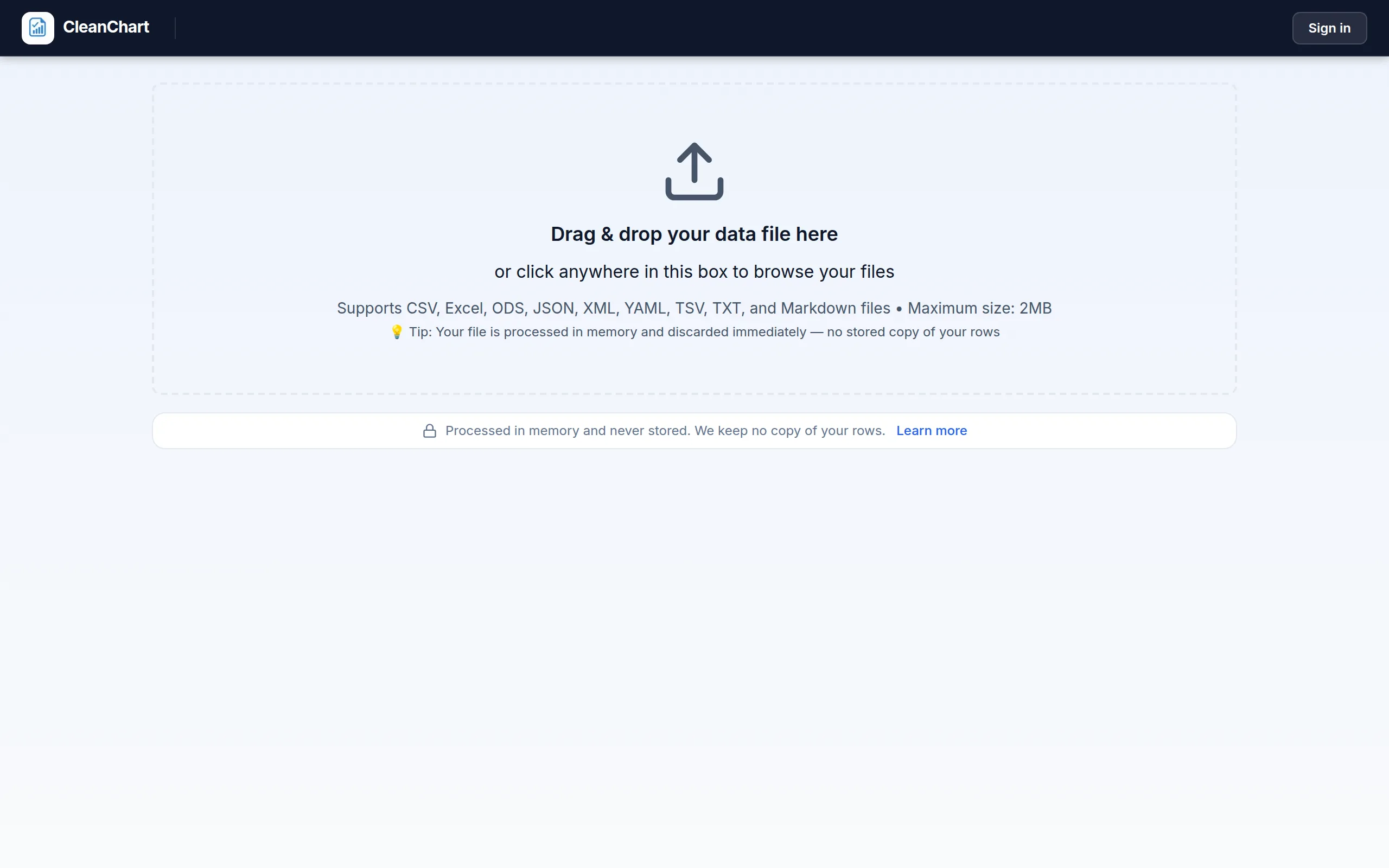
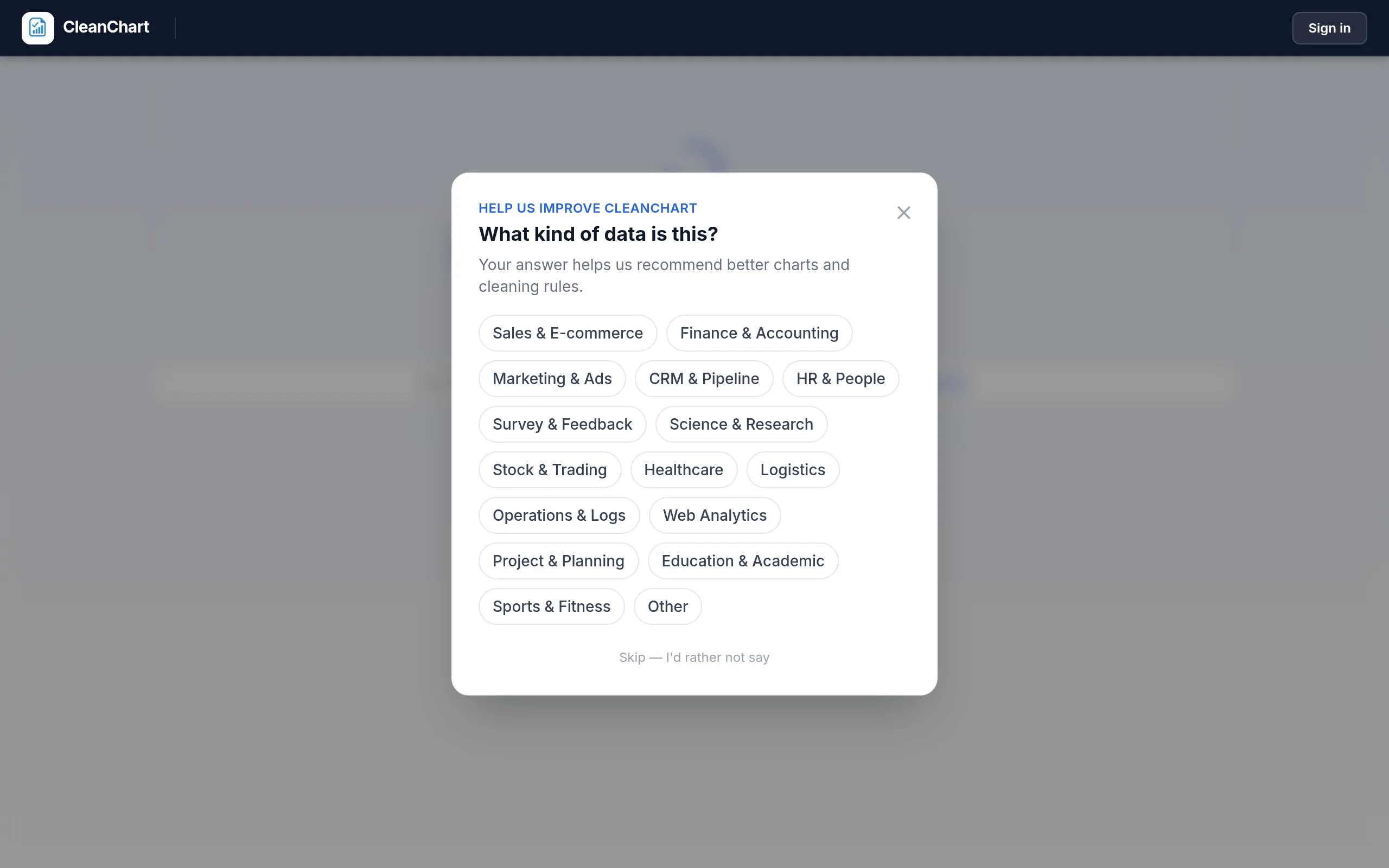
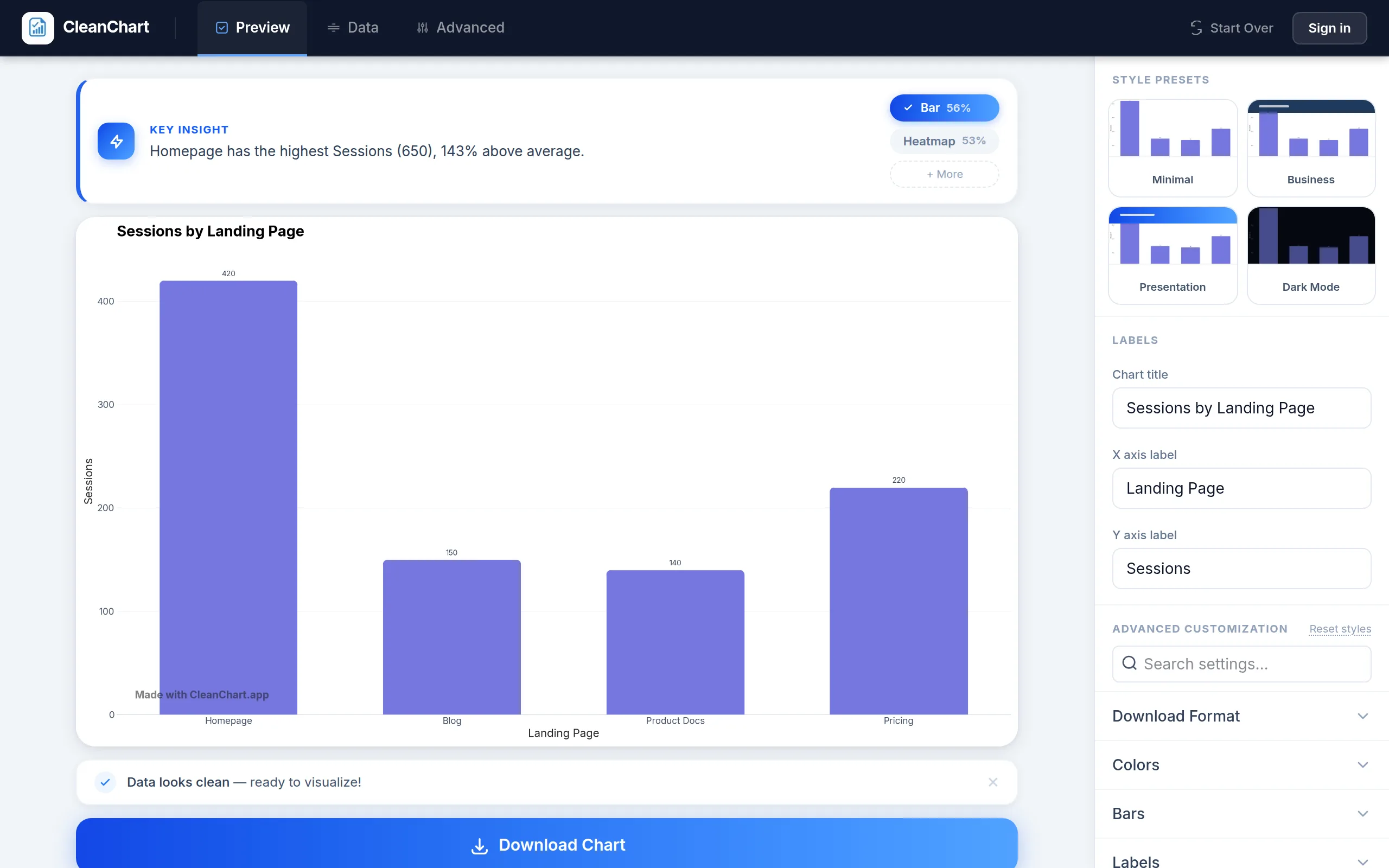
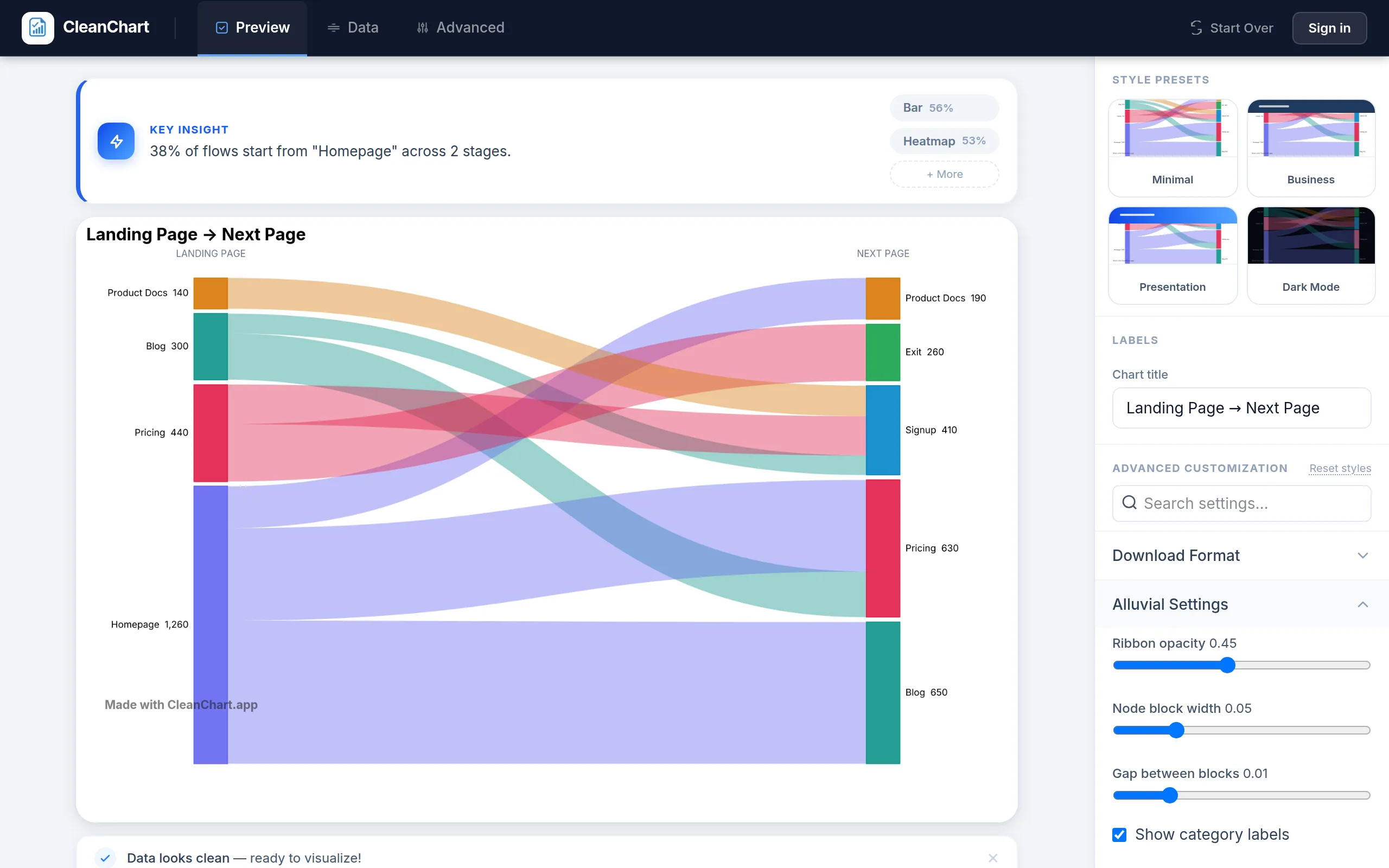
Here's that no-code path from Method 1, screenshotted end to end: uploading a page-to-page traffic CSV (similar to Example 1 above) and switching to the Alluvial (Sankey) chart type.
Sankey Diagram Best Practices
- Limit the number of nodes to 15–20. More than that creates a visual tangle. Aggregate small flows into an "Other" category and provide drill-down for details.
- Use color to distinguish source categories. Assign distinct colors to each source node and carry those colors through the bands. This makes it easy to trace where flows originate, even through intermediate stages.
- Order nodes to minimize band crossings. Position nodes so that the largest flows go roughly left-to-right without crossing. Most tools optimize this automatically, but manual adjustments can improve readability.
- Label both nodes and significant bands. Node labels should show the category name and total value. Large bands should display their value so viewers don't have to estimate from width. For color guidance, see our guide on color in data visualization.
- Use semi-transparent bands. Transparency (opacity around 0.4–0.6) lets overlapping bands remain visible. Fully opaque bands hide overlaps, and fully transparent ones are invisible.
- Flow left to right. The convention for Sankey diagrams is left-to-right flow. Vertical layouts work but are less common. Stick with the standard unless you have a compelling reason.
Common Mistakes to Avoid
Mistake 1: Circular Flows
Sankey diagrams assume directed acyclic flow—A flows to B flows to C, never back to A. If your data has cycles (e.g., users revisiting pages), aggregate the cycle or break it into separate time steps. Circular references cause most Sankey tools to error or produce unreadable output.
Mistake 2: Too Many Thin Bands
A Sankey with 50 bands where 40 are hair-thin slivers is visual noise. Filter out flows below a meaningful threshold or merge them into "Other." The goal is to highlight the dominant flows, not catalog every connection.
Mistake 3: Inconsistent Node Naming
If "Email" appears as a source and "email" as a target, the tool creates two separate nodes. Clean your data so that each category has a single, consistent label. Our CSV data cleaning guide covers techniques for standardizing text fields.
Mistake 4: No Value Context
Band width alone doesn't tell viewers the absolute numbers. Always include labels or tooltips showing the actual values. A band might look wide relative to others but represent a small absolute number. Without context, viewers draw wrong conclusions.
Mistake 5: Using Sankey for Non-Flow Data
Sankey diagrams imply movement from one state to another. If your data is a static comparison (e.g., revenue by region), a bar chart or treemap is the right choice. Forcing non-flow data into a Sankey misleads viewers into thinking there's a transfer. For guidance on choosing the right chart, see our article on why your chart looks wrong.
When Should You NOT Use a Sankey Diagram?
Sankey diagrams are powerful but specialized. Avoid them when:
- Your data doesn't represent flow — Use a bar chart for comparisons or a treemap for static composition
- You have fewer than 3 nodes — A simple percentage or a donut chart is clearer for binary splits
- You need precise value comparisons — Band width estimation is imprecise; use a bar chart for exact comparisons
- Your data has cycles — Sankey requires directed acyclic flow; circular patterns need network graphs or chord diagrams
- You want to show change over time — Use line charts or area charts for temporal trends
- You have too many connections — Beyond 30–40 links, Sankey diagrams become unreadable spaghetti
How to Make Sankey Diagrams Accessible
Sankey diagrams rely heavily on color and spatial position, which creates accessibility challenges. To make yours inclusive:
- Use colorblind-safe palettes. Avoid relying solely on red/green distinctions. Use palettes where hue, saturation, and brightness all differ. Our guide to colorblind-friendly charts has specific palette recommendations.
- Add text labels to all nodes and major bands. Screen readers and users with low vision depend on text, not spatial arrangement.
- Provide an alternative data table. Include a sortable table below the diagram showing Source, Target, and Value for each flow. This gives full accessibility to all users.
- Use descriptive chart titles. Instead of "Flow Diagram," write "Customer Journey from Ad Click to Purchase, Q1 2026" so the purpose is clear without seeing the visual.
- Ensure sufficient contrast. Bands against a white background should have enough opacity to be visible. Light pastel bands on a white background are hard to see for many users.
Frequently Asked Questions
What data format do I need for a Sankey diagram?
Sankey diagrams need three columns: a source node, a target node, and a numerical value representing the flow between them. Each row represents one connection. You can supply this as a CSV file, Excel spreadsheet, or Google Sheet. The edge list format (Source, Target, Value) is the most common and widely supported.
What is the difference between a Sankey diagram and a waterfall chart?
A waterfall chart shows how a single value changes through sequential additions and subtractions (e.g., revenue minus costs equals profit). A Sankey diagram shows how quantities split and merge across branching paths (e.g., traffic sources flowing through pages to conversions). Waterfall is linear; Sankey is branching. For step-by-step financial breakdowns, see our waterfall chart guide.
What is the difference between a Sankey diagram and a treemap?
A treemap shows static composition—how a total breaks down into nested parts at a single point in time. A Sankey diagram shows dynamic flow—how quantities move from one stage to another. Use a treemap to answer "what does the breakdown look like?" and a Sankey to answer "where does everything go?" For hierarchical composition, see our treemap guide.
Can I create a Sankey diagram in Excel?
Excel does not include a built-in Sankey chart type. Power BI (which integrates with Excel) offers Sankey diagrams via a custom visual. For a simpler approach, export your Excel data as CSV and use CleanChart's Sankey diagram maker. Our Excel vs. online chart makers comparison covers the trade-offs.
Can I create a Sankey diagram from a Google Sheet?
Google Sheets does not have a native Sankey chart type, but Google Charts (a JavaScript library) supports Sankey diagrams with data from Google Sheets.
How many nodes and links should a Sankey diagram have?
Aim for 5–20 nodes and 10–40 links. Fewer than 5 nodes makes the diagram trivial (a simple table works). More than 20 nodes and 40 links creates visual clutter. For large datasets, aggregate small categories into "Other" and consider providing interactive drill-down for sub-flows.
What is an alluvial diagram?
An alluvial diagram is a variant of a Sankey diagram specifically designed for showing how categorical data changes across time periods or conditions. In an alluvial diagram, each vertical axis represents a time point, and bands show how entities move between categories. The term comes from the visual resemblance to alluvial (river sediment) patterns. Alluvial diagrams are a subset of Sankey diagrams where the axes represent ordered stages.
Create Your First Sankey Diagram
Sankey diagrams turn complex multi-step flows into a single, scannable visual. Whether you're mapping a conversion funnel, tracing energy through a system, or understanding where your budget actually goes, a Sankey diagram shows both the big picture and every branching path.
Ready to try it? Create a Sankey diagram with CleanChart—upload your data from CSV, Excel, or Google Sheets and get a publication-ready chart in under a minute.
Related CleanChart Resources
- Sankey Diagram Maker – Create Sankey diagrams online, free
- CSV to Sankey Diagram – Convert CSV files directly
- Excel to Sankey Diagram – Convert Excel spreadsheets
- Funnel Chart Maker – Visualize linear conversion drop-off
- Waterfall Chart Maker – Show sequential cumulative changes
- Treemap Maker – Visualize hierarchical composition
- Bar Chart Maker – Compare categories side by side
- Line Chart Maker – Track trends over time
- Pie Chart Maker – Show simple parts of a whole
- Donut Chart Maker – Ring-format composition
- Chart Types Explained – Find the right chart for your data
- How to Create a Funnel Chart – Complete funnel chart guide
- How to Create a Waterfall Chart – Complete waterfall guide
- How to Create a Treemap – Complete treemap guide
- How to Create a Heatmap – Complete heatmap guide
- Visualize Sales Data – Sales chart examples and techniques
- Business Reports with Charts – Professional report design
- Data Visualization for Beginners – Start here
- Color in Data Visualization – Choose effective colors
External Resources
- Wikipedia: Sankey Diagram – History, applications, and notable examples
- Plotly Sankey Diagram Documentation – Python reference for programmers
- D3.js – JavaScript library for custom interactive Sankey diagrams
- Lawrence Livermore National Laboratory Energy Flow Charts – Iconic real-world Sankey examples
- Storytelling with Data – Best practices for data communication
- From Data to Viz: Sankey – Decision guide for flow visualizations
Last updated: October 1, 2026