Pareto Chart Maker
Apply the 80/20 rule to prioritize improvements. Create professional, interactive Pareto Charts in seconds without any design or coding skills.
Create Your Pareto Chart NowInstant Creation
Generate charts in seconds
Fully Customizable
Colors, labels, and styling
Export Ready
PNG, SVG, and PDF
Free to Start
No credit card required
What is a Pareto Chart?
Pareto charts combine bar charts and line graphs to illustrate the Pareto principle (the 80/20 rule)—the idea that 80% of effects typically come from 20% of causes. The bars show individual values in descending order, while the cumulative percentage line shows how each value contributes to the total. Pareto charts help identify which factors have the most significant impact.
Pareto charts are essential for quality improvement and process optimization, helping teams focus on the vital few problems that account for the majority of issues. They're used in Six Sigma initiatives, customer complaint analysis, and failure mode analysis. By visualizing the cumulative contribution of each category, Pareto charts guide resource allocation to areas with maximum impact.
When to Use a Pareto Chart
How to Create a Pareto Chart in 3 Steps
Upload Your Data
Copy and paste your data, upload a file (CSV, Excel, JSON), or type directly into our data table. CleanChart automatically detects your data structure and format.
Select Pareto Chart & Customize
Choose Pareto Chart from our chart type selector. Customize colors, labels, legend position, and styling. Preview changes in real-time as you adjust settings.
Export & Share
Download your Pareto Chart as PNG or SVG for reports and presentations, or as PDF on a paid plan.
Pareto Chart Example: 500 Product Returns
An online store logged 500 product returns and tallied them by reason. The file has two columns, a reason and a count, in no particular order. That's all a Pareto chart needs: CleanChart sorts the bars largest first, adds the cumulative percentage line and draws the 80% reference line for you.
| Return reason | Returns | Share | Cumulative % |
|---|---|---|---|
| Wrong size | 168 | 33.6% | 33.6% |
| Damaged in transit | 121 | 24.2% | 57.8% |
| Not as described | 77 | 15.4% | 73.2% |
| Arrived late | 41 | 8.2% | 81.4% |
| Changed mind | 35 | 7.0% | 88.4% |
| Defective part | 27 | 5.4% | 93.8% |
| Wrong item shipped | 19 | 3.8% | 97.6% |
| Missing accessories | 12 | 2.4% | 100.0% |
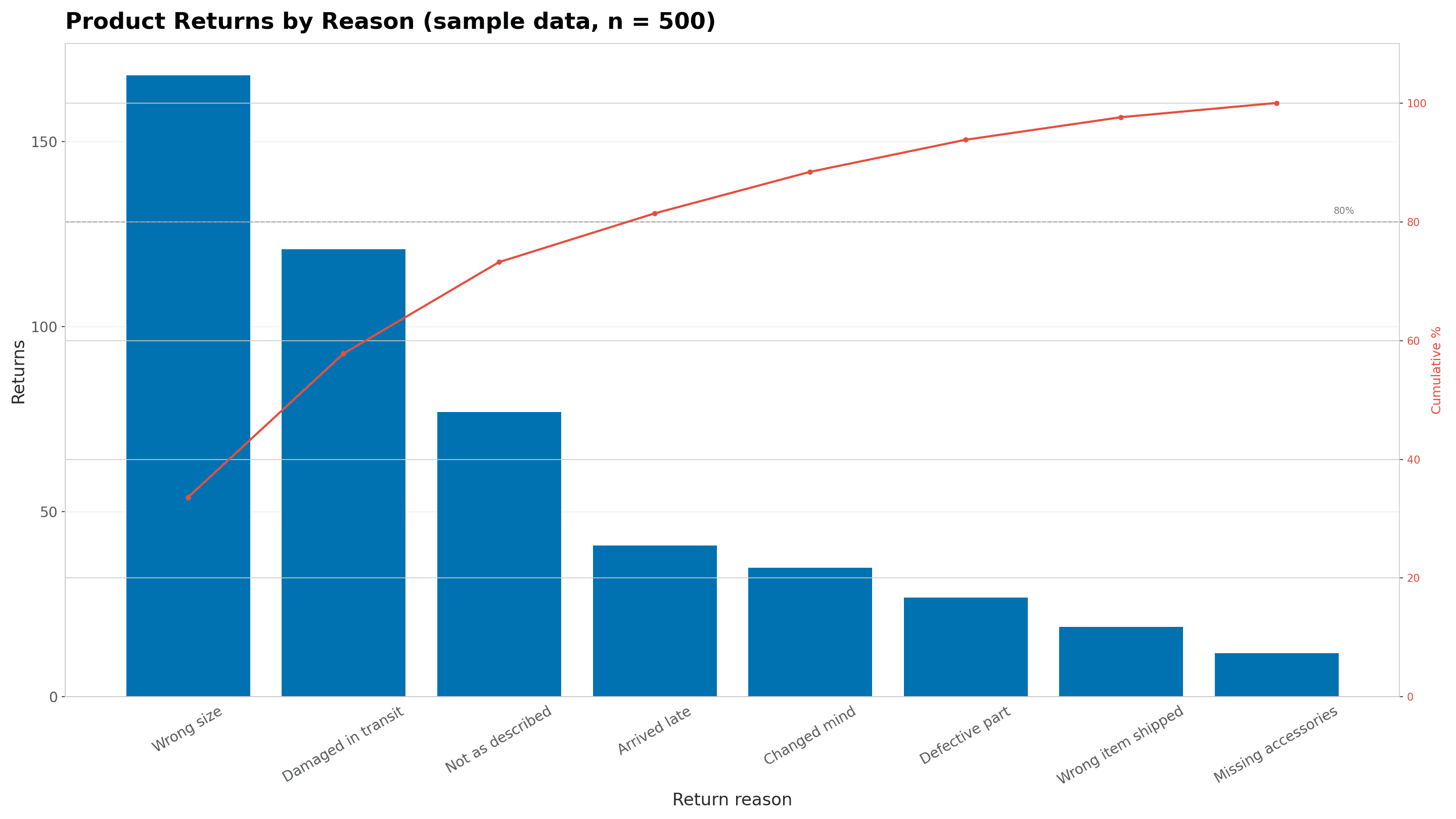
How to read it
- The red line crosses 80% at the fourth bar. Four of the eight reasons (wrong size, damaged in transit, not as described, arrived late) cause 407 of the 500 returns, or 81.4%.
- That's a 50/81 split, not 80/20. The 80/20 rule is a rule of thumb, so read the chart at the point where the cumulative line crosses 80%, wherever that falls.
- The first two bars alone cover 57.8% of returns. Better size guidance and sturdier packaging are where a fix pays off first.
- The four reasons right of the cutoff add up to 93 returns (18.6%). They're worth tracking, but not worth fixing first.
Real-World Example
Identifying which product defects account for 80% of customer returns
Best Practices for Pareto Charts
- 1.Keep labels clear and readable - use concise text that fits without overlapping
- 2.Use consistent colors throughout your visualization for easy pattern recognition
- 3.Include a descriptive title that explains what the chart shows
- 4.Ensure data is accurate and up-to-date before creating your chart
- 5.Consider your audience when choosing complexity and detail level
For more visualization guidelines, see resources from Tableau, Chartio, and the Interaction Design Foundation.
Create Pareto Charts From Your Data
Import your data from any format and convert it to a beautiful Pareto Chart
CSV to Pareto Chart
Convert CSV files instantly
Excel to Pareto Chart
Convert Excel files instantly
JSON to Pareto Chart
Convert JSON files instantly
TSV to Pareto Chart
Convert TSV files instantly
XML to Pareto Chart
Convert XML files instantly
Clipboard to Pareto Chart
Convert Clipboard files instantly
YAML to Pareto Chart
Convert YAML files instantly
ODS to Pareto Chart
Convert ODS files instantly
Markdown to Pareto Chart
Convert Markdown files instantly
Parquet to Pareto Chart
Convert Parquet files instantly
SPSS to Pareto Chart
Convert SPSS files instantly
Stata to Pareto Chart
Convert Stata files instantly
SAS to Pareto Chart
Convert SAS files instantly
TXT to Pareto Chart
Convert TXT files instantly
Helpful Guides & Resources
Data Visualization for Beginners
Learn the fundamentals of creating effective charts
Chart Types Explained
When to use different types of charts for your data
Best Color Palettes for Charts
Choose colors that make your data stand out
Best Free Chart Makers (2026)
Compare top chart making tools and find the best fit
Frequently Asked Questions
How do I create a Pareto Chart for free?
CleanChart offers a free tier that lets you create Pareto Charts. Simply upload your data, select Pareto Chart as your chart type, customize the design, and export.
What data formats are supported?
We support CSV, Excel (.xlsx), JSON, and direct paste from clipboard.
Can I customize the Pareto Chart design?
Yes! You can customize colors, fonts, labels, axis formatting, legends, and more to match your brand or presentation needs.
What export formats are available?
Export your Pareto Chart as PNG (for presentations) or SVG (for editing). PDF export for print-ready reports is included on paid plans.
Is my data secure?
Yes. CleanChart processes data securely and follows best practices for data protection. We don't store your data longer than necessary for chart creation.
Ready to Create Your Pareto Chart?
Start visualizing your data in seconds — no coding required.
Get Started Free