Healthcare generates more data than almost any other sector — patient records, clinical trial results, hospital throughput metrics, disease surveillance reports — yet transforming that data into clear, actionable charts remains a challenge for clinicians, researchers, and health administrators alike. The right visualization can reveal a drug's efficacy at a glance, flag a hospital capacity crisis before it becomes catastrophic, or communicate an outbreak trend to a non-technical audience in seconds.
This guide covers which chart types work best for each category of healthcare data, how to handle the unique challenges of medical datasets, and how to meet accessibility and compliance requirements when visualizing patient information.
Updated October 1, 2026: refreshed the usage data; September 15, 2026: added a data section with real CleanChart usage stats, app screenshots for the upload-to-chart walkthrough, and a title and summary that better match this guide's actual scope (the broader healthcare picture, not just clinical trials).
What Healthcare Teams Actually Chart in CleanChart
Rather than guess which chart types fit healthcare data best, here is what CleanChart's own usage data shows. Our dataset classifier tags each upload with a domain, and "healthcare" is still a small slice (60 of 3,339 sessions), and no chart type within it reaches our 50-session disclosure threshold, so a domain-specific breakdown isn't publishable yet. So the two charts below are platform-wide, across all 3,339 sessions, not healthcare-only, and every bucket shown clears that threshold.
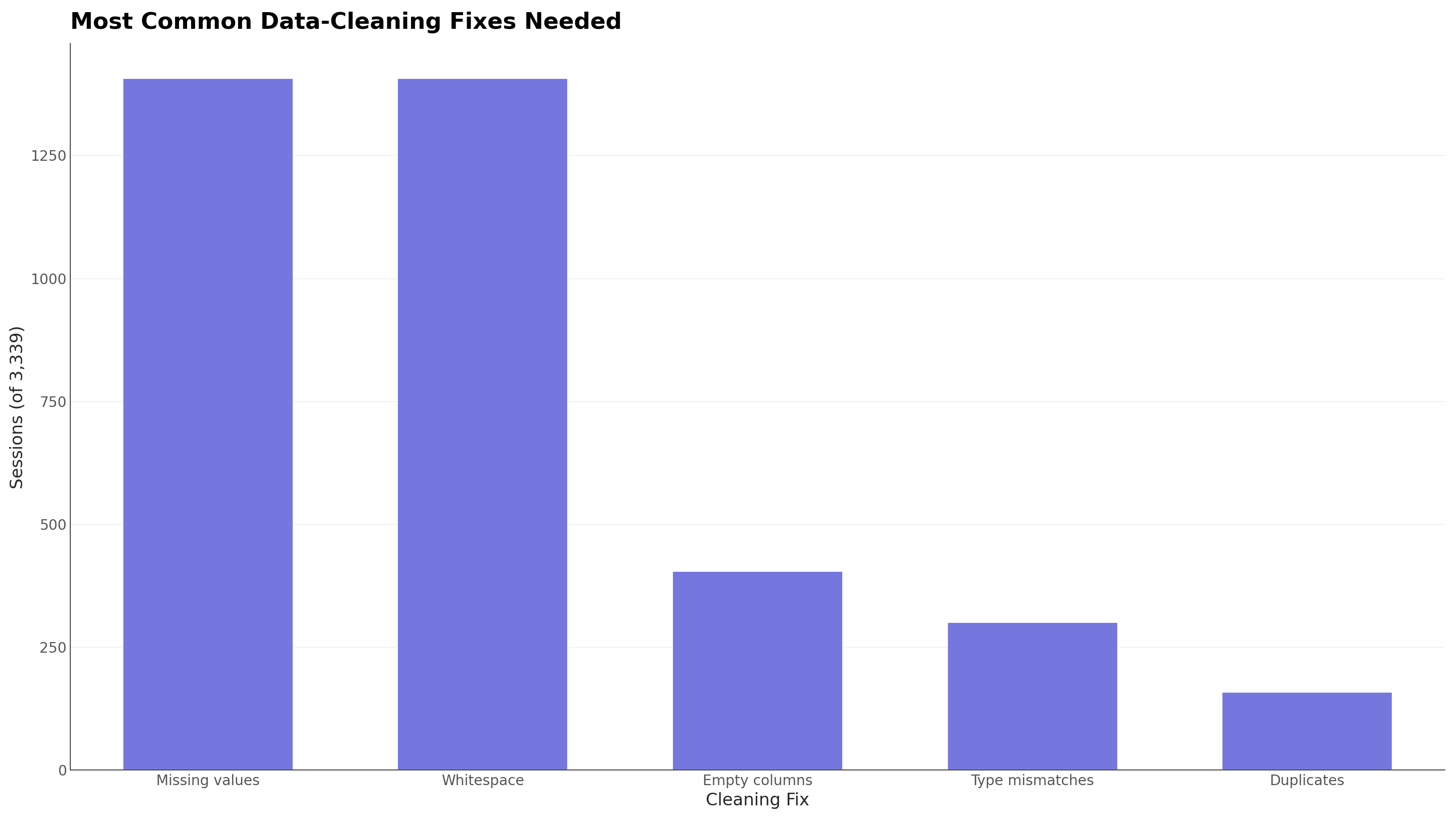
The practical implication for a healthcare export: budget time for a missing-value pass before you chart anything, whether that is a manual review or CleanChart's automatic cleaning step. Silently dropping incomplete rows, rather than fixing or labeling them, is how a chart ends up misrepresenting a dataset that was 40% incomplete to begin with.
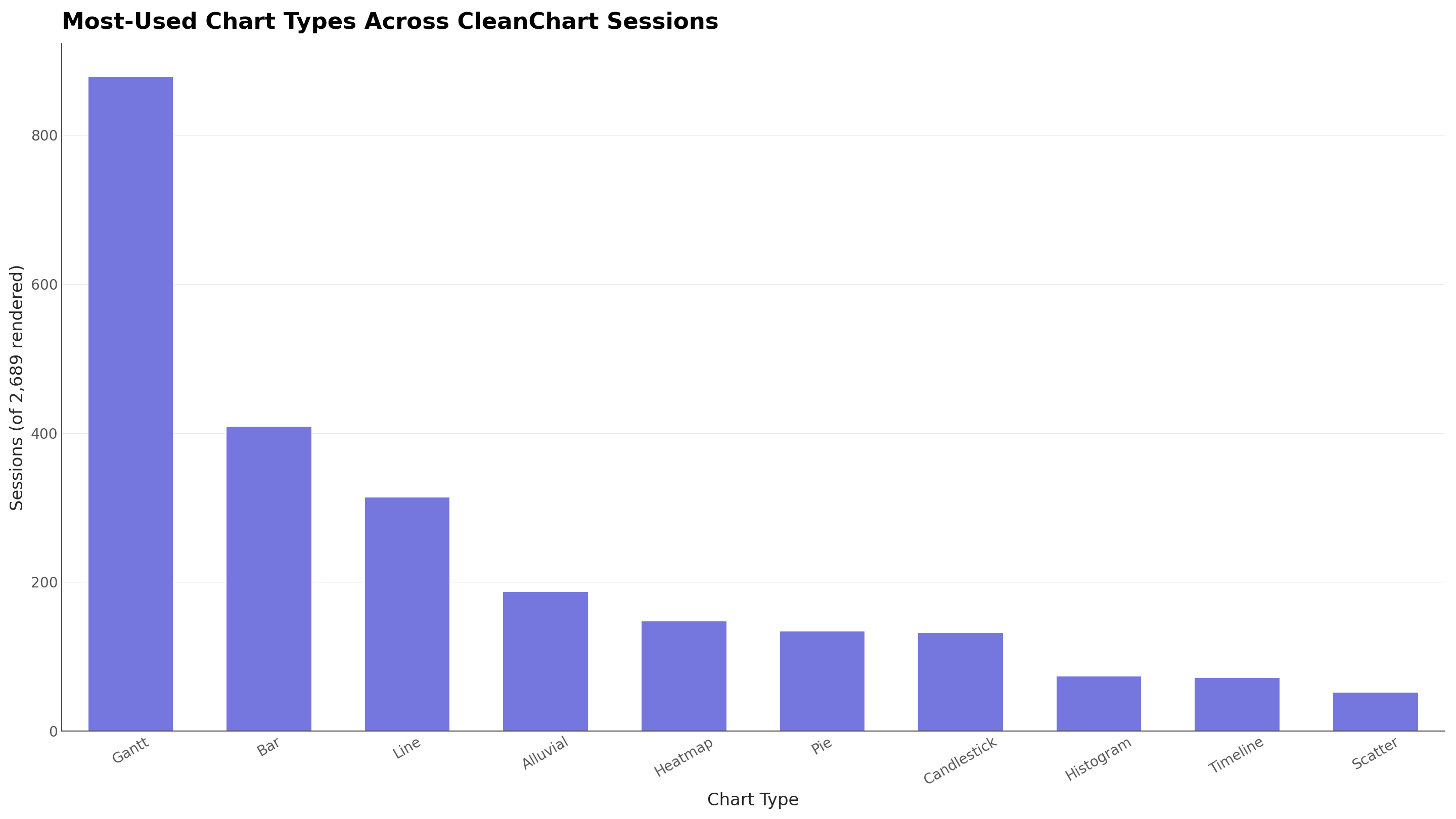
TODO(data): "healthcare" is a small dataset archetype in CleanChart's classifier (n = 60 sessions), and its largest chart-type bucket (pie, 12 sessions) is well under our 50-session minimum for a domain-specific breakdown. We will add a healthcare-specific version of the chart-type chart above once those buckets clear the threshold.
What Makes Healthcare Data Different?
Healthcare data has several characteristics that make visualization more complex than standard business analytics:
- Non-normal distributions: Patient measurements (length of stay, lab values, recovery times) are frequently skewed or multimodal. Simple bar charts of averages can be deeply misleading. Distribution charts like histograms and box plots are often more honest.
- Censored time-to-event data: In survival analysis, not every patient reaches the endpoint (death, relapse, discharge). Standard line charts don't handle censoring well; Kaplan-Meier curves are the clinical standard for a reason.
- High missing data rates: Electronic health records routinely have 20–40% missing values in secondary variables. Always label what proportion of data is missing rather than silently omitting incomplete records.
- Temporal dependencies: Patient data is almost always time-indexed — vitals, lab trends, readmission rates over quarters. Time series charts need careful axis scaling to avoid misleading readers about rate of change.
- Privacy and compliance: HIPAA in the US (and equivalents globally) prohibits displaying data in ways that could identify individual patients. Small cell sizes in disaggregated data must be suppressed or aggregated.
- Multi-stakeholder audiences: The same data may need to be presented to clinicians (who want statistical detail), administrators (who want KPIs), regulators (who want reproducibility), and patients (who need plain language). Different audiences require different visualizations of the same underlying data.
For comparison, see how scientific data visualization handles similar distribution and reproducibility challenges in research contexts.
Which Chart Type for Which Healthcare Data?
Use this reference table to match your healthcare data type to the most appropriate chart:
| Data Type | Best Chart(s) | Why | Common Use Cases |
|---|---|---|---|
| Patient outcomes over time | Line chart, area chart | Shows trends and change rate clearly | Recovery trajectories, readmission rates by quarter, mortality trends |
| Lab value distributions | Box plot, histogram | Reveals spread, outliers, and skew beyond the mean | HbA1c distributions, BMI ranges, blood pressure percentiles |
| Multi-arm clinical trial comparison | Grouped bar chart | Side-by-side comparison across treatment groups | Efficacy endpoints by treatment arm, adverse event rates by cohort |
| Correlation between biomarkers | Scatter plot | Shows relationship strength and direction directly | Age vs. LDL cholesterol, dose vs. response, BMI vs. surgical outcomes |
| Part-to-whole composition | Stacked bar, donut chart | Shows how categories make up a total | Diagnosis mix by ward, payer type breakdown, comorbidity prevalence |
| Intensity patterns by category × time | Heatmap | Encodes magnitude via color across two dimensions | ED visit volume by hour and day, infection rates by ward and week |
| Conversion through care stages | Funnel chart | Visualizes drop-off at each stage of a process | Screening → diagnosis → treatment → adherence pipelines |
| KPI vs. target | Gauge chart, bullet chart | Single-metric performance at a glance | Bed occupancy rate, patient satisfaction score, hand hygiene compliance |
| Patient flow between departments | Sankey diagram | Shows volume and direction of movement | ED → ICU → ward → discharge flows, referral pathways |
| Geographic disease incidence | Heatmap (geographic) | Encodes rates spatially | Disease burden by county, vaccination coverage by region |
For a broader reference, see our complete chart types guide covering all 25+ chart types with selection criteria.
Visualizing Patient Outcomes
What chart works best for patient outcome data?
For longitudinal patient outcomes, line charts are the default choice — they communicate trend and rate of change better than any other format. Use one line per cohort (treatment group, age band, diagnosis category) and plot the outcome metric on the Y-axis against time on the X-axis.
Key rules for patient outcome line charts:
- Always start the Y-axis at zero when showing rates or proportions, to avoid visually exaggerating small differences
- Add confidence intervals as shaded bands to communicate uncertainty alongside the trend
- Label the final data point directly on the chart rather than using a legend, so readers can match line to label without hunting
- Use colorblind-safe palettes (see the accessibility section below), since red-green combinations are the most common mistake in clinical charts
For before/after treatment comparisons with small samples, scatter plots with connected paired dots (one dot per patient, pre- and post-treatment, connected by a line) are more honest than group means — they show individual variation and the direction of change for every subject.
See our line chart creation guide for step-by-step instructions, or use the Line Chart Maker to get started with your patient data.
Clinical Trial Data Visualization
How should clinical trial results be visualized?
Clinical trial data requires particular care because statistical nuance matters: a chart that misrepresents uncertainty or hides variability can mislead clinicians and regulators alike. This section covers the fundamentals.
Distribution comparison across arms: Use box plots or violin plots to compare lab values, symptom scores, or efficacy endpoints across treatment groups. Box plots show median, IQR, and outliers in a compact format. Histograms work when you have a single group and want to show the full shape of the distribution. See our box plot guide for interpretation help.
Dose-response relationships: Scatter plots are the standard tool for visualizing correlation between dose and outcome. Add a regression line to indicate the trend direction, and label individual outliers where clinically relevant. Our correlation charts guide covers best practices for scatter plots in detail. Use the Scatter Chart Maker to plot your trial data.
Multi-arm efficacy comparison: When comparing 3+ treatment groups on a primary endpoint, grouped bar charts with error bars (95% CI or standard deviation) work well. Each cluster of bars represents one time point or sub-group; bars within each cluster represent the treatment arms.
Adverse event frequency: Horizontal bar charts ranked by frequency (most common at top) make it easy to scan which adverse events occurred most often across arms. Use the Bar Chart Maker and sort descending by event rate.
Kaplan-Meier Survival Curves
When a trial tracks time to an event (death, relapse, disease progression) and not every patient reaches it before the study ends, a standard line chart misleads: it either drops the still-alive patients or plots them as already failed. The Kaplan-Meier estimator steps survival probability down only at each observed event and holds it flat otherwise, which is why these curves use a step chart rather than a smooth line, since survival never moves between events.
To build one in CleanChart, calculate the cumulative survival probability at each event time (R's survival package and Python's lifelines both export this directly), then plot it with the Step Chart Maker. Add one series per treatment arm to compare survival between groups, and mark censored observations with tick marks if your reporting standard calls for them.
Forest Plots for Subgroup and Meta-Analysis
Forest plots show a treatment effect (hazard ratio, odds ratio, or mean difference) as a point estimate with a horizontal confidence interval, stacked one row per subgroup or per study. They're the standard way to report whether a trial's overall result holds across subgroups like age band, sex, or disease severity, and the default figure in every meta-analysis. A vertical reference line at "no effect" (1.0 for a ratio, 0 for a difference) shows at a glance which subgroups cross it and which don't.
A forest plot needs each row's confidence interval rendered on its own axis rather than a single shared grouping, which isn't a chart type CleanChart currently supports. If your trial reporting requires one, a dedicated statistics package (R's forestplot, Stata's metan) is still the right tool; CleanChart is a better fit for the distribution, comparison, and trend charts covered elsewhere in this guide.
Diagnostic Test Performance: Sensitivity, Specificity, and ROC Curves
A diagnostic test's ROC curve plots the true positive rate (sensitivity) against the false positive rate (one minus specificity) as the classification cutoff moves from 0 to 1. The curve's shape shows how much sensitivity you're giving up for a given drop in false positives, and the area under it (AUC) summarizes discriminative power in one number.
An ROC curve is just one series of (FPR, TPR) pairs plotted against each other, so a Scatter Chart Maker with connected points handles it once you've calculated those pairs at each threshold. Add a diagonal reference line from (0,0) to (1,1) to mark the no-discrimination baseline, and label the AUC value directly on the chart rather than tucking it into a caption readers won't look for.
For reporting sensitivity and specificity at one fixed cutoff, rather than the full curve, a Bullet Chart Maker comparing each metric against a target threshold gets the trade-off across faster than a table of numbers, especially for a non-statistical audience like a hospital committee reviewing a new screening protocol.
Hospital Operations Metrics
What charts work for hospital operations and capacity planning?
Hospital operations data tends to be high-frequency, multi-dimensional, and dashboard-oriented. The goal is fast comprehension by administrators making real-time decisions.
Bed occupancy and throughput over time: Line charts work well for daily or weekly bed occupancy rates, average length of stay trends, and ED wait times. Layer a reference line at target occupancy (e.g., 85%) so readers immediately see when the metric is above or below goal.
Department-level comparison: Bar charts comparing departments, wards, or facilities on a single metric (e.g., HAI rate, patient satisfaction score) are easy for administrators to act on. Sort bars from highest to lowest to draw attention to outliers.
KPI dashboards: Gauge charts and bullet charts excel for single-metric KPI displays — bed occupancy %, hand hygiene compliance, patient satisfaction score. Use the Gauge Chart Maker for percentage metrics against a target. See our data dashboard design guide for how to assemble multiple charts into a coherent operations dashboard.
Patient flow patterns: Heatmaps showing ED visit volume by hour-of-day (Y-axis) and day-of-week (X-axis) are one of the most actionable operations visualizations — they instantly reveal staffing gaps. Use our heatmap guide or the Heatmap Maker to create these. Load your data with CSV to Heatmap.
Care pathway flows: Sankey diagrams show how patients move through the system — from ED triage to various wards, from diagnosis to treatment pathways, or from admission to discharge disposition. The width of each flow band encodes patient volume.
Public Health and Epidemiology Data
Public health data is often longitudinal (tracking disease incidence over years), geographic (rates by region), and population-level (requiring careful age-standardization before comparison).
- Incidence and prevalence trends: Line charts with one line per disease, region, or demographic group. Use a logarithmic Y-axis when the data spans multiple orders of magnitude (common in outbreak tracking).
- Disease burden by geography: Heatmaps — either grid-based (e.g., state × year) or choropleth maps — encode incidence rates via color. Use a sequential color palette (light = low, dark = high) and ensure the palette is colorblind-safe. See our Heatmap Maker.
- Screening and vaccination funnel: Funnel charts show the cascade from eligible population → screened → tested positive → treated → cured. Drop-off at each stage is immediately visible. Use our Funnel Chart Maker.
- Age-sex pyramids: Population pyramids (horizontal bar charts mirrored on a central axis, males left and females right) are the standard for demographic visualization in epidemiology. Build these with grouped bar charts in a horizontal orientation.
Accessibility and Compliance in Healthcare Charts
What accessibility standards apply to healthcare data visualizations?
Healthcare organizations in the US must comply with Section 508 of the Rehabilitation Act for government-related content, and many apply WCAG 2.1 AA standards broadly. In practice, this means:
- Color cannot be the sole encoding: If you distinguish two groups by color alone (red vs. green line), colorblind viewers cannot tell them apart. Always add a secondary encoding — dashed vs. solid lines, different marker shapes, or direct data labels.
- Minimum contrast ratio: Text and data labels must meet 4.5:1 contrast against their background (WCAG AA). This rules out light gray labels on white backgrounds.
- Colorblind-safe palettes: Approximately 8% of males have red-green color deficiency. Avoid red/green together. Use the Okabe-Ito palette for categorical data or Viridis/Blues for sequential data. Our colorblind accessibility guide covers palette selection in depth.
- Alt text for all charts: Every chart in a published report or web page needs descriptive alt text that conveys the key finding in words.
- HIPAA small cell suppression: If a cell in a disaggregated table has fewer than 5–10 records (thresholds vary by institution), suppress the value and display "<5" or "suppressed" to prevent patient re-identification.
How to Create Healthcare Charts with CleanChart
CleanChart is a free online chart maker that works directly from CSV files, with no coding and no software installation, and it never stores your rows.
- Export your data as CSV. Most EHR systems, REDCap, and hospital reporting tools support CSV export. Remove any direct patient identifiers before exporting (name, MRN, date of birth if not needed).
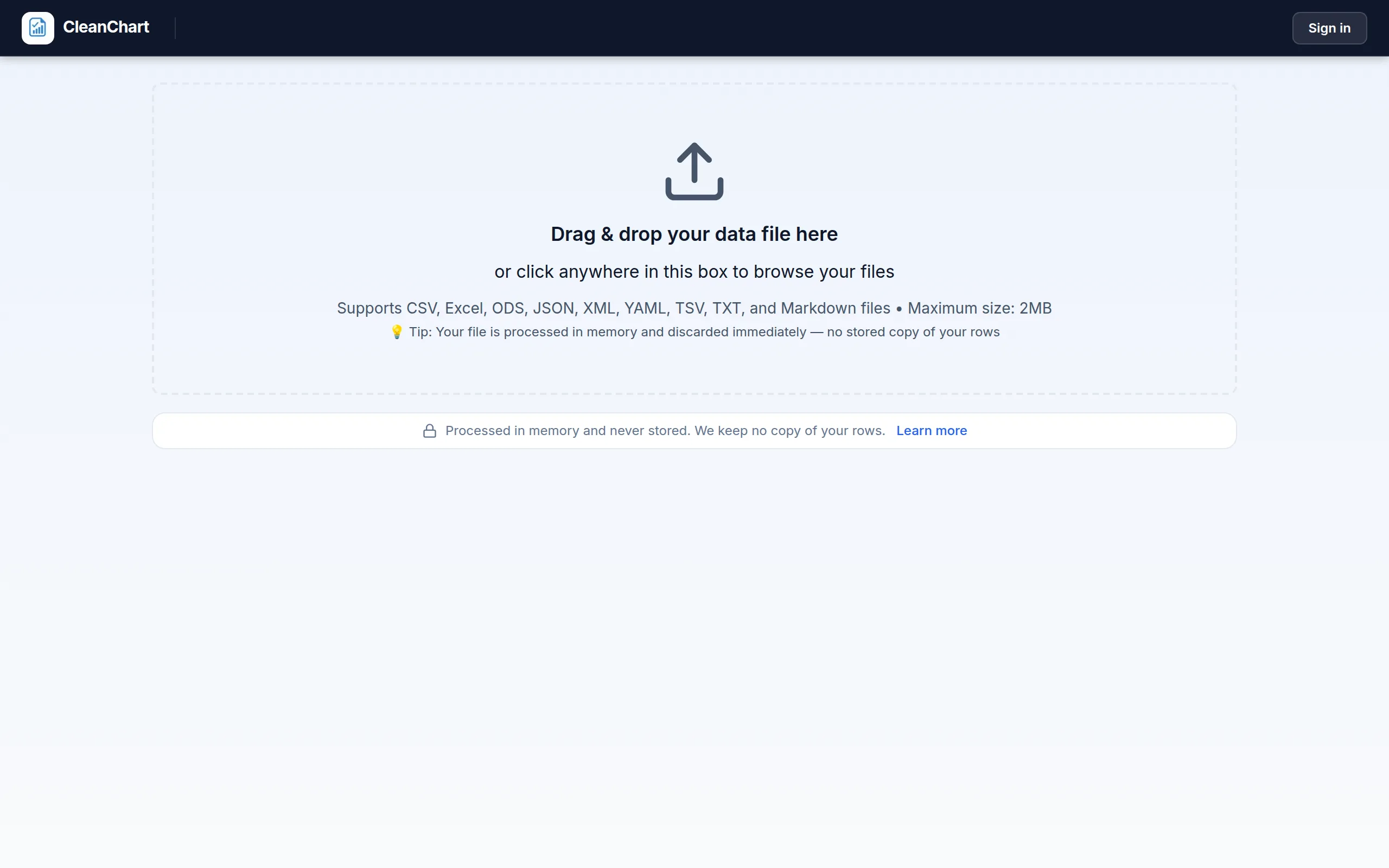
- Go to CleanChart and upload your CSV file. The tool auto-detects column types and suggests chart types based on your data structure.
- Select your chart type from the options on the left — line chart, scatter plot, box plot, heatmap, or any of the other 25+ supported types.
- Configure axes and groupings. Map your date column to the X-axis and your outcome metric to the Y-axis. Use the color/series grouping to split by treatment arm, ward, or demographic group.
- Choose a colorblind-safe palette in the Colors section. The Okabe-Ito, Viridis, and Blues palettes are all available and accessible.
- Export your chart as PNG or SVG for reports, presentations, or publications. SVG exports are fully scalable and suitable for print.
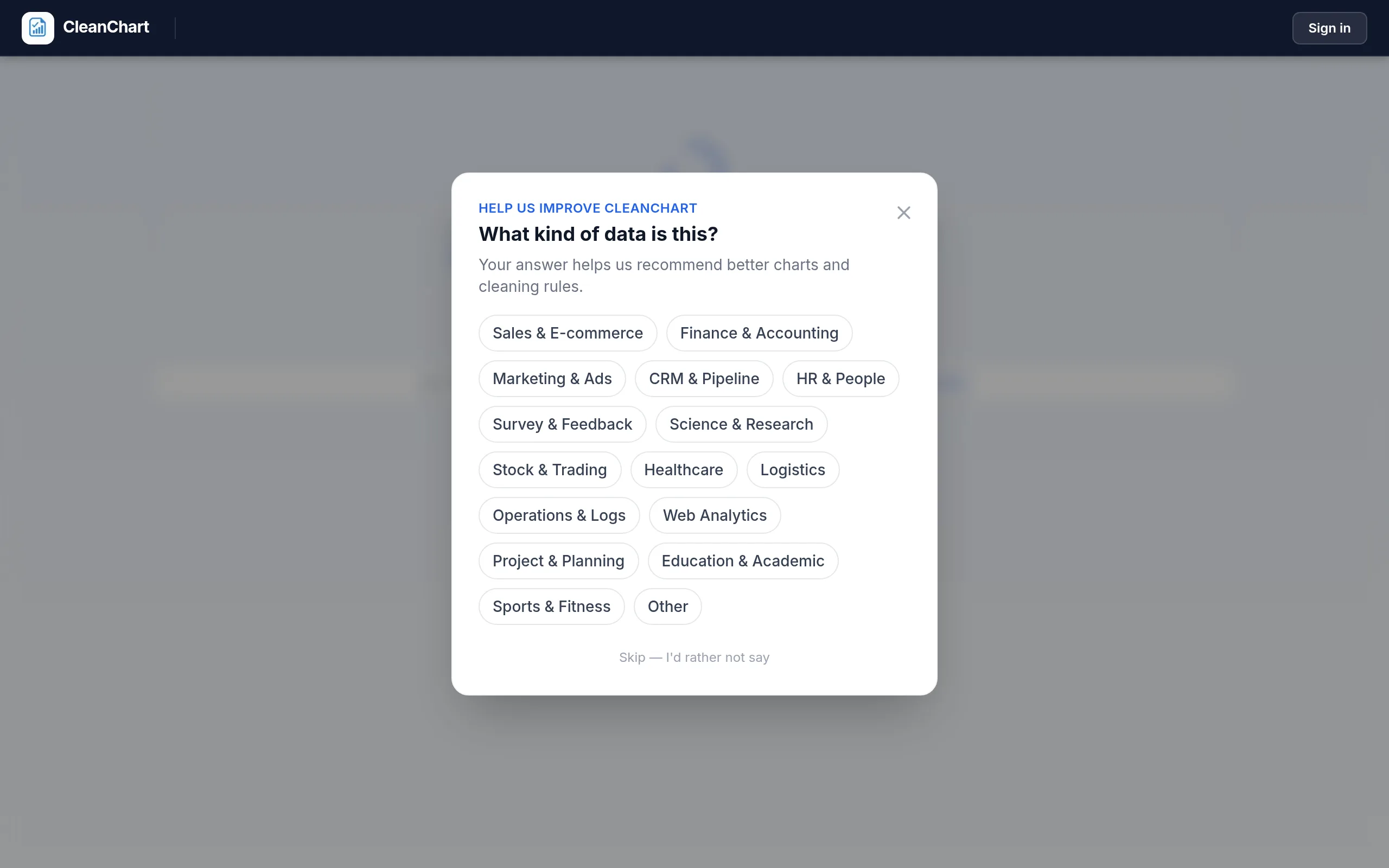
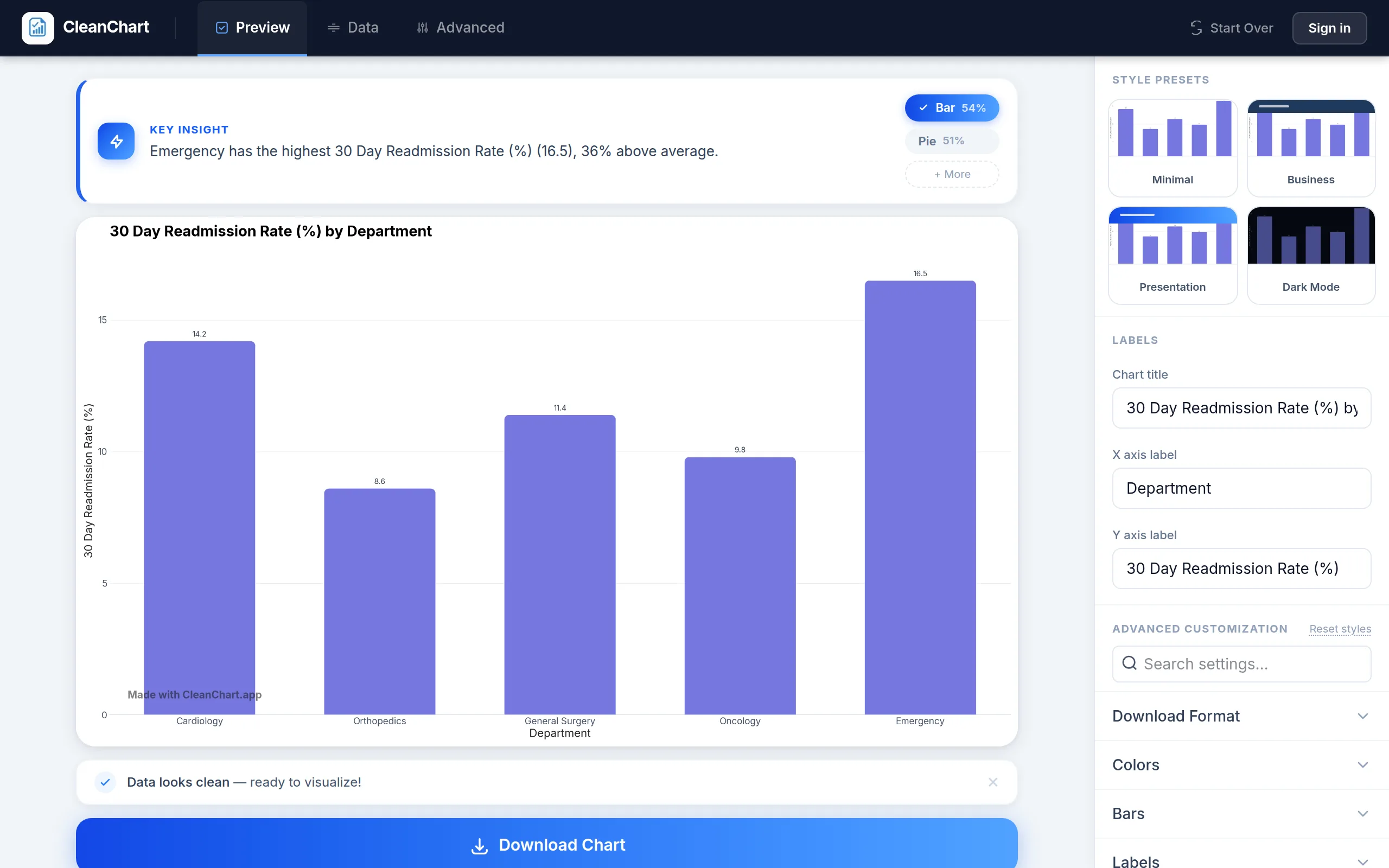
Here is the actual flow with a departmental readmission-rate export, a common operations metric from the table above:
For loading data directly: use CSV to Line Chart, CSV to Scatter Chart, or CSV to Bar Chart for quick one-click chart creation from your exported healthcare data.
Related CleanChart Resources
- Scientific Data Visualization — charts and standards for research publications, with overlap in clinical trial reporting
- Chart Types Explained — complete reference for selecting the right chart for any data type
- Box Plot Guide — reading and creating box plots for clinical distribution data
- Correlation Charts and Scatter Plots — visualizing relationships between biomarkers and outcomes
- How to Create a Heatmap — intensity patterns for ED volume, infection rates, and geographic data
- How to Create a Line Chart — time series best practices for patient outcome trends
- Colorblind-Friendly Charts — palette selection and design rules for WCAG-compliant healthcare visualizations
- Data Dashboard Design — building operations dashboards for hospital administrators
- Scatter Chart Maker — for biomarker correlations and dose-response analysis
- Histogram Maker — for lab value and outcome distributions
- Box Plot Maker — for clinical trial endpoint comparisons
- Heatmap Maker — for ED volume patterns and geographic incidence
- Gauge Chart Maker — for KPI dashboard metrics
- Funnel Chart Maker — for screening and care cascade visualization
External Resources
- WHO Global Health Observatory — standardized health data and indicators for 194 member states, with downloadable datasets
- CDC WONDER Database — public access to US epidemiological and vital statistics data for public health analysis
- NEJM Author Center — figure and data presentation standards for one of the world's leading clinical journals
- The Lancet Figure Guidelines — detailed specifications for clinical data figures in peer-reviewed publication
- NIH Data Sharing Guidance — requirements for sharing clinical research data in compliance with NIH policies
- NerdSip — bite-sized lessons on data visualization for healthcare professionals and analysts
Frequently Asked Questions
What is the best chart type for clinical trial data?
It depends on what you're showing. For comparing outcomes across treatment arms, grouped bar charts with error bars work well. For distribution of lab values or endpoints, box plots or histograms reveal spread and outliers that means alone hide. For time-to-event data (survival analysis), Kaplan-Meier line plots are the clinical standard because they handle censored observations correctly. For dose-response relationships, scatter plots with a regression line are appropriate. In practice, most trial reports use multiple chart types: one for the primary endpoint comparison, one for the distribution of baseline characteristics, and one for adverse event frequency.
How do I visualize patient data without violating HIPAA?
Aggregate your data before charting — visualize rates, means, medians, and counts rather than individual patient records. If you must show disaggregated data (e.g., outcomes broken down by age group and diagnosis), suppress any cells with fewer than 5–10 patients (exact thresholds vary by institution and jurisdiction) and display "<5" or "suppressed" instead. Never include direct patient identifiers (name, MRN, exact date of birth, full ZIP code) in chart axes, labels, or tooltips. When sharing charts publicly, also review the Safe Harbor or Expert Determination de-identification standards under the HIPAA Privacy Rule.
Which color palettes are safe for healthcare data visualization?
For categorical data (different treatment groups, diagnoses, departments), use the Okabe-Ito palette — it's specifically designed to be distinguishable under all common forms of color vision deficiency, including the most common red-green deficiencies. For sequential data (intensity maps, geographic incidence), use Viridis or Blues — both are perceptually uniform and colorblind-safe. Avoid red/green combinations in any clinical chart: approximately 8% of male patients and clinicians have red-green color deficiency. See our full colorblind accessibility guide for palette recommendations and testing tools.
What is the best chart for hospital bed occupancy and capacity data?
For tracking bed occupancy over time, a line chart with a reference line at target occupancy (typically 85%) is most effective — it immediately shows when capacity is approaching dangerous levels and reveals seasonal patterns. For a single point-in-time KPI display on a dashboard, a gauge chart or bullet chart comparing current occupancy to target communicates status at a glance. For comparing occupancy across multiple wards or facilities simultaneously, a horizontal bar chart sorted from highest to lowest makes outliers immediately visible.
How should I visualize public health surveillance data?
For incidence and prevalence trends over time, line charts with one line per disease, region, or demographic group are standard. When comparing multiple diseases that differ by orders of magnitude, use a logarithmic Y-axis so smaller outbreaks remain visible alongside larger ones. For geographic distribution, heatmaps (grid-based: region × time period) or choropleth maps (geographic: intensity by area) encode spatial patterns effectively. For screening and vaccination cascade analysis, funnel charts show where populations drop out at each stage of a program, which directly informs intervention priorities. Always specify whether rates are crude or age-standardized, as unadjusted rates can be misleading when comparing populations with different age structures.
Last updated: October 1, 2026