To draw a candlestick chart, plot one candle per time period: the body runs from the open price to the close price, and thin wicks extend up to the high and down to the low. Color the body green when the close is above the open and red when it is below. You can draw one by hand on graph paper, or upload a CSV with Date, Open, High, Low and Close columns to CleanChart's candlestick chart maker and get one in seconds.
Below you'll find the data format, the steps, how to read the patterns, and how people use candlestick charts on CleanChart.
What Is a Candlestick Chart?
A candlestick chart represents price movement within a time period using a rectangular "body" and two "wicks" (also called shadows or tails). Each candlestick encodes four values:
- Open — the price at the start of the period
- High — the highest price reached during the period
- Low — the lowest price reached during the period
- Close — the price at the end of the period
The body spans from open to close. When the close is higher than the open (bullish / up), the body is typically green or hollow. When the close is lower than the open (bearish / down), the body is red or filled. The upper wick extends from the body top to the high; the lower wick extends from the body bottom to the low.
This compact design means a single candlestick communicates more information than a simple line chart data point, which typically shows only the closing price.
When Should You Use a Candlestick Chart?
Candlestick charts are the right choice when you have OHLC data and want to visualize price action over time. Typical use cases:
- Stock price analysis — track daily, weekly, or monthly price movements for equities
- Cryptocurrency trading — monitor Bitcoin, Ethereum, and altcoin price action
- Forex (currency exchange) — visualize exchange rate fluctuations over time
- Commodity price tracking — oil, gold, silver, agricultural products
- Technical analysis — identify support/resistance levels and common patterns
When Not to Use a Candlestick Chart
Candlestick charts are specifically designed for OHLC financial data. Avoid them when:
- Your data has only one value per time period — use a line chart or time series chart instead.
- You want to compare multiple metrics across categories — use a bar chart or grouped bar chart.
- You're showing non-financial interval data (e.g., temperature ranges) — a box plot is more appropriate.
- Your audience is unfamiliar with financial charts — a line chart showing closing prices is easier to read for general audiences.
Understanding OHLC Data Format
To create a candlestick chart, your data must contain four price columns plus a time column. The standard column order is:
| Column | Description | Example |
|---|---|---|
| Date / Time | The time period each candlestick represents | 2026-01-15 |
| Open | Price at the start of the period | 148.20 |
| High | Highest price during the period | 151.75 |
| Low | Lowest price during the period | 146.90 |
| Close | Price at the end of the period | 150.30 |
Most data sources—including Yahoo Finance, Google Finance, and brokerage platforms—export CSV files in this format. The most important constraint: High must be ≥ Open, Close, and Low must be ≤ Open, Close. Rows that violate this rule indicate data errors.
Sample CSV Format
Date,Open,High,Low,Close
2026-01-13,147.50,149.80,146.20,148.90
2026-01-14,148.90,152.30,148.10,151.60
2026-01-15,151.60,153.00,149.50,150.20
2026-01-16,150.20,154.40,149.90,153.70
2026-01-17,153.70,155.10,151.80,152.40
If your data comes from a spreadsheet, see our CSV data cleaning guide to fix common issues like merged cells, missing values, and inconsistent date formats before uploading.
How to Create a Candlestick Chart Step by Step
Step 1: Prepare your OHLC data
Start with a clean data file containing your date and four price columns. Key preparation steps:
- Use a consistent date format — ISO 8601 (
YYYY-MM-DD) works universally and avoids regional ambiguity between MM/DD/YYYY and DD/MM/YYYY. - Sort rows chronologically — oldest data first (ascending by date).
- Remove non-trading days — weekends and public holidays typically have no price data; leave them out rather than filling with zeros.
- Check for gaps — missing dates mid-series can cause display issues. Our guide to handling missing values explains strategies for gaps.
- Validate OHLC logic — High should always be the largest value; Low should always be the smallest of the four prices.
Step 2: Choose your time period
Candlestick time periods change the meaning of the chart significantly:
| Period | Best For | Typical Use Case |
|---|---|---|
| 1-minute / 5-minute | Intraday trading | Day traders watching real-time price action |
| Hourly | Short-term swings | Swing traders holding overnight positions |
| Daily | Medium-term analysis | Most common; position traders and investors |
| Weekly | Long-term trends | Portfolio review, long-term investors |
| Monthly | Macro overview | Multi-year trend analysis, annual reports |
Step 3: Upload your data to CleanChart
- Go to the CleanChart Candlestick Chart Maker.
- Upload your CSV file or paste data directly. You can also convert from Excel, JSON, or Google Sheets.
- Map your columns: assign which column is Date, Open, High, Low, and Close.
- Click Generate Chart.
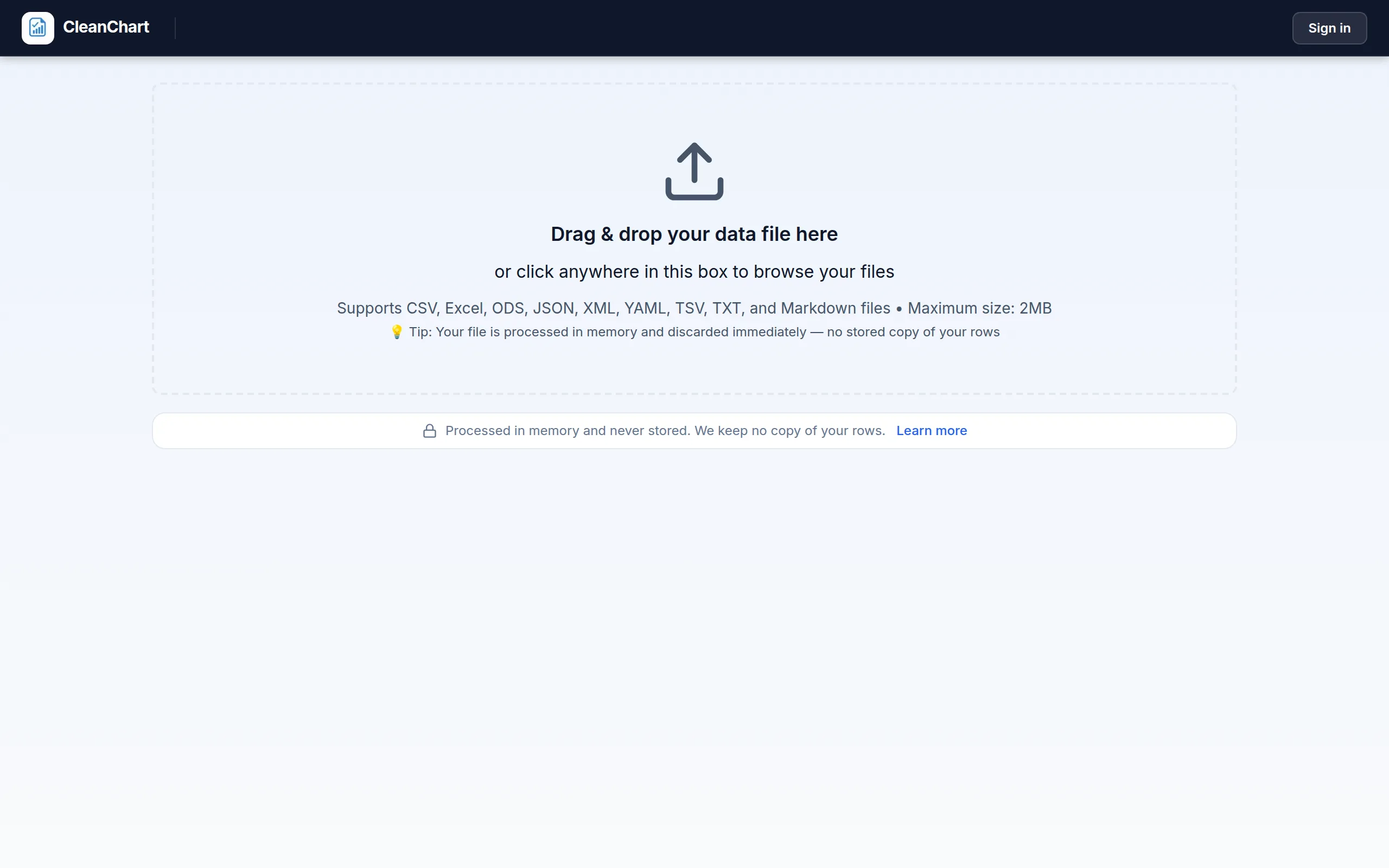
Here is that flow with a 30-row sample file of Date, Open, High, Low and Close columns (synthetic demo data, not a real ticker). The upload screen accepts the CSV directly:
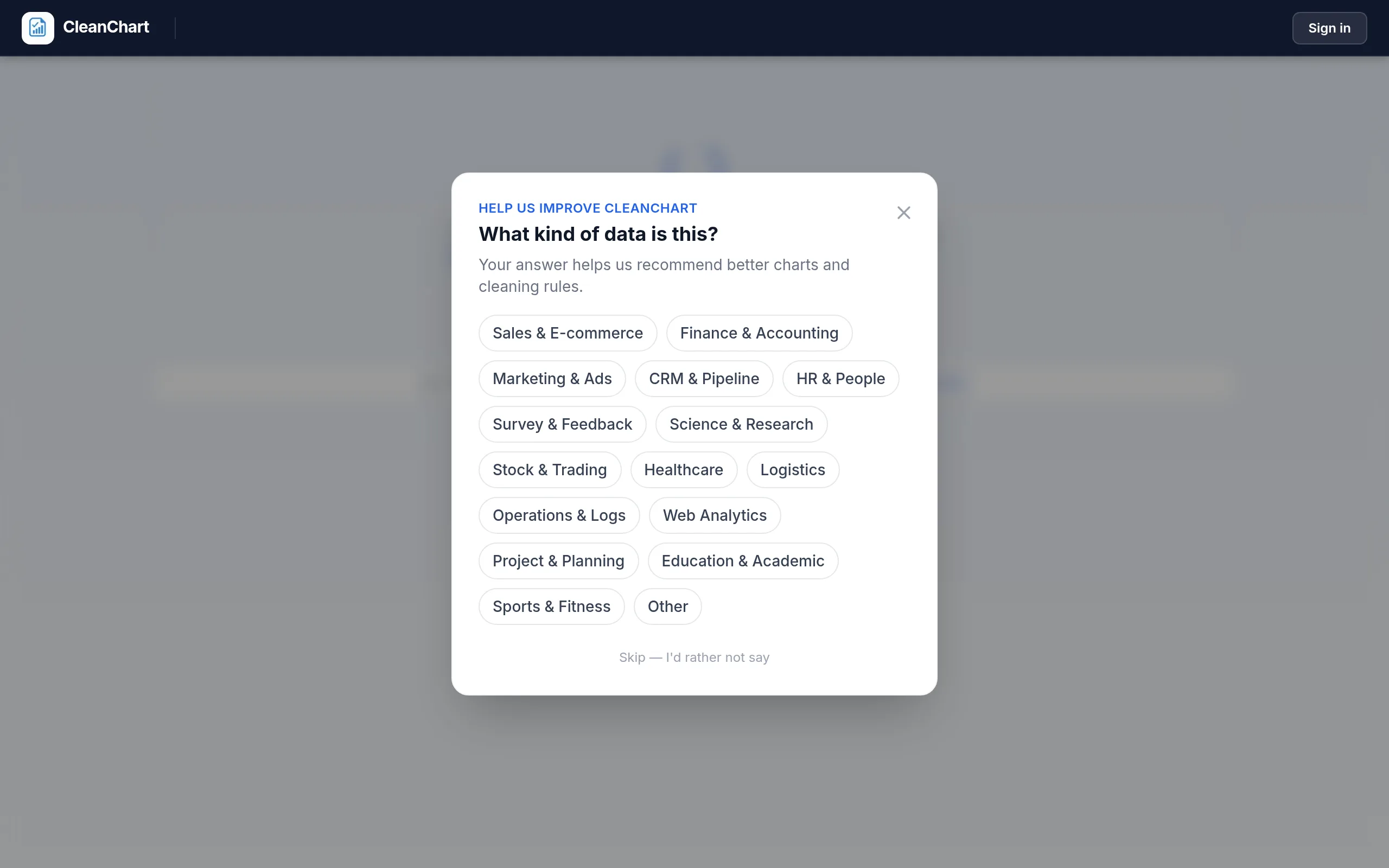
After the upload, CleanChart asks what kind of data the file contains. Choosing Stock & Trading tunes the chart recommendation:
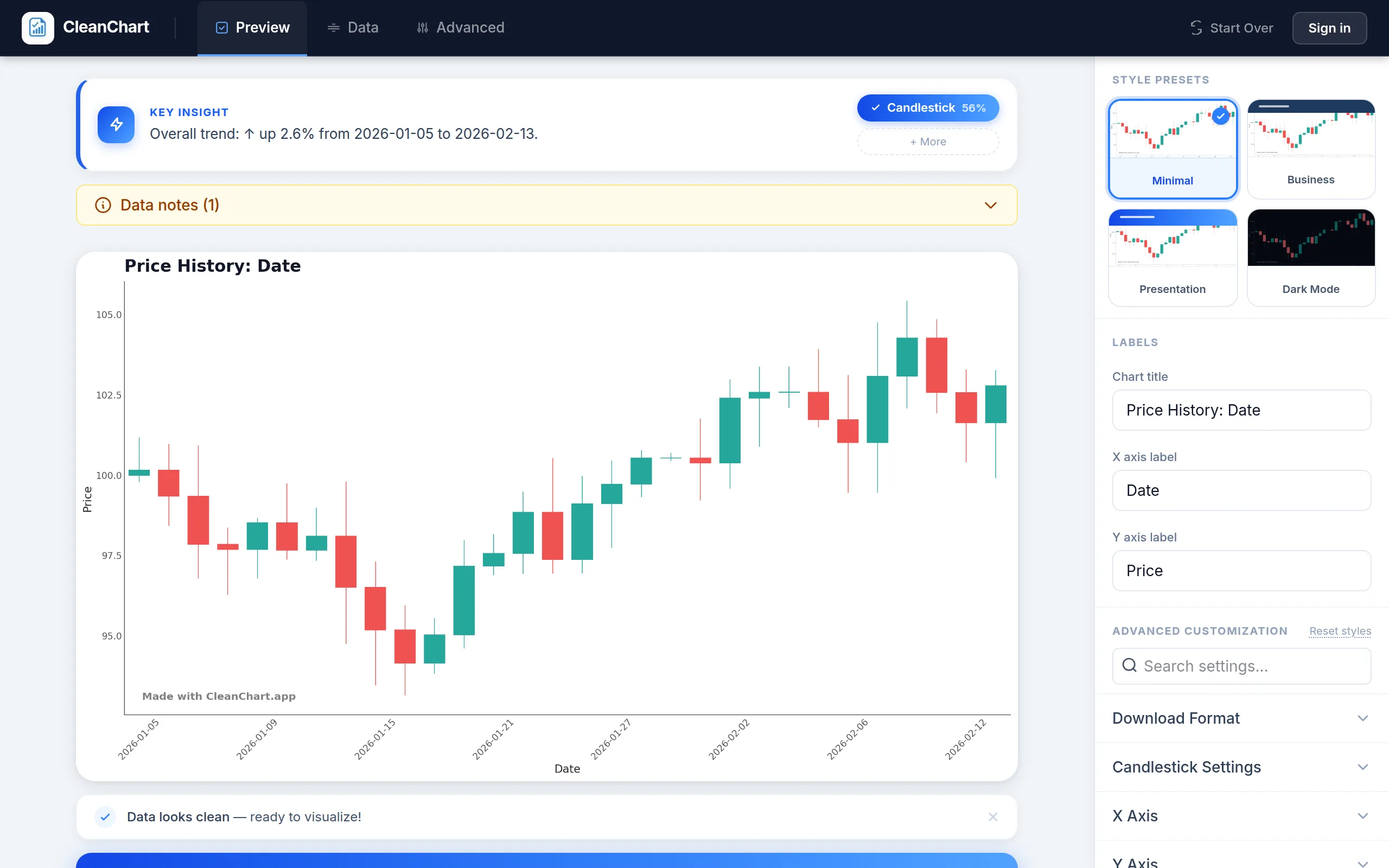
Seconds later the candlestick chart renders, with the Open, High, Low and Close columns mapped automatically. The style presets, title and axis labels are editable from the side panel:
Step 4: Customize your chart
After generating, customize for your audience and use case:
- Colors — Standard convention: green (bullish) and red (bearish). For colorblind accessibility, consider blue/orange instead—see our colorblind-accessible chart guide.
- Date range — Zoom into a specific period to focus on a meaningful window (e.g., last 3 months, earnings season).
- Title and labels — Always include the asset name and the time period in the chart title (e.g., "AAPL Daily Price — Jan–Mar 2026").
- Y-axis range — Consider whether to start the y-axis at zero or at the data minimum. For price charts, starting at the data minimum is usually more useful to show price action clearly.
Step 5: Export
Export your candlestick chart as PNG for presentations, SVG for web use, or PDF for formal reports. For embedding in PowerPoint, see our chart export to PowerPoint guide.
Reading Candlestick Patterns
One of the major reasons traders prefer candlestick charts over simple line charts is the ability to read price action patterns directly. Here are the most common single-candle and multi-candle patterns:
Single-candle patterns
| Pattern | Description | Signal |
|---|---|---|
| Doji | Open and close are nearly equal; long wicks on both sides | Indecision; potential reversal |
| Hammer | Small body at top, long lower wick | Bullish reversal after downtrend |
| Shooting Star | Small body at bottom, long upper wick | Bearish reversal after uptrend |
| Marubozu | Large body with no (or very short) wicks | Strong momentum in body direction |
| Spinning Top | Small body, wicks longer than body on both sides | Uncertainty; momentum weakening |
Multi-candle patterns
Multi-candle patterns require at least two or three consecutive candlesticks to form:
- Engulfing — A large candle whose body completely engulfs the prior candle's body. Bullish engulfing (green after red) signals upward reversal; bearish engulfing signals downward reversal.
- Morning Star / Evening Star — Three-candle patterns signaling reversals. Morning Star (bearish → doji → bullish) is a bottom signal; Evening Star (bullish → doji → bearish) is a top signal.
- Three White Soldiers / Three Black Crows — Three consecutive bullish or bearish candles with small wicks, indicating sustained momentum.
Important caveat: Candlestick patterns are signals, not certainties. Patterns that appear meaningful on their own should always be interpreted in context with volume, trend, and broader market conditions. For authoritative reading on technical analysis, see Investopedia's candlestick chart guide.
Common Candlestick Chart Mistakes to Avoid
Mistake #1: Using closing prices only
Problem: If you only have closing prices (common for daily indices), you cannot create a true candlestick chart—you'd just be plotting a single line with no body or wick variation.
Fix: For single-value time series, use a line chart or area chart instead. Save candlestick charts for genuine OHLC data. If you need OHLC data for equities, export it from Yahoo Finance (download CSV) or your brokerage's data tools.
Mistake #2: Too many candlesticks at once
Problem: Displaying 5 years of daily data (1,250+ candlesticks) makes each candle too small to read and individual patterns invisible.
Fix: Choose the right time period for your viewing window. For a 5-year view, use monthly candlesticks (~60 candles). For a 6-month view, use daily or weekly. Aim for 40–120 candlesticks as a readable range for most presentation contexts.
Mistake #3: Starting the y-axis at zero
Problem: A stock trading between $145 and $160 looks completely flat if the y-axis starts at $0, hiding all meaningful price variation.
Fix: For candlestick charts, set the y-axis to start slightly below the lowest low in your data range. This maximizes the visible price range and makes patterns readable. See our common charting mistakes guide for more axis-related issues.
Mistake #4: Ignoring volume
Problem: A price move on low volume has very different implications than the same move on high volume. A candlestick chart alone doesn't convey this.
Fix: Add a volume bar chart below the candlestick chart as a secondary panel. Volume bars confirm or contradict price patterns: a bullish engulfing on high volume is a stronger signal than one on thin volume.
Mistake #5: Wrong color conventions for your audience
Problem: Western convention is green = bullish, red = bearish. But in some Asian markets, red = bullish and green = bearish (the reverse). Using the wrong convention for your audience creates confusion.
Fix: Clarify the color convention in your chart legend or title. If your audience includes colorblind viewers, consider blue/orange or add labels directly to the candle body.
Candlestick Chart vs. Alternatives
| Chart Type | Data Required | Best For | Choose When |
|---|---|---|---|
| Candlestick | OHLC per period | Technical analysis, price action | You need all four price dimensions |
| Line chart | One value per period | Simple trend visualization | General audiences; single price series |
| Area chart | One value per period | Cumulative or filled trend | Emphasizing volume/magnitude over time |
| Box plot | Distribution per category | Statistical distribution | Comparing price ranges across many assets |
| OHLC bar chart | OHLC per period | Same as candlestick (older format) | Rarely preferred over candlestick today |
For a comprehensive guide to choosing between chart types, see our chart types explained guide. For time series data in general, see our complete time series chart guide, which covers line charts, area charts, step charts, and candlestick charts in one place.
How People Use Candlestick Charts on CleanChart
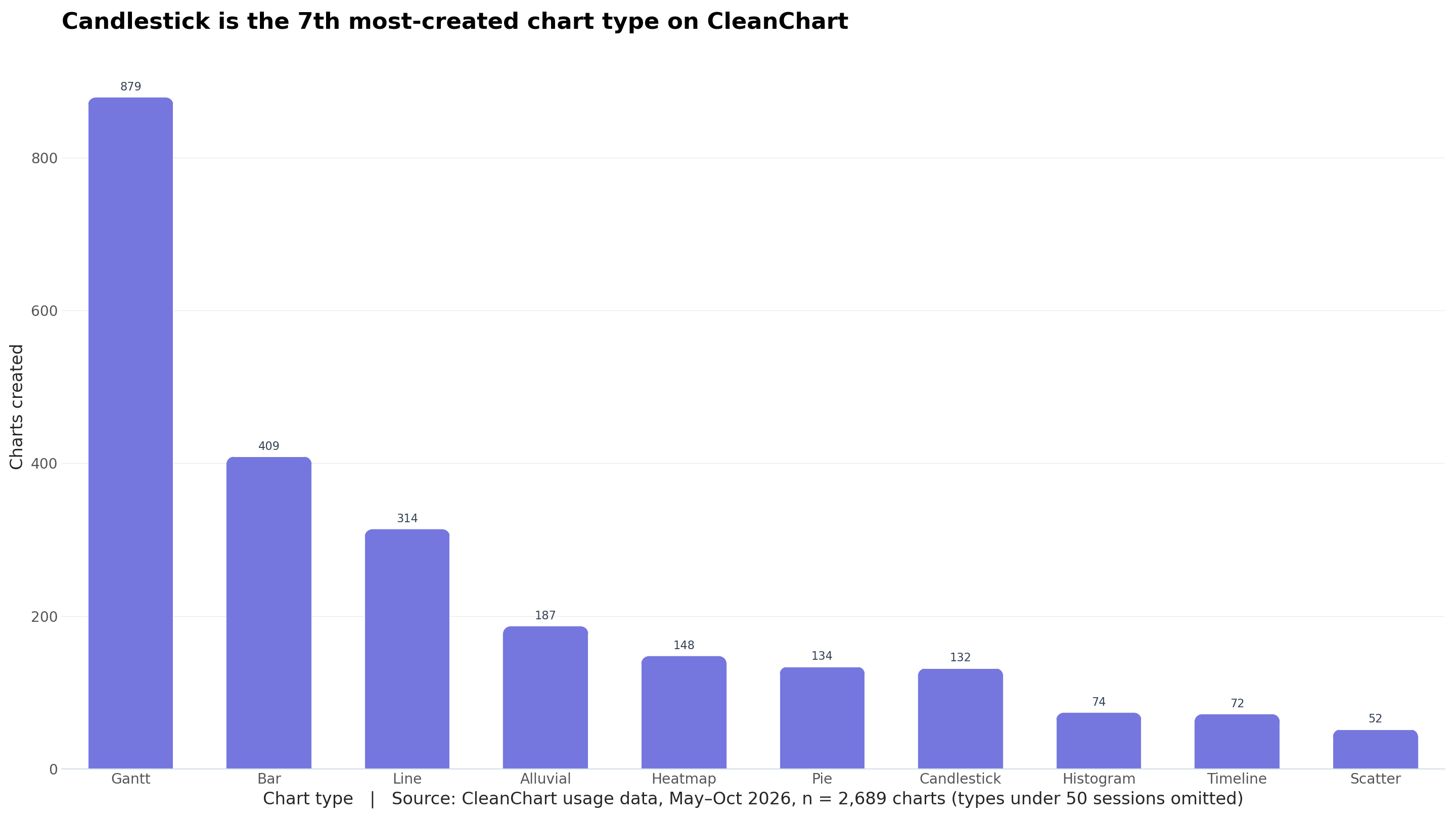
Candlestick charts are a specialist tool, but a steady one. Across 2,689 charts created with CleanChart between May and October 2026, candlestick was the 7th most-created type with 132 charts (4.9%), just behind pie charts (134) and ahead of histograms (74) and timelines (72). Gantt (879), bar (409) and line (314) lead the list.
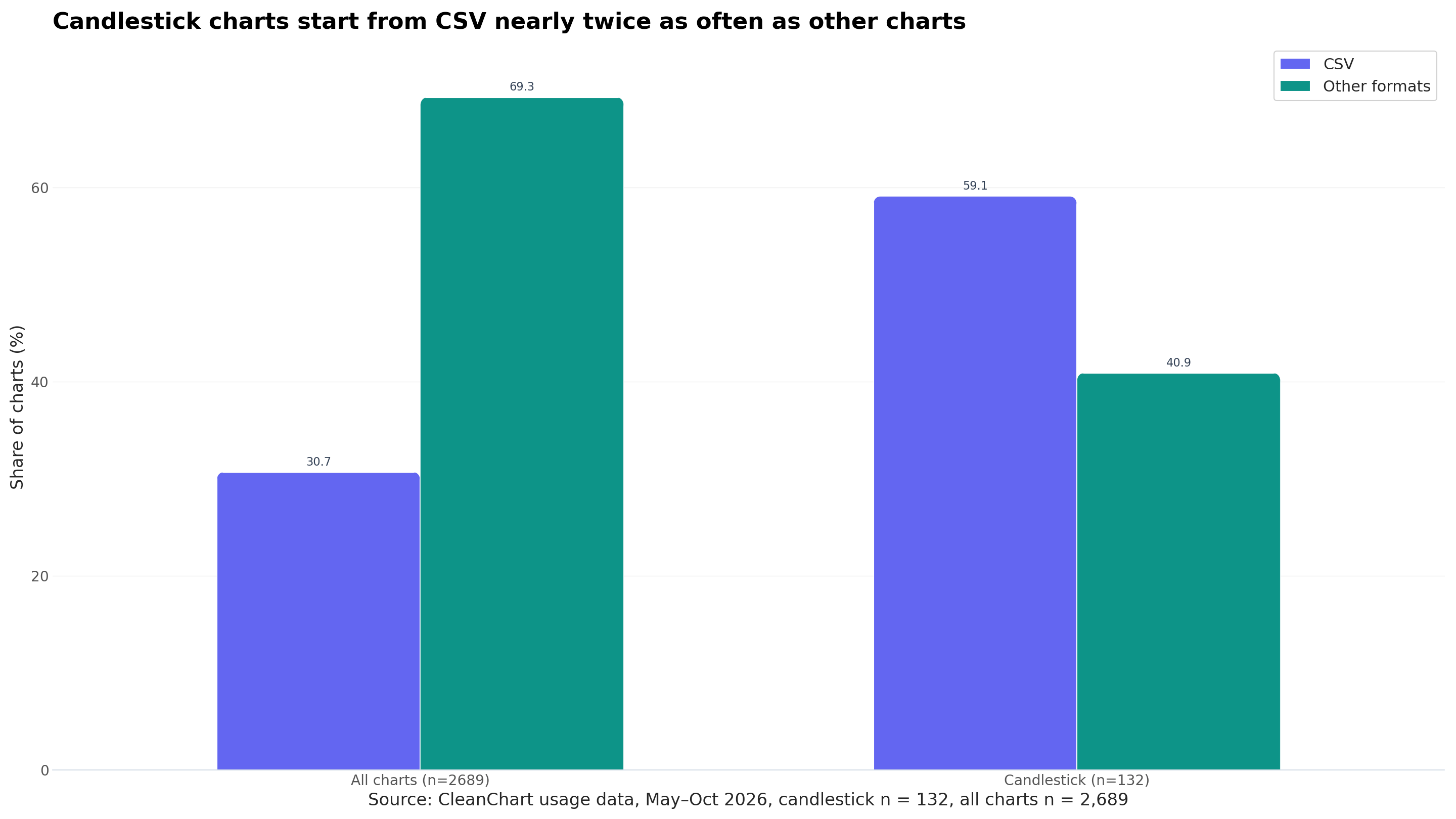
The more useful finding is where the data comes from. 59.1% of candlestick charts (78 of 132) started from a CSV file, versus 30.7% of all charts (825 of 2,689). That fits how price data is usually obtained: most market-data sources export CSV, and it's the format the sample in this guide uses.
Each other file format has fewer than 50 candlestick charts, so we group them together rather than publish tiny buckets.
Frequently Asked Questions
How do I draw a candlestick chart by hand?
For each period, mark the open and close prices on the vertical axis and draw a rectangle between them. Draw a thin line from the top of the rectangle up to the high and from the bottom down to the low. Shade or color the rectangle green (or leave it hollow) if the close is above the open, and red (or fill it) if the close is below.
Repeat for each period from left to right. For more than a handful of periods, a chart maker such as CSV to candlestick chart is faster and avoids plotting errors.
What data do I need to create a candlestick chart?
You need four price values per time period: Open, High, Low, and Close (OHLC). Most financial data providers (Yahoo Finance, Google Finance, your brokerage) offer CSV downloads in this exact format. The date or timestamp column is also required.
Can I create a candlestick chart from Excel?
Excel has a built-in Stock chart type (under the "All Charts" tab) that supports OHLC data. However, customization is limited. For better-looking results, upload your Excel file to the CleanChart Excel to Candlestick Chart converter—it handles OHLC column mapping automatically.
What's the difference between a candlestick chart and an OHLC bar chart?
Both display the same four values. An OHLC bar chart uses horizontal tick marks on a vertical bar to show open and close, while a candlestick uses a filled rectangle (body). Candlestick charts are more visually intuitive because the color and size of the body immediately signal direction and momentum. Most traders have switched to candlesticks for this reason.
How many candlesticks should I show at once?
For most presentation or analysis contexts: 40–120 candlesticks. Fewer than 20 doesn't show enough trend context; more than 150 makes individual candles unreadably small. Adjust your time period (daily, weekly, monthly) to keep the count in this range for your time window.
Are candlestick patterns reliable?
Academic research on candlestick patterns is mixed. A widely cited study by Lo, Mamaysky, and Wang (NBER, 2000) found that some technical patterns have statistically significant predictive value, but results vary by market and time period. Most practitioners treat patterns as one input among many, not as standalone buy/sell signals.
Can I add a moving average to a candlestick chart?
Yes. Overlaying a 20-day or 50-day moving average line on a candlestick chart is standard practice in technical analysis. The moving average smooths out noise and helps identify the underlying trend direction. CleanChart supports overlay lines on candlestick charts through the chart configuration panel.
What's the best file format for downloading candlestick chart data?
CSV is the most universally compatible format for OHLC data. It can be opened in Excel, Google Sheets, Python (pandas), R, or uploaded directly to CleanChart. JSON is preferred if you're feeding the data into a web application or API.
Related CleanChart Resources
Candlestick Chart Tools
- Candlestick Chart Maker – Create candlestick charts from OHLC data
- CSV to Candlestick Chart – Upload CSV and create instantly
- Excel to Candlestick Chart – Convert Excel OHLC files directly
- JSON to Candlestick Chart – Visualize JSON financial data
Related Chart Types
- Line Chart Maker – Simple time series trends
- Step Chart Maker – For rates and levels that change at discrete moments (e.g., interest rate history)
- Area Chart Maker – Filled trend visualization
- Box Plot Maker – Statistical price distributions
Related Blog Posts
- Best Chart for Day Trading – Which chart types suit short-term price analysis
- Financial Data Visualization – Charts for reports, dashboards and market data
- Time Series Charts Guide – Complete guide to visualizing temporal data
- How to Create a Step Chart – Visualize interest rates and other discrete financial data
- Chart Types Explained – Choosing the right chart for your data
- How to Visualize Sales Data – Financial and business data visualization
- Clean CSV Data Guide – Prepare your OHLC data before charting
- Handle Missing Values in CSV – Fix gaps in financial time series
- Colorblind-Accessible Charts – Make candlestick charts accessible to all
- Export Charts to PowerPoint – Present candlestick charts in slides
- Why Your Chart Looks Wrong – Fix common candlestick chart mistakes
External Resources
- Wikipedia: Candlestick Chart – History, patterns, and technical explanation
- Investopedia: Candlestick Charts – Comprehensive guide to reading and interpreting candlestick patterns
- Investopedia: OHLC Charts – Explanation of open, high, low, close charting
- NBER: Foundations of Technical Analysis (Lo et al., 2000) – Academic research on the statistical validity of chart patterns
- StockCharts School: Introduction to Candlesticks – Free course on reading candlestick charts
- NerdSip – Micro-learning platform for financial data analysis and visualization skills
Updated October 1, 2026 (usage data refreshed): added a direct answer on how to draw a candlestick chart, an app walkthrough with screenshots, and CleanChart usage data on candlestick charts.