An Excel sales report turns a sheet of sales rows into the answers a manager asks for: how much did we sell, is it growing, which products and regions carry the total, where's the margin going, and what should we do next. A good one fits on a first page of four numbers and three findings, with the charts and tables behind it. Below is a sample built from 648 rows of sales data, and two ways to build it: with PivotTables, or generated from the file.
One disclosure before we start: the sample report was generated with CleanChart, and we make CleanChart, so weigh our ranking accordingly. The Excel route is described in full, with Microsoft's own documentation linked.
What Should an Excel Sales Report Include?
Each section answers one question, and each one needs a particular column in your sheet. If the column's missing, so is the section:
| Section | Question it answers | Columns it needs |
|---|---|---|
| Summary and KPIs | How much did we sell, and is it more than last year? | A date or month, revenue |
| Trend and seasonality | Which months are strong, which broke the pattern? | A date or month, revenue |
| Breakdown | Which categories, products or regions carry the total? | Category, product or region |
| Margin and order value | Are we still earning on what we sell? | Cost for margin; orders for average order value |
| Data quality | Can we trust these totals? | Any of the above |
| Findings and recommendations | What should we do next? | Whatever the sections found |
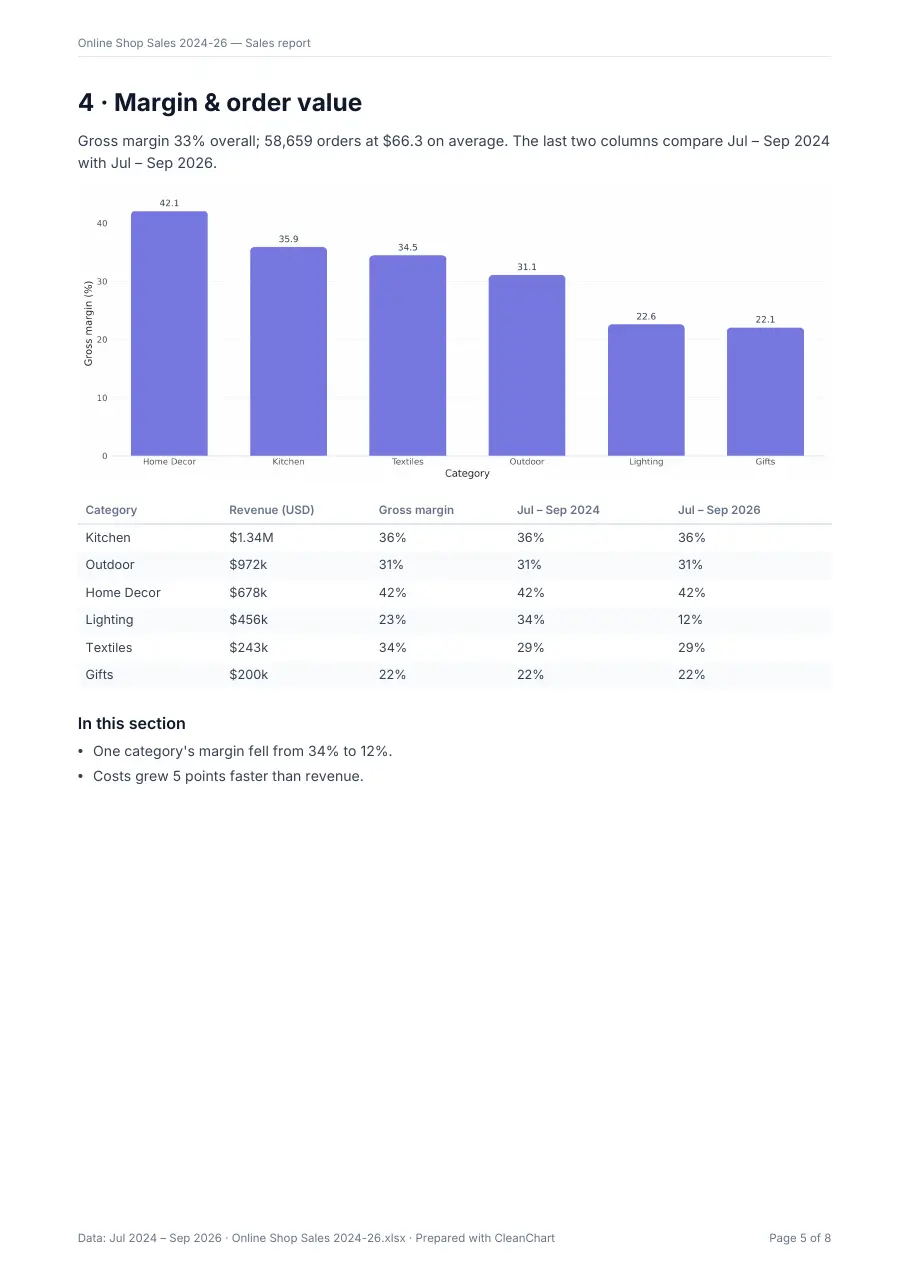
Gross margin is the line most sales reports leave out, and it's often the most useful one. It's (revenue − cost) ÷ revenue, calculated from the totals per category rather than averaged across rows, so big orders weigh more than small ones.
What Does the Sample Sales Data Look Like?
The sample is a fictional online shop: one row per month, category and region from July 2024 to September 2026. That's 27 months, 6 categories and 4 regions, 648 rows in total. Download the sample sales data (CSV) to follow along in Excel. The first rows look like this:
| Month | Category | Region | Orders | Units | Revenue (USD) | Cost (USD) |
|---|---|---|---|---|---|---|
| 2024-07 | Kitchen | North | 220 | 359 | 14,960.52 | 9,491.09 |
| 2024-07 | Kitchen | South | 156 | 228 | 10,587.15 | 6,776.04 |
It's the shape most shop, CRM and accounting exports reduce to: a period, one or two ways to group, and money columns. If your export has one row per order instead, the same report works; there are simply more rows.
Excel Sales Report Example: What 648 Rows Say
Here's the report CleanChart generated from that file. You can open the full 8-page sample sales report (PDF); every number in it is sample data.
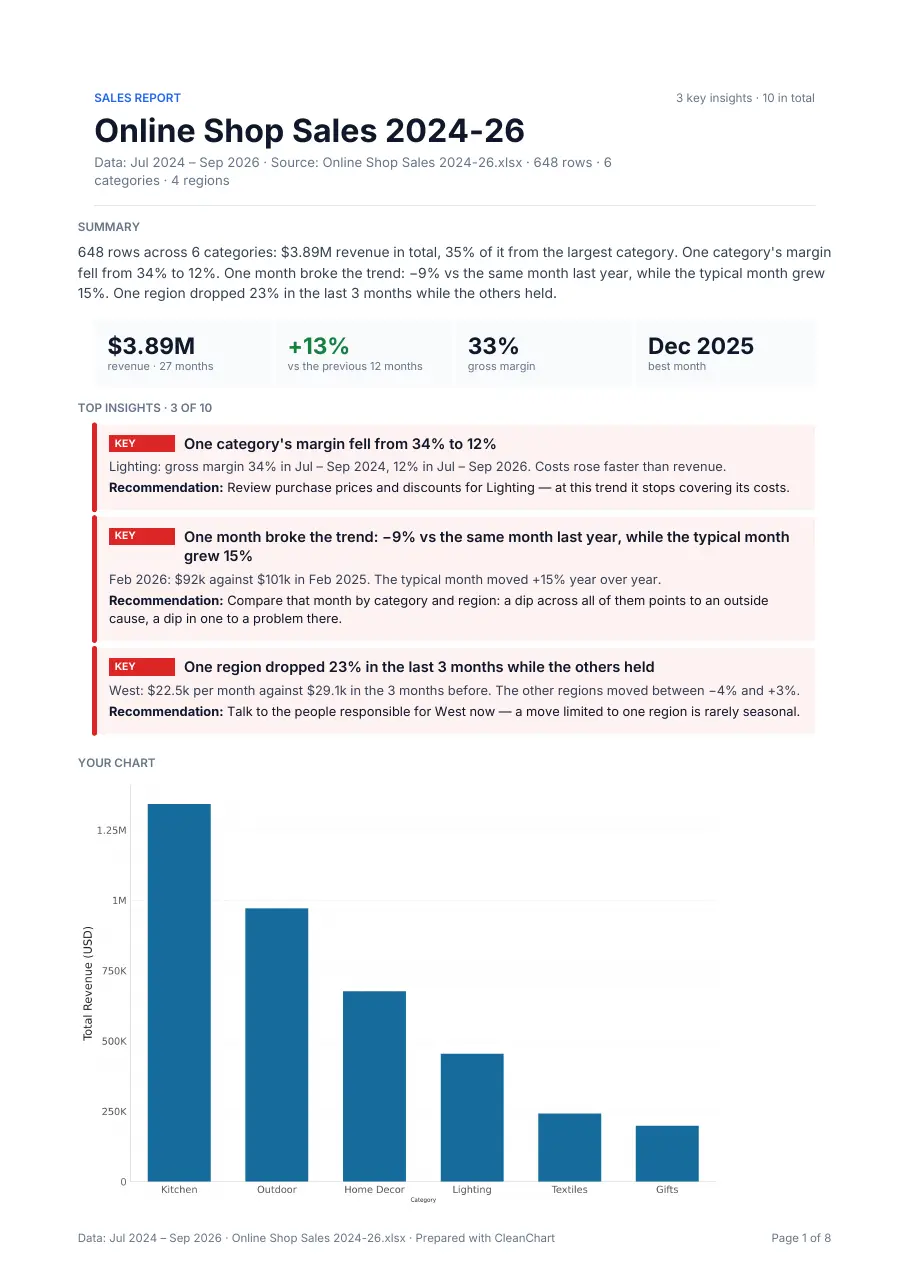
The 10 findings, ranked
The three key findings are the ones you'd want in front of a manager this week:
- One category's margin fell from 34% to 12%. Lighting, July–September 2024 against the same months of 2026: costs rose faster than revenue. Recommendation: review purchase prices and discounts for Lighting.
- One month broke the trend. February 2026 brought $92k against $101k a year earlier (−9%), while the typical month grew 15%.
- One region dropped 23% in the last 3 months while the others held. West averaged $22.5k a month against $29.1k before; the other regions moved between −4% and +3%.
The other seven are worth a line each in the report:
- Costs grew 5 points faster than revenue (+36% against +30%).
- One row is about 8.6 times the usual value for its category and region: August 2025, Textiles, South shows $20k where comparable rows have about $2,321. That's a likely typo, and it should be fixed before anyone shares a total.
- Revenue grew 13% over the last 12 months ($1.87M against $1.66M).
- The best month (December 2025, $206k) is 2.2 times the weakest (February 2026, $92k).
- November and December run above the yearly average every year, by 24% and 37%.
- Kitchen and Outdoor bring 59% of revenue.
- Kitchen alone brings 35%.
How Do You Build a Sales Report in Excel?
You can build every section above in Excel. It takes a few PivotTables and some writing:
- Format the data as a table (Ctrl+T) with a single header row, so PivotTables and formulas pick up new rows.
- Revenue by month: a PivotTable with Month in rows and the sum of revenue in values, plus a line chart. Compare the last 12 months with the 12 before by filtering or grouping the months.
- Breakdown: a second PivotTable with Category (and Region) in rows, sorted by revenue, with "% of grand total" to show each share.
- Margin per category: sum revenue and cost per category in a PivotTable, then compute 1 − cost ÷ revenue next to it. Repeat for the first and last quarter to see which margins moved.
- Data quality: sort each category and region by revenue, or add conditional formatting, and look for values far outside their neighbors.
- Write it up: pick the three findings that matter most, put them on top with a recommendation each, and paste the charts below.
Microsoft's guide to creating a PivotTable covers steps 2 to 4. Excel's Analyze Data feature can suggest charts and PivotTables from a question in plain language. Microsoft lists it for Microsoft 365 subscribers, it doesn't support datasets over 1.5 million cells, and it analyzes text dates such as "2024-07" as text until you convert them.
How Do You Get the Report Without Building It by Hand?
Upload the same sheet to the Excel to bar chart converter (or the line chart one for a trend view). Once the chart renders, open the report preview. Because the file has revenue, cost and orders columns, CleanChart names it a sales report and adds the margin and order value page; the trend, breakdown and data-quality pages come from the month, category and region columns.
The preview is free and shows your own key figures and how many findings there are. One report costs $2.99, and reports are included in the 24-hour pass and the monthly plan. The written summary is produced by the Claude API from the computed findings, never from your raw rows, and its numbers are checked against those findings.
Limits: the file needs 10 to 20,000 rows and enough findings to fill a report, and the report is an English PDF. It isn't a template you edit, and it doesn't refresh on a schedule, so next month you'd upload the new export.
Excel or CleanChart: Which Should You Use?
| Excel (PivotTables) | CleanChart report | |
|---|---|---|
| Best for | A report you'll rebuild and adjust every month | A finished report from one file, now |
| Analysis | Whatever you build and notice yourself | Trend, seasonality, breakdown, margin, outliers, ranked findings |
| Written text | You write it | Generated from the findings, with a recommendation each |
| Output | Editable workbook | PDF, not editable |
| Refresh | Refresh the PivotTables | Upload the new file |
| Cost | Your Excel license and your time | $2.99 per report, or a pass or plan |
If you report on the same sheet every month and want to own every formula, build it in Excel. If you need the analysis written up from an export today, or you want a second pair of eyes on a file before you share totals (the typo above is a good reason), generate the report and use your own workbook for the rest.
Frequently Asked Questions
What is a sales report in Excel?
It's a summary of sales rows in a workbook: total revenue and its change against a previous period, a trend over time, a breakdown by category, product or region, often margin, and a short list of findings with recommendations.
What columns does a sales report need?
At minimum a date or month and a revenue column. A category, product or region column adds a breakdown, a cost column adds gross margin, and an orders column adds average order value.
How do you calculate gross margin in a sales report?
Gross margin is (revenue − cost) ÷ revenue. Calculate it from the summed revenue and cost of each category or period, not as the average of row-level margins, so large orders count for more than small ones.
Can I get the CleanChart sales report as an Excel file?
No. The report's a PDF. Your data stays in your own workbook, and the chart exports separately: as a watermarked PNG for free, or as a clean PNG or SVG on a paid plan.
How much does a sales report from CleanChart cost?
The preview is free. One report costs $2.99, and reports are included in the 24-hour pass and the monthly plan. Charts on their own stay free with a watermark.
Related CleanChart Resources
Tools
- Excel to Bar Chart Converter – Upload a sales sheet and open the report preview
- Excel to Line Chart Converter – Revenue over time from the same file
- Bar Chart Maker – Revenue by category or region
- How CleanChart reports work – Data and project reports side by side
Related Blog Posts
- Chart of Sales: Which Chart Fits Which Metric – Choosing the chart for each sales question
- Business Reports With Charts – Report types and the charts for each
- Best Chart for Budget vs Actual – Including a sample budget report
- Financial Data Visualization – Margin, cost and revenue charts
External Resources
- Microsoft Support: Create a PivotTable – The core of a hand-built sales report
- Microsoft Support: Analyze Data in Excel – Natural-language analysis and its limits
- Wikipedia: Gross margin – Definition and calculation